Bootstrap Navbar
Introduction
Using Bootstrap, you can create static navigation bars. This tutorial will teach you how to do this.
We will use an HTML5 page with content and see how to add a header navigation bar. Below is the final output:
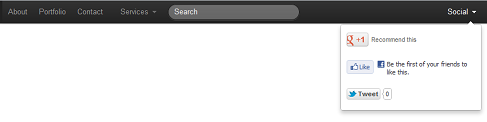
Below is the HTML5 code of the page without any content.
<!DOCTYPE html> <html lang="en"> <head> <meta charset="utf-8"> <title>Bootstrap基本的基于与标签的导航</title> <meta name="description" content="Bootstrap Basic Tab Based Navigation Example"> <link href="../bootstrap/twitter-bootstrap-v2/docs/assets/css/bootstrap.css" rel="stylesheet"> </head> <body> <!-- 我们将在这创建导航 --> </body> </html>
To create the basic structure containing the navigation, in the HTML5 code shown above, immediately after the
tag, insert the following code:<div class="navbar navbar-fixed-top"> <div class="navbar-inner"> <div class="container"> <!--navigation does here--> </div> </div> </div>
Now, let's replace thewith the following code to create the first set of navigation. Note that the "brand" class is rendered differently here, which can be used to display your company name or organization name.
<ul class="nav">
    <li class="active">
        <a class="brand" href="../index.html">example</a>
    </li>
    <li><a href="../index.html">About</a></li>
    <li><a href="../index.html">Portfolio</a></li>
    <li><a href="../index.html">Contact</a></li>
</ul>
If you need to create a dropdown menu, insert the following code immediately after the HTML code shown in the last code block.
<ul class="nav">
    <li class="dropdown">
        <a href="../index.html"
           class="dropdown-toggle"
           data-toggle="dropdown">
            Services
            <b class="caret"></b>
        </a>
        <ul class="dropdown-menu">
            <li><a href="../index.html">Web Design</a></li>
            <li><a href="../index.html">Web development</a></li>
            <li><a href="../index.html">Wordpress Theme development</a></li>
        </ul>
    </li>
</ul>
However, since Bootstrap dropdown menus require JavaScript, you need to insert the following two lines of code into your HTML page. You can insert them into