PyTorch Tensor
A tensor is a multidimensional array, which can be a scalar, vector, matrix, or higher-dimensional data structure.
In PyTorch, a tensor is the core representation of data, similar to NumPy's multidimensional arrays, but with more powerful features, such as support for GPU acceleration and automatic gradient computation.
Tensors support multiple data types (integer, floating-point, boolean, etc.).
Tensors can be stored on CPU or GPU; GPU tensors can significantly accelerate computation.
The following figure shows how tensors of different dimensions are represented in PyTorch:
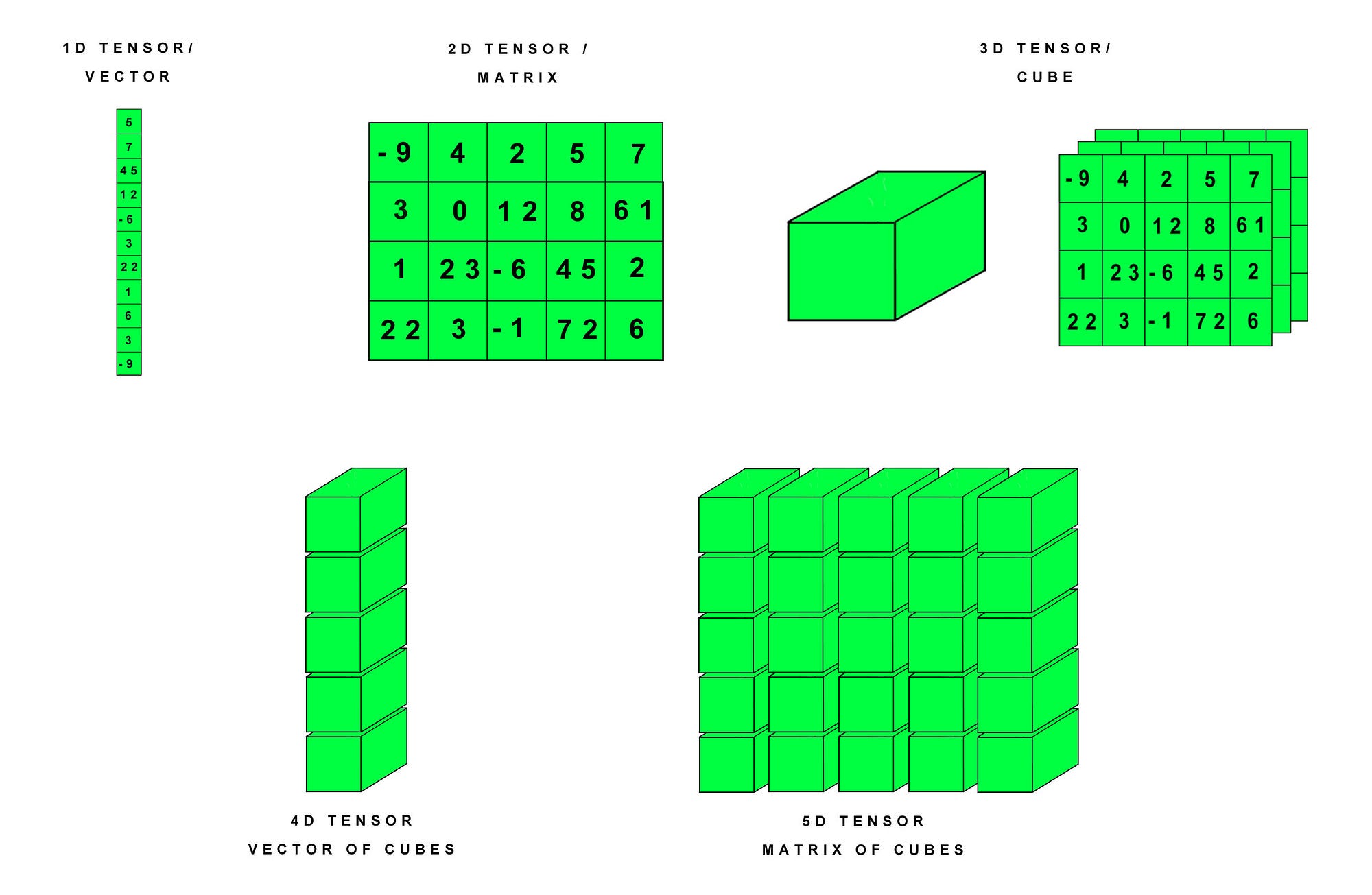
Explanation:
- 1D Tensor / Vector (one-dimensional tensor/vector):The most basic tensor form, can be viewed as an array. The example in the figure is a vector containing 10 elements.
- 2D Tensor / Matrix (two-dimensional tensor/matrix):A two-dimensional array, usually used to represent a matrix. The example in the figure is a 4x5 matrix containing 20 elements.
- 3D Tensor / Cube (three-dimensional tensor/cube):A three-dimensional array, can be viewed as a cube formed by stacking multiple matrices. The example in the figure shows a 3x4x5 cube, where each 5x5 matrix represents a "layer" of the cube.
- 4D Tensor / Vector of Cubes (four-dimensional tensor/vector of cubes):A four-dimensional array, can be viewed as a vector composed of multiple cubes. The example in the figure has no specific values, but it can be understood as a collection containing multiple 3D tensors.
- 5D Tensor / Matrix of Cubes (five-dimensional tensor/matrix of cubes):A five-dimensional array, can be viewed as a matrix composed of multiple 4D tensors. The example in the figure likewise has no specific values, but it can be understood as a collection containing multiple 4D tensors.
Creating Tensors
There are several ways to create tensors:
| Method | Description | Example Code |
|---|---|---|
torch.tensor(data) | Create a tensor from a Python list or NumPy array. | x = torch.tensor([[1, 2], [3, 4]]) |
torch.zeros(size) | Create a tensor of all zeros. | x = torch.zeros((2, 3)) |
torch.ones(size) | Create a tensor of all ones. | x = torch.ones((2, 3)) |
torch.empty(size) | Create an uninitialized tensor. | x = torch.empty((2, 3)) |
torch.rand(size) | Create a random tensor following a uniform distribution, with values in[0, 1)。 | x = torch.rand((2, 3)) |
torch.randn(size) | Create a random tensor following a normal distribution, with mean 0 and standard deviation 1. | x = torch.randn((2, 3)) |
torch.arange(start, end, step) | Create a one-dimensional sequence tensor, similar to Python'srange。 | x = torch.arange(0, 10, 2) |
torch.linspace(start, end, steps) | Create a sequence tensor with equal intervals within a specified range. | x = torch.linspace(0, 1, 5) |
torch.eye(size) | Create an identity matrix (diagonal is 1, others are 0). | x = torch.eye(3) |
torch.from_numpy(ndarray) | Convert a NumPy array to a tensor. | x = torch.from_numpy(np.array([1, 2, 3])) |
Usetorch.tensor()function, you can convert a list or array into a tensor:
Example
tensor = torch.tensor([1, 2, 3])
print(tensor)
The output is as follows:
tensor([1, 2, 3])
If you have a NumPy array, you can use torch.from_numpy() to convert it to a tensor:
Example
np_array = np.array([1, 2, 3])
tensor = torch.from_numpy(np_array)
print(tensor)
The output is as follows:
tensor([1, 2, 3])
Creating a 2D tensor (matrix):
Example
tensor_2d = torch.tensor([
[-9, 4, 2, 5, 7],
[3, 0, 12, 8, 6],
[1, 23, -6, 45, 2],
[22, 3, -1, 72, 6]
])
print("2D Tensor (Matrix):\n", tensor_2d)
print("Shape:", tensor_2d.shape) # shape
The output is as follows:
2D Tensor (Matrix):
 tensor([[-9,  4,  2,  5,  7],
        [ 3,  0, 12,  8,  6],
        [ 1, 23, -6, 45,  2],
        [22,  3, -1, 72,  6]])
Shape: torch.Size([4, 5])
Creating other dimensions:
# 创建 3D 张量(立方体)
tensor_3d = torch.stack([tensor_2d, tensor_2d + 10, tensor_2d - 5])  # 堆叠 3 个 2D 张量
print("3D Tensor (Cube):\n", tensor_3d)
print("Shape:", tensor_3d.shape)  # 形状

# 创建 4D 张量(向量的立方体)
tensor_4d = torch.stack([tensor_3d, tensor_3d + 100])  # 堆叠 2 个 3D 张量
print("4D Tensor (Vector of Cubes):\n", tensor_4d)
print("Shape:", tensor_4d.shape)  # 形状

# 创建 5D 张量(矩阵的立方体)
tensor_5d = torch.stack([tensor_4d, tensor_4d + 1000])  # 堆叠 2 个 4D 张量
print("5D Tensor (Matrix of Cubes):\n", tensor_5d)
print("Shape:", tensor_5d.shape)  # 形状
Tensor Attributes
The attributes of a tensor are as follows:
| Attribute | Description | Example |
|---|---|---|
.shape | Get the shape of a tensor | tensor.shape |
.size() | Get the shape of a tensor | tensor.size() |
.dtype | Get the data type of a tensor | tensor.dtype |
.device | View the device (CPU/GPU) where the tensor is located | tensor.device |
.dim() | Get the number of dimensions of a tensor | tensor.dim() |
.requires_grad | Whether gradient computation is enabled | tensor.requires_grad |
.numel() | Get the total number of elements in a tensor | tensor.numel() |
.is_cuda | Check whether the tensor is on the GPU | tensor.is_cuda |
.T | Get the transpose of a tensor (applicable to 2D tensors) | tensor.T |
.item() | Get the value of a single-element tensor | tensor.item() |
.is_contiguous() | Check whether the tensor is stored contiguously | tensor.is_contiguous() |
Example
# Create a 2D tensor
tensor = torch.tensor([[1, 2, 3], [4, 5, 6]], dtype=torch.float32)
# Tensor attributes
print("Tensor:\n", tensor)
print("Shape:", tensor.shape) # Get shape
print("Size:", tensor.size()) # Get shape (another method)
print("Data Type:", tensor.dtype) # Data type
print("Device:", tensor.device) # Device
print("Dimensions:", tensor.dim()) # Number of dimensions
print("Total Elements:", tensor.numel()) # Total number of elements
print("Requires Grad:", tensor.requires_grad) # Whether gradient is enabled
print("Is CUDA:", tensor.is_cuda) # Whether on GPU
print("Is Contiguous:", tensor.is_contiguous()) # Whether contiguous storage
# Get single-element value
single_value = torch.tensor(42)
print("Single Element Value:", single_value.item())
# Transpose tensor
tensor_T = tensor.T
print("Transposed Tensor:\n", tensor_T)
Output result:
Tensor:
 tensor([[1., 2., 3.],
         [4., 5., 6.]])
Shape: torch.Size([2, 3])
Size: torch.Size([2, 3])
Data Type: torch.float32
Device: cpu
Dimensions: 2
Total Elements: 6
Requires Grad: False
Is CUDA: False
Is Contiguous: True
Single Element Value: 42
Transposed Tensor:
 tensor([[1., 4.],
         [2., 5.],
         [3., 6.]])
Tensor Operations
The tensor operation methods are described below.
Basic operations:
| Operation | Description | Example Code |
|---|---|---|
+, -, *, / |
Element-wise addition, subtraction, multiplication, and division. | z = x + y |
torch.matmul(x, y) |
Matrix multiplication. | z = torch.matmul(x, y) |
torch.dot(x, y) |
Vector dot product (only applicable to 1D tensors). | z = torch.dot(x, y) |
torch.sum(x) |
Sum. | z = torch.sum(x) |
torch.mean(x) |
Mean. | z = torch.mean(x) |
torch.max(x) |
Maximum. | z = torch.max(x) |
torch.min(x) |
Minimum. | z = torch.min(x) |
torch.argmax(x, dim) |
Return the index of the maximum value (along a specified dimension). | z = torch.argmax(x, dim=1) |
torch.softmax(x, dim) |
Compute softmax (along a specified dimension). | z = torch.softmax(x, dim=1) |
Shape operations
| Operation | Description | Example Code |
|---|---|---|
x.view(shape) |
Change the shape of a tensor (without changing data). | z = x.view(3, 4) |
x.reshape(shape) |
Similar toview, but more flexible. |
z = x.reshape(3, 4) |
x.t() |
Transpose the matrix. | z = x.t() |
x.unsqueeze(dim) |
Add a dimension at a specified dimension. | z = x.unsqueeze(0) |
x.squeeze(dim) |
Remove the dimension with size 1 at the specified dimension. | z = x.squeeze(0) |
torch.cat((x, y), dim) |
Concatenate multiple tensors along a specified dimension. | z = torch.cat((x, y), dim=1) |
Example
# Create a 2D tensor
tensor = torch.tensor([[1, 2, 3], [4, 5, 6]], dtype=torch.float32)
print("Original tensor:\n", tensor)
# 1. **Indexing and slicing operations**
print("\n[Indexing and slicing]")
print("Get the first row:", tensor[0]) # Get the first row
print("Get the element at the first row and first column:", tensor[0, 0]) # Get a specific element
print("Get all elements in the second column:", tensor[:, 1]) # Get all elements in the second column
# 2. **Shape transformation operations**
print("\n[Shape transformation]")
reshaped = tensor.view(3, 2) # Change tensor shape to 3x2
print("Tensor after reshaping:\n", reshaped)
flattened = tensor.flatten() # Flatten the tensor to one dimension
print("Flattened tensor:\n", flattened)
# 3. **Mathematical operations**
print("\n[Mathematical operations]")
tensor_add = tensor + 10 # Tensor addition
print("Tensor plus 10:\n", tensor_add)
tensor_mul = tensor * 2 # Tensor multiplication
print("Tensor multiplied by 2:\n", tensor_mul)
tensor_sum = tensor.sum() # Compute the sum of all elements
print("Sum of tensor elements:", tensor_sum.item())
# 4. **Operations with other tensors**
print("\n[Operations with other tensors]")
tensor2 = torch.tensor([[1, 1, 1], [1, 1, 1]], dtype=torch.float32)
print("Another tensor:\n", tensor2)
tensor_dot = torch.matmul(tensor, tensor2.T) # Tensor matrix multiplication
print("Matrix multiplication result:\n", tensor_dot)
# 5. **Conditional judgment and filtering**
print("\n[Conditional judgment and filtering]")
mask = tensor > 3 # Create a boolean mask
print("Boolean mask of elements greater than 3:\n", mask)
filtered_tensor = tensor[tensor > 3] # Filter elements that meet the condition
print("Elements greater than 3:\n", filtered_tensor)
Output result:
原始张量:
 tensor([[1., 2., 3.],
         [4., 5., 6.]])

【索引和切片】
获取第一行: tensor([1., 2., 3.])
获取第一行第一列的元素: tensor(1.)
获取第二列的所有元素: tensor([2., 5.])

【形状变换】
改变形状后的张量:
 tensor([[1., 2.],
         [3., 4.],
         [5., 6.]])
展平后的张量:
 tensor([1., 2., 3., 4., 5., 6.])

【数学运算】
张量加 10:
 tensor([[11., 12., 13.],
         [14., 15., 16.]])
张量乘 2:
 tensor([[ 2.,  4.,  6.],
         [ 8., 10., 12.]])
张量元素的和: 21.0

【与其他张量操作】
另一个张量:
 tensor([[1., 1., 1.],
         [1., 1., 1.]])
矩阵乘法结果:
 tensor([[ 6.,  6.],
         [15., 15.]])

【条件判断和筛选】
大于 3 的元素的布尔掩码:
 tensor([[False, False, False],
         [ True,  True,  True]])
大于 3 的元素:
 tensor([4., 5., 6.])
GPU Acceleration of Tensors
Transfer the tensor to GPU:
device = torch.device('cuda' if torch.cuda.is_available() else 'cpu')
x = torch.tensor([1.0, 2.0, 3.0], device=device)
Check whether GPU is available:
torch.cuda.is_available() # 返回 True 或 False
Interoperability between Tensors and NumPy
The interoperability between tensors and NumPy is shown in the following table:
| Operation | Description | Example Code |
|---|---|---|
torch.from_numpy(ndarray) |
Convert a NumPy array to a tensor. | x = torch.from_numpy(np_array) |
x.numpy() |
Convert a tensor to a NumPy array (CPU tensors only). | np_array = x.numpy() |
Example
import numpy as np
# 1. Convert NumPy array to PyTorch tensor
print("1. Convert NumPy to PyTorch tensor")
numpy_array = np.array([[1, 2, 3], [4, 5, 6]])
print("NumPy array:\n", numpy_array)
# Use torch.from_numpy() to convert a NumPy array to a tensor
tensor_from_numpy = torch.from_numpy(numpy_array)
print(Converted PyTorch tensor:\n", tensor_from_numpy)
# Modify the NumPy array and observe the change in the tensor (shared memory)
numpy_array[0, 0] = 100
print(Modified NumPy array:\n", numpy_array)
print(The PyTorch tensor also changes accordingly:\n", tensor_from_numpy)
# 2. Convert a PyTorch tensor to a NumPy array
print("\n2. PyTorch tensor to NumPy array)
tensor = torch.tensor([[7, 8, 9], [10, 11, 12]], dtype=torch.float32)
print(PyTorch tensor:\n", tensor)
# Use tensor.numpy() to convert the tensor to a NumPy array
numpy_from_tensor = tensor.numpy()
print(Converted NumPy array:\n", numpy_from_tensor)
# Modify the tensor and observe the change in the NumPy array (shared memory)
tensor[0, 0] = 77
print(Modified PyTorch tensor:\n", tensor)
print(The NumPy array also changes accordingly:\n", numpy_from_tensor)
# 3. Note: Cases where memory is not shared (need to copy data)
print("\n3. Use clone() to ensure independent data)
tensor_independent = torch.tensor([[13, 14, 15], [16, 17, 18]], dtype=torch.float32)
numpy_independent = tensor_independent.clone().numpy() # Use clone to copy data
print(Original tensor:\n", tensor_independent)
tensor_independent[0, 0] = 0 # Modify tensor data
print(Modified tensor:\n", tensor_independent)
print(NumPy array (will not change accordingly):\n", numpy_independent)
Output:
1. NumPy 转为 PyTorch 张量
NumPy 数组:
 [[1 2 3]
 [4 5 6]]
转换后的 PyTorch 张量:
 tensor([[1, 2, 3],
         [4, 5, 6]])

修改后的 NumPy 数组:
 [[100   2   3]
 [  4   5   6]]
PyTorch 张量也会同步变化:
 tensor([[100,   2,   3],
         [  4,   5,   6]])

2. PyTorch 张量转为 NumPy 数组
PyTorch 张量:
 tensor([[ 7.,  8.,  9.],
         [10., 11., 12.]])
转换后的 NumPy 数组:
 [[ 7.  8.  9.]
 [10. 11. 12.]]

修改后的 PyTorch 张量:
 tensor([[77.,  8.,  9.],
         [10., 11., 12.]])
NumPy 数组也会同步变化:
 [[77.  8.  9.]
 [10. 11. 12.]]

3. 使用 clone() 保证独立数据
原始张量:
 tensor([[13., 14., 15.],
         [16., 17., 18.]])
修改后的张量:
 tensor([[ 0., 14., 15.],
         [16., 17., 18.]])
NumPy 数组(不会同步变化):
 [[13. 14. 15.]
 [16. 17. 18.]]
Other extensions