PyTorch Dataset
In deep learning tasks, data loading and processing are a crucial part.
PyTorch provides powerful data loading and processing tools, mainly including:
torch.utils.data.Dataset: An abstract class for datasets, which needs to be customized and implemented__len__(dataset size) and__getitem__(get samples by index).torch.utils.data.TensorDataset: A tensor-based dataset, suitable for handling data-label pairs, directly supports batching and iteration.torch.utils.data.DataLoader: An iterator that wraps Dataset, providing batching, data shuffling, multi-threaded loading, etc., to facilitate data input for model training.torchvision.datasets.ImageFolder: Loads image data from folders, each subfolder represents a class, suitable for image classification tasks.
PyTorch Built-in Datasets
PyTorch provides many commonly used datasets through the torchvision.datasets module, for example:
- MNIST: Handwritten digit image dataset, used for image classification tasks.
- CIFAR: A dataset of 60,000 32x32 color images in 10 classes, used for image classification tasks.
- COCO: A large-scale dataset for general object detection, segmentation, and keypoint detection, containing over 330k images and 2.5M object instances.
- ImageNet: Contains over 14 million images, used for tasks such as image classification and object detection.
- STL-10: A dataset containing 100k 96x96 color images, used for image classification tasks.
- Cityscapes: Contains 5,000 finely annotated city street scene images, used for semantic segmentation tasks.
- SQUAD: A dataset used for machine reading comprehension tasks.
The above datasets can be loaded through functions in the torchvision.datasets module, and other datasets can also be loaded through custom methods.
torchvision and torchtext
- torchvision: A graphics library that provides APIs and dataset interfaces related to image data processing, including dataset loading functions and common image transformations.
- torchtext: A natural language processing toolkit that provides tools for text data processing and modeling, including data preprocessing and data loading methods.
torch.utils.data.Dataset
Dataset is a class in PyTorch used for dataset abstraction.
To create a custom dataset, you need to inherit torch.utils.data.Dataset and override the following two methods:
__len__: Returns the size of the dataset.__getitem__: Gets a data sample and its label by index.
Example
from torch.utils.data import Dataset
# Custom dataset
class MyDataset(Dataset):
def __init__(self, data, labels):
# Data initialization
self.data = data
self.labels = labels
def __len__(self):
# Return dataset size
return len(self.data)
def __getitem__(self, idx):
# Return data and label by index
sample = self.data[idx]
label = self.labels[idx]
return sample, label
# Generate sample data
data = torch.randn(100, 5) # 100 samples, each with 5 features
labels = torch.randint(0, 2, (100,)) # 100 labels, values are 0 or 1
# Instantiate dataset
dataset = MyDataset(data, labels)
# Test dataset
print("Dataset size:", len(dataset))
print("Sample 0:", dataset[0])
The output result is as follows:
数据集大小: 100
第 0 个样本: (tensor([-0.2006,  0.7304, -1.3911, -0.4408,  1.1447]), tensor(0))
torch.utils.data.DataLoader
DataLoader is a data loader provided by PyTorch, used to load datasets in batches.
It provides the following features:
- Batch loading: By setting
batch_size。 - Data shuffling: By setting
shuffle=True。 - Multi-thread acceleration: By setting
num_workers。 - Iterative access: Conveniently access data batch by batch.
Example
from torch.utils.data import Dataset
from torch.utils.data import DataLoader
# Custom dataset
class MyDataset(Dataset):
def __init__(self, data, labels):
# Data initialization
self.data = data
self.labels = labels
def __len__(self):
# Return dataset size
return len(self.data)
def __getitem__(self, idx):
# Return data and label by index
sample = self.data[idx]
label = self.labels[idx]
return sample, label
# Generate sample data
data = torch.randn(100, 5) # 100 samples, each with 5 features
labels = torch.randint(0, 2, (100,)) # 100 labels, values are 0 or 1
# Instantiate dataset
dataset = MyDataset(data, labels)
# Instantiate DataLoader
dataloader = DataLoader(dataset, batch_size=10, shuffle=True, num_workers=0)
# Iterate over DataLoader
for batch_idx, (batch_data, batch_labels) in enumerate(dataloader):
print(f"Batch {batch_idx + 1}")
print("Data:", batch_data)
print("Labels:", batch_labels)
if batch_idx == 2: # Only display the first 3 batches
break
The output result is as follows:
批次 1
数据: tensor([[ 0.4689,  0.6666, -1.0234,  0.8948,  0.4503],
        [ 0.0273, -0.4684, -0.7762,  0.7963,  0.2168],
        [ 1.0677, -0.3502, -0.9594, -1.1318, -0.2196],
        [-1.4989,  0.0267,  1.0405, -0.7284,  0.2335],
        [-0.5887, -0.4934,  1.6283,  1.4638,  0.0157],
        [-1.1047, -0.6550, -0.0381,  0.3617, -1.2792],
        [ 0.3592, -0.8264,  0.0231, -1.5508,  0.6833],
        [-0.6835,  0.6979,  0.9048, -0.4756,  0.3003],
        [ 1.1562, -0.4516, -1.2415,  0.2859,  0.5837],
        [ 0.7937,  1.5316, -0.6139,  0.7999,  0.5506]])
标签: tensor([0, 1, 1, 1, 1, 0, 1, 1, 0, 0])
批次 2
数据: tensor([[-0.0388, -0.3658,  0.8993, -1.5027,  1.0738],
        [-0.6182,  1.0684, -2.3049,  0.8338,  0.1363],
        [-0.5289,  0.1661, -0.0349,  0.2112,  1.4745],
        [-0.3304, -1.2114, -0.2982, -0.3006,  0.5252],
        [-1.4394, -0.3732,  1.0281,  0.5754,  1.0081],
        [ 0.8714, -0.1945, -0.2451, -0.2879, -2.0520],
        [ 0.0235,  0.4360,  0.1233,  0.0504,  0.5908],
        [ 0.5927,  0.1785, -0.9052, -0.9012,  0.8914],
        [ 0.4693,  0.5533, -0.1903,  0.0267,  0.4077],
        [-1.1683,  1.6699, -0.4846, -0.7404,  0.3370]])
标签: tensor([1, 1, 0, 1, 0, 1, 1, 0, 1, 1])
批次 3
数据: tensor([[ 0.2103, -0.7839,  1.4899,  2.2749, -0.7548],
        [-1.2836,  1.0025, -1.1162, -0.4261,  1.0690],
        [-0.7969,  1.0418, -0.7405,  0.8766,  0.2347],
        [-1.1071,  1.8560, -1.2979, -0.8364, -0.2925],
        [-1.0488,  0.4802, -0.6453,  0.2009,  0.5693],
        [ 0.8883,  0.4619, -0.2087,  0.2189, -0.3708],
        [-1.4578,  0.3629,  1.8282,  0.5353, -1.1783],
        [-1.2813,  0.5129, -0.4598, -0.2131, -1.2804],
        [ 1.7831,  1.1730, -0.2305, -0.6550,  0.1197],
        [-0.9384, -0.0483,  1.9626,  0.3342,  0.1700]])
标签: tensor([0, 0, 0, 1, 0, 1, 1, 1, 0, 1])
Using Built-in Datasets
PyTorch provides several commonly used datasets in torchvision, especially suitable for image tasks.
Load the MNIST dataset:
Example
import torchvision.transforms as transforms
from torch.utils.data import DataLoader
# Define data preprocessing
transform = transforms.Compose([
transforms.ToTensor(), # Convert to tensor
transforms.Normalize((0.5,), (0.5,)) # Standardize
])
# Load training dataset
train_dataset = torchvision.datasets.MNIST(
root='./data', train=True, transform=transform, download=True)
# Use DataLoader to load data
train_loader = DataLoader(train_dataset, batch_size=32, shuffle=True)
# View a batch of data
data_iter = iter(train_loader)
images, labels = next(data_iter)
print(f"Batch image size: {images.shape}") # Output shape is [batch_size, 1, 28, 28]
print(f"Batch labels: {labels}")
The output result is:
批次图像大小: torch.Size([32, 1, 28, 28])
批次标签: tensor([0, 4, 9, 8, 1, 3, 8, 1, 7, 2, 1, 1, 1, 2, 6, 3, 9, 7, 6, 9, 4, 9, 7, 1,
        3, 7, 3, 0, 7, 7, 6, 7])
Custom Application of Dataset and DataLoader
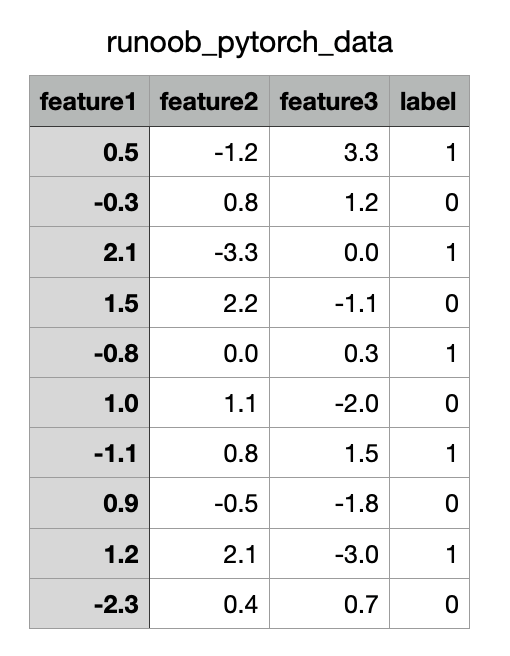
The following is an example of using a CSV file as a data source and reading data through a custom Dataset and DataLoader.
The CSV file content is as follows (downloadexample_pytorch_data.csv):
Example
import pandas as pd
from torch.utils.data import Dataset, DataLoader
# Custom CSV dataset
class CSVDataset(Dataset):
def __init__(self, file_path):
# Read CSV file
self.data = pd.read_csv(file_path)
def __len__(self):
# Return dataset size
return len(self.data)
def __getitem__(self, idx):
# Use .iloc to explicitly use position-based indexing
row = self.data.iloc[idx]
# Separate features and labels
features = torch.tensor(row.iloc[:-1].to_numpy(), dtype=torch.float32) # Features
label = torch.tensor(row.iloc[-1], dtype=torch.float32) # Labels
return features, label
# Instantiate dataset and DataLoader
dataset = CSVDataset("example_pytorch_data.csv")
dataloader = DataLoader(dataset, batch_size=4, shuffle=True)
# Iterate over DataLoader
for features, label in dataloader:
print("Features:", features)
print("Labels:", label)
break
The output result is:
特征: tensor([[ 1.2000,  2.1000, -3.0000],
        [ 1.0000,  1.1000, -2.0000],
        [ 0.5000, -1.2000,  3.3000],
        [-0.3000,  0.8000,  1.2000]])
标签: tensor([1., 0., 1., 0.])
tianqixin@Mac-mini example-test % python3 test.py
特征: tensor([[ 1.5000,  2.2000, -1.1000],
        [ 2.1000, -3.3000,  0.0000],
        [-2.3000,  0.4000,  0.7000],
        [-0.3000,  0.8000,  1.2000]])
标签: tensor([0., 1., 0., 0.])
Other Extensions