PyTorch Model Saving and Loading
In deep learning projects, model saving and loading is a crucial step. The main reasons include:
- Training interruption recovery: You can resume training from a checkpoint when the training process is unexpectedly interrupted
- Model deployment: Deploy the trained model to a production environment
- Model sharing: Convenient for sharing model results among team members
- Transfer learning: Save pre-trained models for other tasks
- Performance evaluation: Save models from different training stages for comparison
Basic Saving and Loading Methods
Saving the Entire Model
This is the simplest method, saving the model's architecture and parameters:
Example
import torch
import torchvision.models as models
# Create and train a model
model = models.resnet18(pretrained=True)
# ... training code ...
# Save the entire model
torch.save(model, 'model.pth')
# Load the entire model
loaded_model = torch.load('model.pth')
import torchvision.models as models
# Create and train a model
model = models.resnet18(pretrained=True)
# ... training code ...
# Save the entire model
torch.save(model, 'model.pth')
# Load the entire model
loaded_model = torch.load('model.pth')
Advantages:
- Simple and intuitive code
- Saves the complete model structure
Disadvantages:
- Larger file size
- Depends on the model class definition
Saving Only Model Parameters (Recommended)
A more recommended way is to save only the model's state_dict:
Example
# Save model parameters
torch.save(model.state_dict(), 'model_weights.pth')
# Load model parameters
model = models.resnet18() # Must first create a model with the same architecture
model.load_state_dict(torch.load('model_weights.pth'))
model.eval() # Set to evaluation mode
torch.save(model.state_dict(), 'model_weights.pth')
# Load model parameters
model = models.resnet18() # Must first create a model with the same architecture
model.load_state_dict(torch.load('model_weights.pth'))
model.eval() # Set to evaluation mode
Advantages:
- Smaller file size
- More flexible, can be loaded into different architectures
- Better compatibility
Saving and Loading Training State
In real projects, we usually also need to save the optimizer state, epoch, and other information:
Example
# Save checkpoint
checkpoint = {
'epoch': epoch,
'model_state_dict': model.state_dict(),
'optimizer_state_dict': optimizer.state_dict(),
'loss': loss,
# Can add other information that needs to be saved
}
torch.save(checkpoint, 'checkpoint.pth')
# Load checkpoint
checkpoint = torch.load('checkpoint.pth')
model.load_state_dict(checkpoint['model_state_dict'])
optimizer.load_state_dict(checkpoint['optimizer_state_dict'])
epoch = checkpoint['epoch']
loss = checkpoint['loss']
model.eval() # Or model.train() depending on your needs
checkpoint = {
'epoch': epoch,
'model_state_dict': model.state_dict(),
'optimizer_state_dict': optimizer.state_dict(),
'loss': loss,
# Can add other information that needs to be saved
}
torch.save(checkpoint, 'checkpoint.pth')
# Load checkpoint
checkpoint = torch.load('checkpoint.pth')
model.load_state_dict(checkpoint['model_state_dict'])
optimizer.load_state_dict(checkpoint['optimizer_state_dict'])
epoch = checkpoint['epoch']
loss = checkpoint['loss']
model.eval() # Or model.train() depending on your needs
Loading Models Across Devices
CPU/GPU Compatibility Handling
Example
# Specify map_location when saving
torch.save(model.state_dict(), 'model_weights.pth')
# Load to CPU (when the model was trained on GPU)
device = torch.device('cpu')
model.load_state_dict(torch.load('model_weights.pth', map_location=device))
# Load to GPU
device = torch.device('cuda')
model.load_state_dict(torch.load('model_weights.pth', map_location=device))
model.to(device)
torch.save(model.state_dict(), 'model_weights.pth')
# Load to CPU (when the model was trained on GPU)
device = torch.device('cpu')
model.load_state_dict(torch.load('model_weights.pth', map_location=device))
# Load to GPU
device = torch.device('cuda')
model.load_state_dict(torch.load('model_weights.pth', map_location=device))
model.to(device)
Loading Models Trained with Multiple GPUs
Example
# Save multi-GPU model
torch.save(model.module.state_dict(), 'multigpu_model.pth')
# Load to a single GPU
model = ModelClass()
model.load_state_dict(torch.load('multigpu_model.pth'))
torch.save(model.module.state_dict(), 'multigpu_model.pth')
# Load to a single GPU
model = ModelClass()
model.load_state_dict(torch.load('multigpu_model.pth'))
Model Conversion and Compatibility
PyTorch Version Compatibility
Example
# Specify _use_new_zipfile_serialization=True when saving for better compatibility
torch.save(model.state_dict(), 'model.pth', _use_new_zipfile_serialization=True)
torch.save(model.state_dict(), 'model.pth', _use_new_zipfile_serialization=True)
Converting to TorchScript
Example
# Convert the model to TorchScript format
scripted_model = torch.jit.script(model)
torch.jit.save(scripted_model, 'model_scripted.pt')
# Load TorchScript model
loaded_script = torch.jit.load('model_scripted.pt')
scripted_model = torch.jit.script(model)
torch.jit.save(scripted_model, 'model_scripted.pt')
# Load TorchScript model
loaded_script = torch.jit.load('model_scripted.pt')
Best Practices and Common Issues
Best Practices
- Naming conventions: Use meaningful file names, such as
resnet18_epoch50.pth - Periodic saving: Save a checkpoint every few epochs
- Verify loading: Test the loading functionality immediately after saving
- Documentation: Record the model architecture and training parameters
- Version control: Include model files in the version control system
Solutions to Common Problems
Problem 1:Missing key(s) in state_dict
Solution: Ensure the model architecture matches exactly, or usestrict=Falseparameter:
model.load_state_dict(torch.load('model.pth'), strict=False)
Problem 2:CUDA out of memory
Solution: Put it on the CPU first when loading:
Example
model.load_state_dict(torch.load('model.pth', map_location='cpu'))
Problem 3: Cannot load older version models
Solution: Try loading in different PyTorch versions, or convert the model format
Practical Application Examples
Image Classification Model Saving and Loading Process
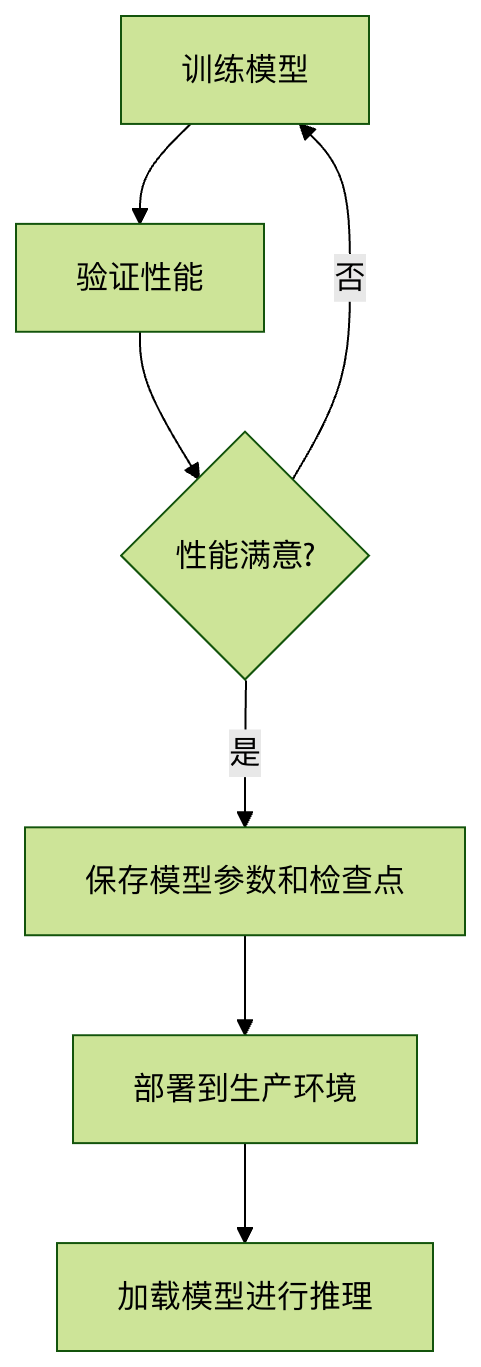
Complete Code Example
Example
import torch
import torch.nn as nn
import torch.optim as optim
# Define a simple model
class SimpleModel(nn.Module):
def __init__(self):
super(SimpleModel, self).__init__()
self.fc = nn.Linear(10, 2)
def forward(self, x):
return self.fc(x)
# Initialization
model = SimpleModel()
optimizer = optim.SGD(model.parameters(), lr=0.01)
criterion = nn.CrossEntropyLoss()
# Simulate the training process
for epoch in range(5):
# Simulate training steps
inputs = torch.randn(32, 10)
labels = torch.randint(0, 2, (32,))
optimizer.zero_grad()
outputs = model(inputs)
loss = criterion(outputs, labels)
loss.backward()
optimizer.step()
# Save a checkpoint every 2 epochs
if epoch % 2 == 0:
checkpoint = {
'epoch': epoch,
'model_state_dict': model.state_dict(),
'optimizer_state_dict': optimizer.state_dict(),
'loss': loss.item(),
}
torch.save(checkpoint, f'checkpoint_epoch{epoch}.pth')
print(f'Checkpoint saved at epoch {epoch}')
# Final save
torch.save(model.state_dict(), 'final_model.pth')
# Loading example
loaded_model = SimpleModel()
loaded_model.load_state_dict(torch.load('final_model.pth'))
loaded_model.eval()
# Test the loaded model
test_input = torch.randn(1, 10)
with torch.no_grad():
output = loaded_model(test_input)
print(f'Test output: {output}')
import torch.nn as nn
import torch.optim as optim
# Define a simple model
class SimpleModel(nn.Module):
def __init__(self):
super(SimpleModel, self).__init__()
self.fc = nn.Linear(10, 2)
def forward(self, x):
return self.fc(x)
# Initialization
model = SimpleModel()
optimizer = optim.SGD(model.parameters(), lr=0.01)
criterion = nn.CrossEntropyLoss()
# Simulate the training process
for epoch in range(5):
# Simulate training steps
inputs = torch.randn(32, 10)
labels = torch.randint(0, 2, (32,))
optimizer.zero_grad()
outputs = model(inputs)
loss = criterion(outputs, labels)
loss.backward()
optimizer.step()
# Save a checkpoint every 2 epochs
if epoch % 2 == 0:
checkpoint = {
'epoch': epoch,
'model_state_dict': model.state_dict(),
'optimizer_state_dict': optimizer.state_dict(),
'loss': loss.item(),
}
torch.save(checkpoint, f'checkpoint_epoch{epoch}.pth')
print(f'Checkpoint saved at epoch {epoch}')
# Final save
torch.save(model.state_dict(), 'final_model.pth')
# Loading example
loaded_model = SimpleModel()
loaded_model.load_state_dict(torch.load('final_model.pth'))
loaded_model.eval()
# Test the loaded model
test_input = torch.randn(1, 10)
with torch.no_grad():
output = loaded_model(test_input)
print(f'Test output: {output}')