PHP imagecolorallocatealpha - Allocate a color and transparency for an image
 PHP Image Processing
imagecolorallocatealpha — Allocate a color and transparency for an image.
Syntax
int imagecolorallocatealpha ( resource $image , int $red , int $green , int $blue , int $alpha )
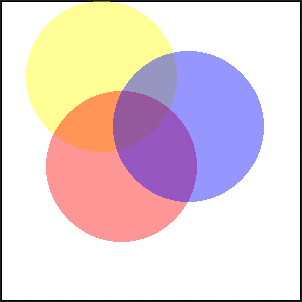
imagecolorallocatealpha() behaves the same as imagecolorallocate(), but with an additional transparency parameter alpha, with values from 0 to 127. 0 means fully opaque, 127 means fully transparent.
Returns FALSE if the allocation fails.
Note:This function requires GD 2.0.1 or higher (2.0.28 or higher is recommended).
Examples
<?php
$size = 300;
$image=imagecreatetruecolor($size, $size);

// 用白色背景加黑色边框画个方框
$back = imagecolorallocate($image, 255, 255, 255);
$border = imagecolorallocate($image, 0, 0, 0);
imagefilledrectangle($image, 0, 0, $size - 1, $size - 1, $back);
imagerectangle($image, 0, 0, $size - 1, $size - 1, $border);

$yellow_x = 100;
$yellow_y = 75;
$red_x    = 120;
$red_y    = 165;
$blue_x   = 187;
$blue_y   = 125;
$radius   = 150;

// 用 alpha 值分配一些颜色
$yellow = imagecolorallocatealpha($image, 255, 255, 0, 75);
$red    = imagecolorallocatealpha($image, 255, 0, 0, 75);
$blue   = imagecolorallocatealpha($image, 0, 0, 255, 75);

// 画三个交迭的圆
imagefilledellipse($image, $yellow_x, $yellow_y, $radius, $radius, $yellow);
imagefilledellipse($image, $red_x, $red_y, $radius, $radius, $red);
imagefilledellipse($image, $blue_x, $blue_y, $radius, $radius, $blue);

// 不要忘记输出正确的 header!
header('Content-type: image/png');

// 最后输出结果
imagepng($image);
imagedestroy($image);
?>
The image output from the above example is as follows:
Related Articles
- imagecolorallocate()Allocate a color for an image.
- imagecolordeallocate()Deallocate a color for an image.