PHP RESTful
REST (English: Representational State Transfer, abbreviated as REST) refers to a set of architectural constraints and principles.
Web APIs that conform to the REST design style are called RESTful APIs. They define resources from the following three aspects:
- Intuitive and concise resource address: URI, for example:
http://example.com/resources/。
- Transferred resource: The Internet media types that the web service accepts and returns, such as JSON, XML, YAM, etc.
- Operations on the resource: A set of request methods supported by the web service on that resource (e.g., POST, GET, PUT, or DELETE).
In this tutorial, we will use PHP (without a framework) to create a RESTful web service. At the end of the article, you can download the code used in this chapter.
Through this tutorial, you will learn the following:
- Create a RESTful Webservice.
- Use native PHP without depending on any framework.
- URI patterns need to follow REST rules.
- The formats that a RESTful service accepts and returns can be JSON, XML, etc.
- Respond with corresponding HTTP status codes according to different situations.
- Demonstrate the use of request headers.
- Use a REST client to test the RESTful web service.
RESTful Webservice Example
The following code is the RESTful service classSite.php:
Example
<?php
Class Site {
private $sites = array(
1 => 'TaoBao',
2 => 'Google',
3 => 'Example',
4 => 'Baidu',
5 => 'Weibo',
6 => 'Sina'
);
public function getAllSite(){
return $this->sites;
}
public function getSite($id){
$site = array($id => ($this->sites[$id]) ? $this->sites[$id] : $this->sites[1]);
return $site;
}
}
?>
RESTful Services URI Mapping
The RESTful Services URI should be set to an intuitive and concise resource address. The Apache server's .htaccess should have corresponding Rewrite rules configured.
In this example, we will use two URI rules:
1. Get the list of all sites:
http://localhost/restexample/site/list/
2. Use id to get a specific site. The following URI gets the site with id 3:
http://localhost/restexample/site/list/3/
The project's .htaccessfile configuration rules are as follows:
# 开启 rewrite 功能
Options +FollowSymlinks
RewriteEngine on

# 重写规则
RewriteRule ^site/list/$   RestController.php?view=all [nc,qsa]
RewriteRule ^site/list/([0-9]+)/$   RestController.php?view=single&id=$1 [nc,qsa]
RESTful Web Service Controller
In.htaccessIn the file, we get the corresponding request in the RestController.php file by setting the parameter 'view', and dispatch to different methods by obtaining different parameters of 'view'.RestController.php The file code is as follows:
Example
<?php
require_once("SiteRestHandler.php");
$view = "";
if(isset($_GET["view"]))
$view = $_GET["view"];
switch($view){
case "all":
$siteRestHandler = new SiteRestHandler();
$siteRestHandler->getAllSites();
break;
case "single":
$siteRestHandler = new SiteRestHandler();
$siteRestHandler->getSite($_GET["id"]);
break;
case "" :
break;
}
?>
Simple RESTful Base Class
The following provides a base class for RESTful, used to handle HTTP status codes for responding to requests,SimpleRest.phpThe file code is as follows:
Example
<?php
class SimpleRest {
private $httpVersion = "HTTP/1.1";
public function setHttpHeaders($contentType, $statusCode){
$statusMessage = $this -> getHttpStatusMessage($statusCode);
header($this->httpVersion. " ". $statusCode ." ". $statusMessage);
header("Content-Type:". $contentType);
}
public function getHttpStatusMessage($statusCode){
$httpStatus = array(
100 => 'Continue',
101 => 'Switching Protocols',
200 => 'OK',
201 => 'Created',
202 => 'Accepted',
203 => 'Non-Authoritative Information',
204 => 'No Content',
205 => 'Reset Content',
206 => 'Partial Content',
300 => 'Multiple Choices',
301 => 'Moved Permanently',
302 => 'Found',
303 => 'See Other',
304 => 'Not Modified',
305 => 'Use Proxy',
306 => '(Unused)',
307 => 'Temporary Redirect',
400 => 'Bad Request',
401 => 'Unauthorized',
402 => 'Payment Required',
403 => 'Forbidden',
404 => 'Not Found',
405 => 'Method Not Allowed',
406 => 'Not Acceptable',
407 => 'Proxy Authentication Required',
408 => 'Request Timeout',
409 => 'Conflict',
410 => 'Gone',
411 => 'Length Required',
412 => 'Precondition Failed',
413 => 'Request Entity Too Large',
414 => 'Request-URI Too Long',
415 => 'Unsupported Media Type',
416 => 'Requested Range Not Satisfiable',
417 => 'Expectation Failed',
500 => 'Internal Server Error',
501 => 'Not Implemented',
502 => 'Bad Gateway',
503 => 'Service Unavailable',
504 => 'Gateway Timeout',
505 => 'HTTP Version Not Supported');
return ($httpStatus[$statusCode]) ? $httpStatus[$statusCode] : $status[500];
}
}
?>
RESTful Web Service Handler Class
The following is a RESTful Web Service handler class SiteRestHandler.php, which inherits the RESTful base class we provided above. The class decides the returned HTTP status code and data format by judging the request parameters. In the example, we provide three data formats: "application/json", "application/xml", or "text/html":
SiteRestHandler.phpThe file code is as follows:
Example
<?php
require_once("SimpleRest.php");
require_once("Site.php");
class SiteRestHandler extends SimpleRest {
function getAllSites() {
$site = new Site();
$rawData = $site->getAllSite();
if(empty($rawData)) {
$statusCode = 404;
$rawData = array('error' => 'No sites found!');
} else {
$statusCode = 200;
}
$requestContentType = $_SERVER['HTTP_ACCEPT'];
$this ->setHttpHeaders($requestContentType, $statusCode);
if(strpos($requestContentType,'application/json') !== false){
$response = $this->encodeJson($rawData);
echo $response;
} else if(strpos($requestContentType,'text/html') !== false){
$response = $this->encodeHtml($rawData);
echo $response;
} else if(strpos($requestContentType,'application/xml') !== false){
$response = $this->encodeXml($rawData);
echo $response;
}
}
public function encodeHtml($responseData) {
$htmlResponse = "<table border='1'>";
foreach($responseData as $key=>$value) {
$htmlResponse .= "<tr><td>". $key. "</td><td>". $value. "</td></tr>";
}
$htmlResponse .= "</table>";
return $htmlResponse;
}
public function encodeJson($responseData) {
$jsonResponse = json_encode($responseData);
return $jsonResponse;
}
public function encodeXml($responseData) {
$xml = new SimpleXMLElement('<?xml version="1.0"?><site></site>');
foreach($responseData as $key=>$value) {
$xml->addChild($key, $value);
}
return $xml->asXML();
}
public function getSite($id) {
$site = new Site();
$rawData = $site->getSite($id);
if(empty($rawData)) {
$statusCode = 404;
$rawData = array('error' => 'No sites found!');
} else {
$statusCode = 200;
}
$requestContentType = $_SERVER['HTTP_ACCEPT'];
$this ->setHttpHeaders($requestContentType, $statusCode);
if(strpos($requestContentType,'application/json') !== false){
$response = $this->encodeJson($rawData);
echo $response;
} else if(strpos($requestContentType,'text/html') !== false){
$response = $this->encodeHtml($rawData);
echo $response;
} else if(strpos($requestContentType,'application/xml') !== false){
$response = $this->encodeXml($rawData);
echo $response;
}
}
}
?>
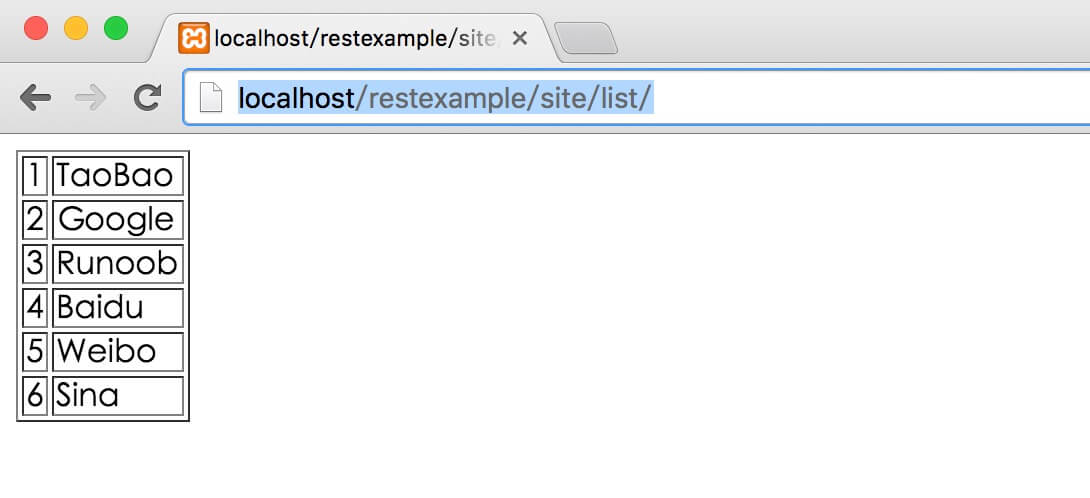
Next, we access via http://localhost/restexample/site/list/, and the output result is as follows:
RESTful Web Service Client
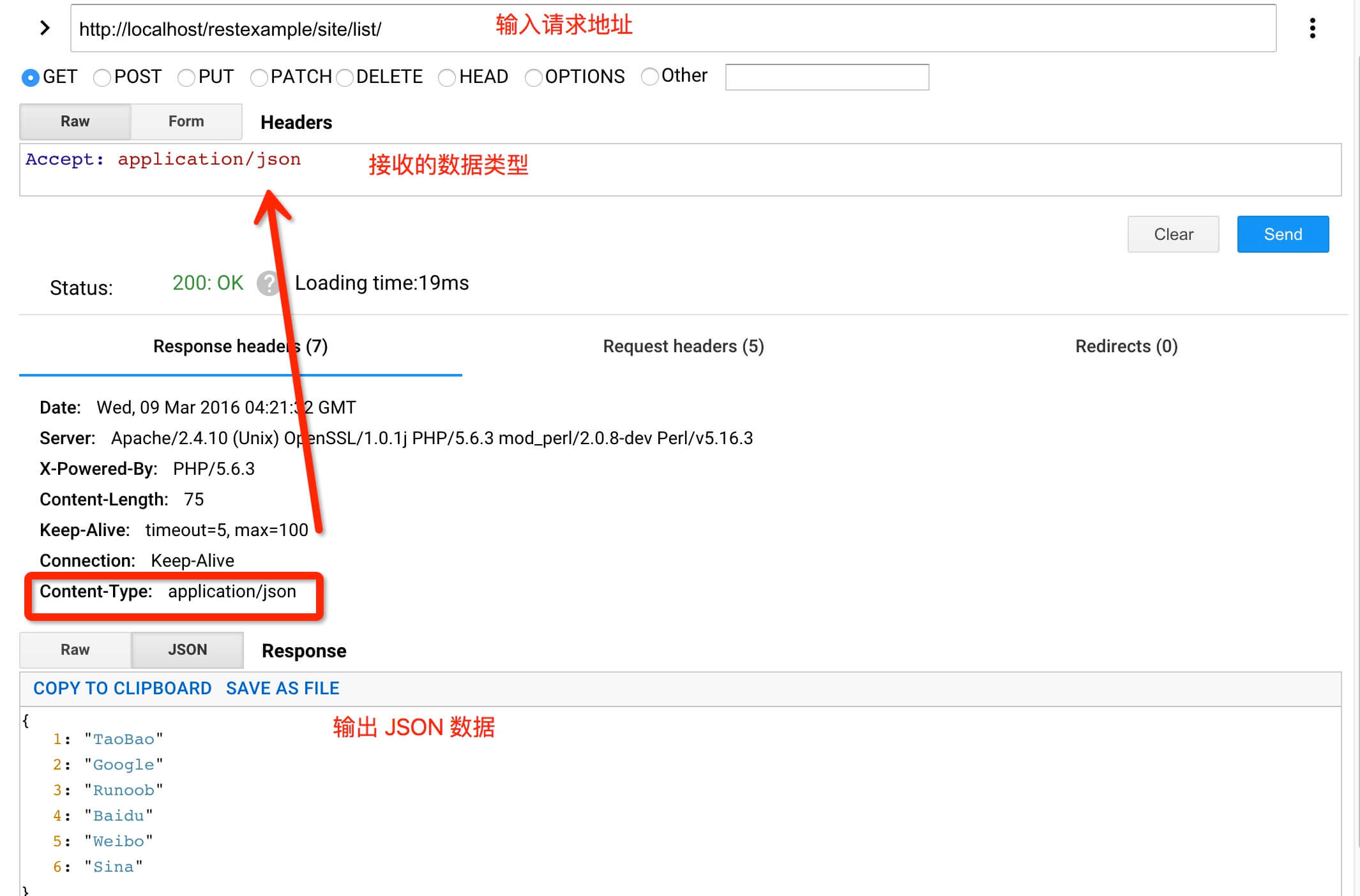
Next, we can use the "Advance Rest Client" of the Google Chrome browser as the RESTful Web Service client to request our service.
In the example, request the address http://localhost/restexample/site/list/, and the received data is similar to:Accept: application/json
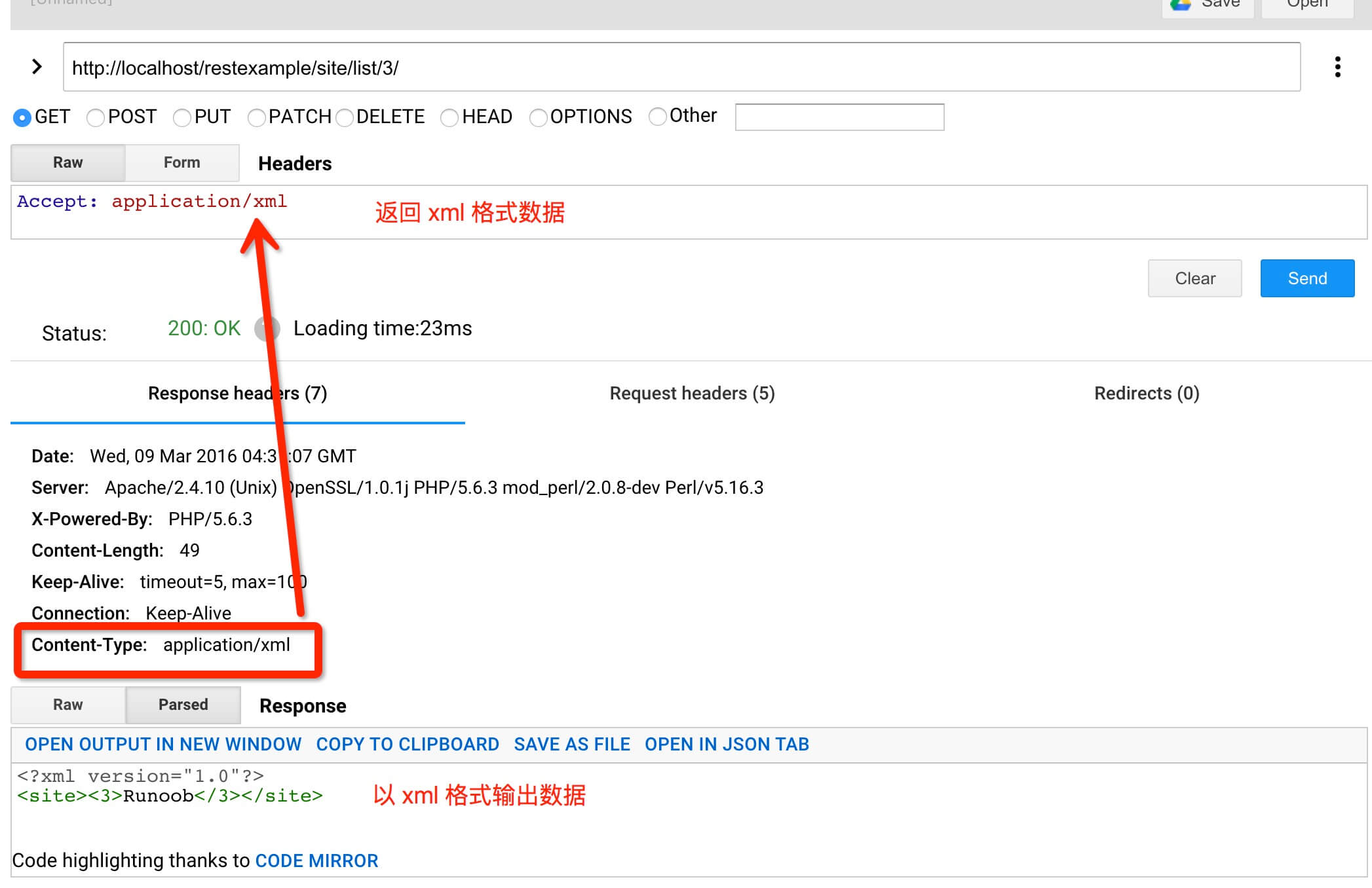
Request the site Example with id 3, access address is http://localhost/restexample/site/list/3/,
Source Code Download
The code used in the example can be downloaded by clicking the following button:
Source Code Download
Other Extensions