Pandas Data Structures - Series
Series is a core data structure in Pandas, similar to a one-dimensional array, with data and index.
Series can store any data type (integers, floats, strings, etc.) and access elements through labels (indexes).
The data structure of Series is very useful because it can handle various data types while maintaining efficient data manipulation capabilities, such as quickly accessing and manipulating data through labels.
Series Features:
One-dimensional array:Each element in a Series has a corresponding index value.
Index:Each data element can be accessed through a label (index). By default, the index is an integer starting from 0, but you can also customize the index.
Data types:
SeriesCan accommodate elements of different data types, including integers, floats, strings, Python objects, etc.Size immutability:The size of a Series is fixed after creation, but it can be changed through certain operations (such as append or delete).
Operations:Series supports various operations, such as mathematical operations, statistical analysis, string processing, etc.
Missing data:Series can contain missing data. Pandas uses NaN (Not a Number) to represent missing or no value.
Automatic alignment:When performing operations on multiple Series, Pandas automatically aligns data based on the index, making data processing more efficient.
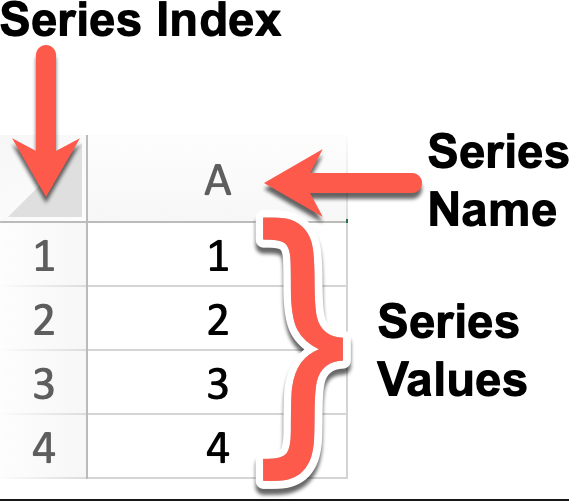
Example
# Create a Series object with name 'A' and values 1, 2, 3, 4
# Default index is 0, 1, 2, 3
series = pd.Series([1, 2, 3, 4], name='A')
# Display the Series object
print(series)
# If you want to explicitly set the index, you can do it like this:
custom_index = [1, 2, 3, 4] # Custom index
series_with_index = pd.Series([1, 2, 3, 4], index=custom_index, name='A')
# Display the Series object with a custom index
print(series_with_index)
The output result is:
0    1
1    2
2    3
3    4
Name: A, dtype: int64
1    1
2    2
3    3
4    4
Name: A, dtype: int64
Series is a basic data structure in Pandas, similar to a one-dimensional array or list, but with labels (indexes), making data more flexible during processing and analysis.
The following is a detailed introduction to Series in Pandas.
Create a Series
You can use the pd.Series() constructor to create a Series object by passing a data array (which can be a list, NumPy array, etc.) and an optional index array.
pandas.Series(data=None, index=None, dtype=None, name=None, copy=False, fastpath=False)
Parameter description:
data: The data part of the Series, can be a list, array, dictionary, scalar value, etc. If this parameter is not provided, an empty Series is created.index: The index part of the Series, used to label the data. Can be a list, array, index object, etc. If this parameter is not provided, a default integer index is created.dtype: Specify the data type of the Series. Can be a NumPy data type, such asnp.int64、np.float64etc. If this parameter is not provided, the data type is inferred automatically from the data.name: The name of the Series, used to identify the Series object. If this parameter is provided, the created Series object will have the specified name.copy: Whether to copy data. Defaults to False, meaning no data is copied. If set to True, the input data is copied.fastpath: Whether to enable the fast path. Defaults to False. Enabling the fast path may improve performance in some cases.
Create a simple Series example:
Example
a = [1, 2, 3]
myvar = pd.Series(a)
print(myvar)
The output result is as follows:
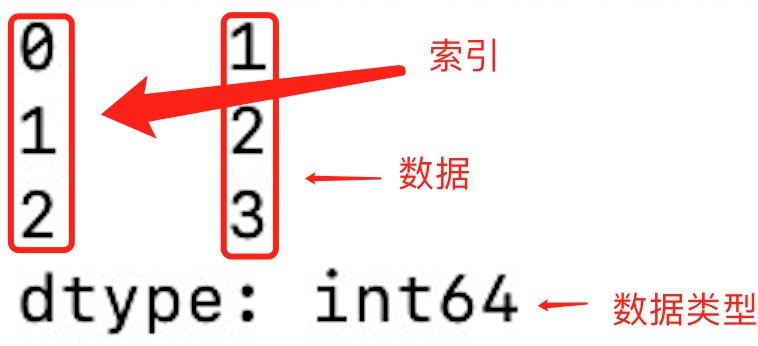
From the figure above, if no index is specified, the index values start from 0. We can read data based on the index value:
Example
a = [1, 2, 3]
myvar = pd.Series(a)
print(myvar[1])
The output result is as follows:
2
We can specify the index values, as in the following example:
Example
a = ["Google", "Example", "Wiki"]
myvar = pd.Series(a, index = ["x", "y", "z"])
print(myvar)
The output result is as follows:
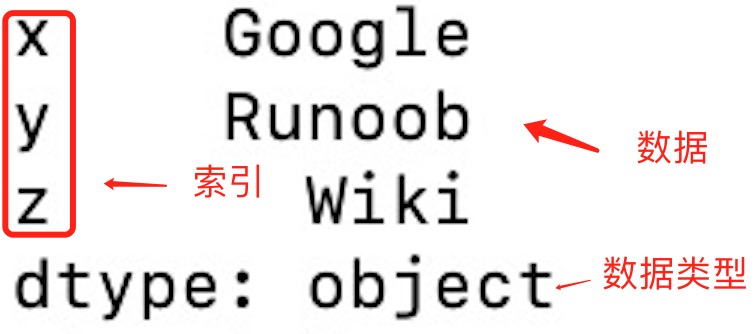
Read data by index value:
Example
a = ["Google", "Example", "Wiki"]
myvar = pd.Series(a, index = ["x", "y", "z"])
print(myvar["y"])
The output result is as follows:
Example
We can also use key/value objects, similar to dictionaries, to create a Series:
Example
sites = {1: "Google", 2: "Example", 3: "Wiki"}
myvar = pd.Series(sites)
print(myvar)
The output result is as follows:
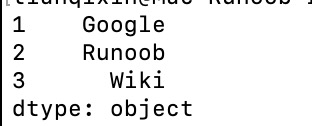
From the figure above, the keys of the dictionary become the index values.
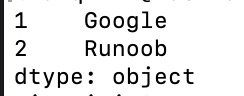
If we only need a part of the data from the dictionary, we just need to specify the index of the required data, as in the following example:
Example
sites = {1: "Google", 2: "Example", 3: "Wiki"}
myvar = pd.Series(sites, index = [1, 2])
print(myvar)
The output result is as follows:
Set the Series name parameter:
Example
sites = {1: "Google", 2: "Example", 3: "Wiki"}
myvar = pd.Series(sites, index = [1, 2], name="EXAMPLE-Series-TEST" )
print(myvar)

Series Methods
The following are some commonly used methods in Series:
| Method Name | Function Description |
|---|---|
index | Get the index of the Series |
values | Get the data part of the Series (returns a NumPy array) |
head(n) | Return the first n rows of the Series (default is 5) |
tail(n) | Return the last n rows of the Series (default is 5) |
dtype | Return the data type of the Series |
shape | Return the shape of the Series (number of rows) |
describe() | Return statistical description of the Series (such as mean, standard deviation, minimum, etc.) |
isnull() | Return a boolean Series indicating whether each element is NaN |
notnull() | Return a boolean Series indicating whether each element is not NaN |
unique() | Return the unique values in the Series (deduplication) |
value_counts() | Return the count of occurrences of each unique value in the Series |
map(func) | Apply the specified function to each element in the Series |
apply(func) | Apply the specified function to each element in the Series, often used for custom operations |
astype(dtype) | Convert the Series to a specified type |
sort_values() | Sort the elements in the Series (sort by value) |
sort_index() | Sort the index of the Series |
dropna() | Remove missing values (NaN) from the Series |
fillna(value) | Fill missing values (NaN) in the Series |
replace(to_replace, value) | Replace specified values in the Series |
cumsum() | Return the cumulative sum of the Series |
cumprod() | Return the cumulative product of the Series |
shift(periods) | Shift the elements in the Series by a specified number of steps |
rank() | Return the ranks of the elements in the Series |
corr(other) | Calculate the correlation between a Series and another Series (Pearson correlation coefficient) |
cov(other) | Calculate the covariance between a Series and another Series |
to_list() | Convert the Series to a Python list |
to_frame() | Convert the Series to a DataFrame |
iloc[] | Select data by positional index |
loc[] | Select data by label index |
Example
# Create a Series
data = [1, 2, 3, 4, 5, 6]
index = ['a', 'b', 'c', 'd', 'e', 'f']
s = pd.Series(data, index=index)
# View basic information
print("Index:", s.index)
print("Data:", s.values)
print("Data type:", s.dtype)
print("First two rows of data:", s.head(2))
# Use the map function to double each element
s_doubled = s.map(lambda x: x * 2)
print("After doubling the elements:", s_doubled)
# Calculate the cumulative sum
cumsum_s = s.cumsum()
print("Cumulative sum:", cumsum_s)
# Find missing values (there are no missing values here, so all returned are False)
print("Missing value check:", s.isnull())
# Sort
sorted_s = s.sort_values()
print("Sorted Series:", sorted_s)
The output result is:
索引: Index(['a', 'b', 'c', 'd', 'e', 'f'], dtype='object')
数据: [1 2 3 4 5 6]
数据类型: int64
前两行数据: a    1
b    2
dtype: int64
元素加倍后: a     2
b     4
c     6
d     8
e    10
f    12
dtype: int64
累计求和: a     1
b     3
c     6
d    10
e    15
f    21
dtype: int64
缺失值判断: a    False
b    False
c    False
d    False
e    False
f    False
dtype: bool
排序后的 Series: a    1
b    2
c    3
d    4
e    5
f    6
dtype: int64
More About Series
Use a list, dictionary, or array to create a Series with a default index.
# 使用列表创建 Series
s = pd.Series([1, 2, 3, 4])

# 使用 NumPy 数组创建 Series
s = pd.Series(np.array([1, 2, 3, 4]))

# 使用字典创建 Series
s = pd.Series({'a': 1, 'b': 2, 'c': 3, 'd': 4})
Basic operations:
# 指定索引创建 Series
s = pd.Series([1, 2, 3, 4], index=['a', 'b', 'c', 'd'])

# 获取值
value = s[2]  # 获取索引为2的值
print(s['a'])  # 返回索引标签 'a' 对应的元素

# 获取多个值
subset = s[1:4]  # 获取索引为1到3的值

# 使用自定义索引
value = s['b']  # 获取索引为'b'的值

# 索引和值的对应关系
for index, value in s.items():
    print(f"Index: {index}, Value: {value}")


# 使用切片语法来访问 Series 的一部分
print(s['a':'c'])  # 返回索引标签 'a' 到 'c' 之间的元素
print(s[:3])  # 返回前三个元素

# 为特定的索引标签赋值
s['a'] = 10  # 将索引标签 'a' 对应的元素修改为 10

# 通过赋值给新的索引标签来添加元素
s['e'] = 5  # 在 Series 中添加一个新的元素,索引标签为 'e'

# 使用 del 删除指定索引标签的元素。
del s['a']  # 删除索引标签 'a' 对应的元素

# 使用 drop 方法删除一个或多个索引标签,并返回一个新的 Series。
s_dropped = s.drop(['b'])  # 返回一个删除了索引标签 'b' 的新 Series
Basic arithmetic:
# 算术运算
result = series * 2  # 所有元素乘以2

# 过滤
filtered_series = series[series > 2]  # 选择大于2的元素

# 数学函数
import numpy as np
result = np.sqrt(series)  # 对每个元素取平方根
Calculate statistical data: Use Series methods to compute descriptive statistics.
print(s.sum())  # 输出 Series 的总和
print(s.mean())  # 输出 Series 的平均值
print(s.max())  # 输出 Series 的最大值
print(s.min())  # 输出 Series 的最小值
print(s.std())  # 输出 Series 的标准差
Attributes and methods:
# 获取索引
index = s.index

# 获取值数组
values = s.values

# 获取描述统计信息
stats = s.describe()

# 获取最大值和最小值的索引
max_index = s.idxmax()
min_index = s.idxmin()

# 其他属性和方法
print(s.dtype)   # 数据类型
print(s.shape)   # 形状
print(s.size)    # 元素个数
print(s.head())  # 前几个元素,默认是前 5 个
print(s.tail())  # 后几个元素,默认是后 5 个
print(s.sum())   # 求和
print(s.mean())  # 平均值
print(s.std())   # 标准差
print(s.min())   # 最小值
print(s.max())   # 最大值
Use boolean expressions: Filter a Series based on conditions.
print(s > 2) # 返回一个布尔 Series,其中的元素值大于 2
View data types: Use the dtype attribute to view the data type of a Series.
print(s.dtype) # 输出 Series 的数据类型
Convert data types: Use the astype method to convert a Series to another data type.
s = s.astype('float64') # 将 Series 中的所有元素转换为 float64 类型
Notes:
SeriesThe data in it is ordered.- You can regard
Seriesit as a one-dimensional array with an index. - The index can be unique, but it is not required.
- The data can be scalars, lists, NumPy arrays, etc.