Linux rev Command
 Linux Command Encyclopedia
1. rev Command Overview
rev is a simple but practical text processing command in Linux. Its function is to reverse the character order of each line of input text. The command name is an abbreviation of "reverse".
Basic Functions
- Reverse the character order of each line of text
- Keep the order of lines unchanged
- Process standard input or file content
Typical Application Scenarios
- Test text processing capabilities
- Check palindromes
- Special format data processing
- Debugging and text analysis
2. Command Syntax and Parameters
Basic Syntax
rev [选项] [文件...]
Parameter Description
The rev command is very simple; most Linux implementations do not include any option parameters:
| Parameter | Description |
|---|---|
| File | Specify the file(s) to process (multiple allowed). If not specified, read from standard input. |
| -V/--version | Display version information (supported by some implementations) |
| -h/--help | Display help information (supported by some implementations) |
Note: rev implementations may differ slightly across Linux distributions. You can use
man revto view the specific instructions.
3. Usage Examples
Example 1: Basic Usage
Reverse the content of standard input:
Example
dlrow olleh
Example 2: Processing File Content
Suppose there is a fileexample.txtwith the content:
Linux
Command
rev
Perform the reversal:
Example
xuniL
dnammoC
ver
Example 3: Multiple File Processing
Example
It will sequentially display the reversed results of the two files' contents.
Example 4: Checking Palindromes
Example
is a palindrome
4. How It Works
The internal processing flow of the rev command:
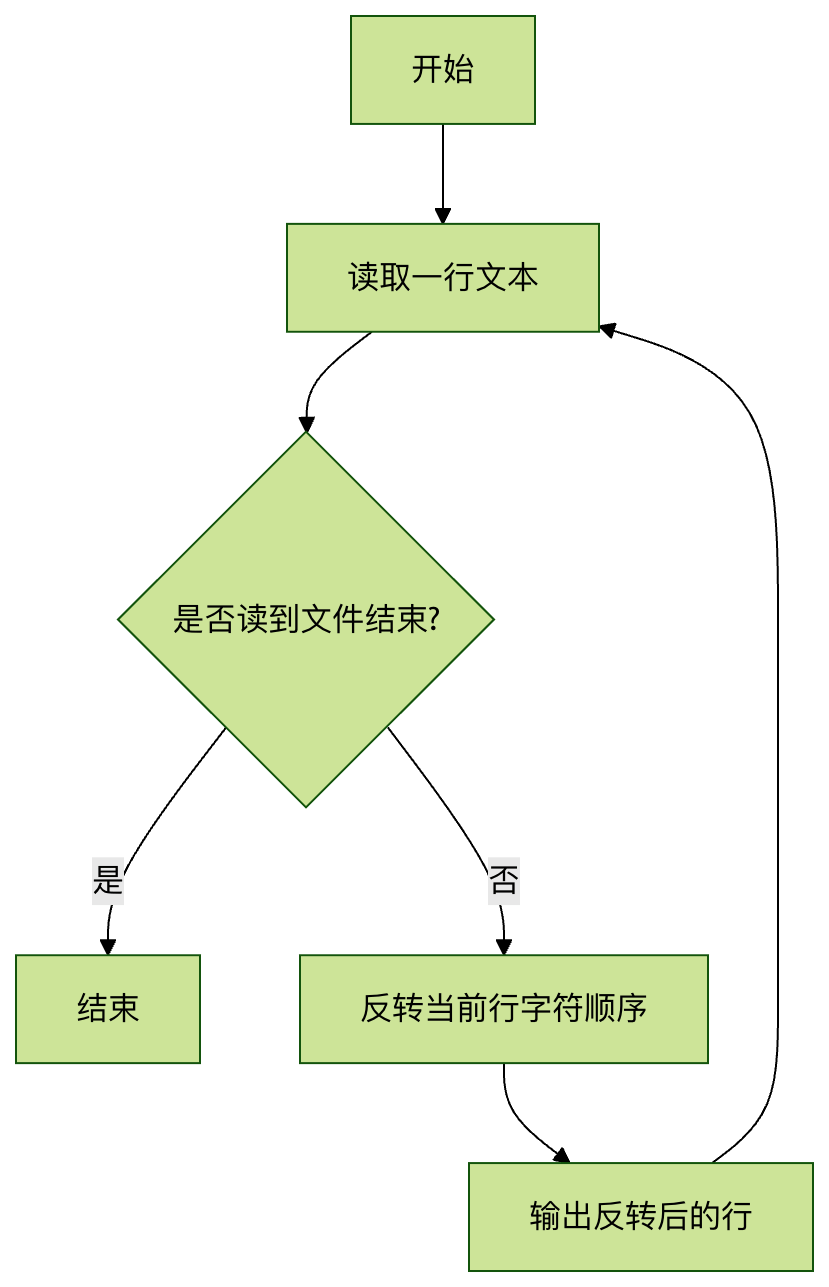
Key points:
- Process text line by line, keeping the line order unchanged
- The character order of each line is completely reversed (including spaces and special characters)
- Does not modify the original file content
5. Notes and Tips
Common Questions
Invisible characters: rev reverses all characters, including spaces, tabs, etc.
Example
b a
Multi-byte characters: Some implementations may not correctly handle Unicode characters.
Example
Practical Tips
Combine with other commands to create complex pipelines:
Example
Quickly reverse a file and save it:
Example
Check symmetry:
Example
6. Practice Exercises
Exercise 1: Basic Operations
- Create a file containing multiple lines of text
- Use the rev command to reverse the file content
- Redirect the result to a new file
Exercise 2: Advanced Application
Write a shell script that implements the following functions:
- Accept a file as a parameter
- Check whether there are palindrome lines in the file
- Output all palindrome lines and their line numbers
Reference solution:
Example
while IFS= read -r line; do
reversed=$(echo "$line" | rev)
if [ "$line" = "$reversed" ]; then
echo Palindrome line:$line"
fi
done < "$1"
7. Summary
Although the rev command is simple, it has unique value in text processing:
- Minimalist design: a model of the Unix philosophy of single functionality
- Pipeline-friendly: perfectly adapts to the Linux command pipeline system
- Educational value: helps understand the basic concepts of text processing
Mastering the rev command allows you to:
- Enhance your understanding of the Linux text processing toolchain
- Lay a foundation for learning more complex text processing commands (such as sed, awk)
- Solve certain special text processing needs
Suggested further study:
tacThe command (outputs lines in reverse order)sedThe text conversion functionality of the commandawkThe string processing functions of