MySQL Installation and Configuration
MySQL is the most popular relational database management system, developed by MySQL AB in Sweden and currently owned by Oracle Corporation.
The SQL language used by MySQL is the most commonly used standardized language for accessing databases.
Due to its small size, high speed, low total cost of ownership, and especially the characteristic of open source, MySQL is generally chosen as the website database for the development of small and medium-sized websites.
MySQL Installation
The system platform for this tutorial: CentOS release 6.6 (Final) 64-bit.
1. Install compilation tools and library files
yum -y install gcc gcc-c++ make autoconf libtool-ltdl-devel gd-devel freetype-devel libxml2-devel libjpeg-devel libpng-devel openssl-devel curl-devel bison patch unzip libmcrypt-devel libmhash-devel ncurses-devel sudo bzip2 flex libaio-devel
2. Install cmake compiler
cmake version: cmake-3.1.1.
1. Download address:http://www.cmake.org/files/v3.1/cmake-3.1.1.tar.gz
$ wget http://www.cmake.org/files/v3.1/cmake-3.1.1.tar.gz

2. Extract the installation package
$ tar zxvf cmake-3.1.1.tar.gz
3. Enter the installation package directory
$ cd cmake-3.1.1
4. Compile and install
$ ./bootstrap
$ make && make install
3. Install MySQL
MySQL version: mysql-5.6.15.
1. Download address:http://dev.mysql.com/get/Downloads/MySQL-5.6/mysql-5.6.15.tar.gz
$ wget http://dev.mysql.com/get/Downloads/MySQL-5.6/mysql-5.6.15.tar.gz

2. Extract the installation package
$ tar zxvf mysql-5.6.15.tar.gz
3. Enter the installation package directory
$ cd mysql-5.6.15
4. Compile and install
$ cmake -DCMAKE_INSTALL_PREFIX=/usr/local/webserver/mysql/ -DMYSQL_UNIX_ADDR=/tmp/mysql.sock -DDEFAULT_CHARSET=utf8 -DDEFAULT_COLLATION=utf8_general_ci -DWITH_EXTRA_CHARSETS=all -DWITH_MYISAM_STORAGE_ENGINE=1 -DWITH_INNOBASE_STORAGE_ENGINE=1 -DWITH_MEMORY_STORAGE_ENGINE=1 -DWITH_READLINE=1 -DWITH_INNODB_MEMCACHED=1 -DWITH_DEBUG=OFF -DWITH_ZLIB=bundled -DENABLED_LOCAL_INFILE=1 -DENABLED_PROFILING=ON -DMYSQL_MAINTAINER_MODE=OFF -DMYSQL_DATADIR=/usr/local/webserver/mysql/data -DMYSQL_TCP_PORT=3306
$ make && make install
5. Check the MySQL version:
$ /usr/local/webserver/mysql/bin/mysql --version

At this point, MySQL installation is complete.
MySQL Configuration
1. Create the user mysql used by MySQL for running:
$ /usr/sbin/groupadd mysql
$ /usr/sbin/useradd -g mysql mysql
2. Create the storage path for binlog and the database, and grant permissions to the mysql user
$ mkdir -p /usr/local/webserver/mysql/binlog /www/data_mysql
$ chown mysql.mysql /usr/local/webserver/mysql/binlog/ /www/data_mysql/
3. Create the my.cnf configuration file
Replace /etc/my.cnf with the following content
$ cat /etc/my.cnf

[client]
port = 3306
socket = /tmp/mysql.sock
[mysqld]
replicate-ignore-db = mysql
replicate-ignore-db = test
replicate-ignore-db = information_schema
user = mysql
port = 3306
socket = /tmp/mysql.sock
basedir = /usr/local/webserver/mysql
datadir = /www/data_mysql
log-error = /usr/local/webserver/mysql/mysql_error.log
pid-file = /usr/local/webserver/mysql/mysql.pid
open_files_limit = 65535
back_log = 600
max_connections = 5000
max_connect_errors = 1000
table_open_cache = 1024
external-locking = FALSE
max_allowed_packet = 32M
sort_buffer_size = 1M
join_buffer_size = 1M
thread_cache_size = 600
#thread_concurrency = 8
query_cache_size = 128M
query_cache_limit = 2M
query_cache_min_res_unit = 2k
default-storage-engine = MyISAM
default-tmp-storage-engine=MYISAM
thread_stack = 192K
transaction_isolation = READ-COMMITTED
tmp_table_size = 128M
max_heap_table_size = 128M
log-slave-updates
log-bin = /usr/local/webserver/mysql/binlog/binlog
binlog-do-db=oa_fb
binlog-ignore-db=mysql
binlog_cache_size = 4M
binlog_format = MIXED
max_binlog_cache_size = 8M
max_binlog_size = 1G
relay-log-index = /usr/local/webserver/mysql/relaylog/relaylog
relay-log-info-file = /usr/local/webserver/mysql/relaylog/relaylog
relay-log = /usr/local/webserver/mysql/relaylog/relaylog
expire_logs_days = 10
key_buffer_size = 256M
read_buffer_size = 1M
read_rnd_buffer_size = 16M
bulk_insert_buffer_size = 64M
myisam_sort_buffer_size = 128M
myisam_max_sort_file_size = 10G
myisam_repair_threads = 1
myisam_recover
interactive_timeout = 120
wait_timeout = 120
skip-name-resolve
#master-connect-retry = 10
slave-skip-errors = 1032,1062,126,1114,1146,1048,1396
#master-host = 192.168.1.2
#master-user = username
#master-password = password
#master-port = 3306
server-id = 1
loose-innodb-trx=0
loose-innodb-locks=0
loose-innodb-lock-waits=0
loose-innodb-cmp=0
loose-innodb-cmp-per-index=0
loose-innodb-cmp-per-index-reset=0
loose-innodb-cmp-reset=0
loose-innodb-cmpmem=0
loose-innodb-cmpmem-reset=0
loose-innodb-buffer-page=0
loose-innodb-buffer-page-lru=0
loose-innodb-buffer-pool-stats=0
loose-innodb-metrics=0
loose-innodb-ft-default-stopword=0
loose-innodb-ft-inserted=0
loose-innodb-ft-deleted=0
loose-innodb-ft-being-deleted=0
loose-innodb-ft-config=0
loose-innodb-ft-index-cache=0
loose-innodb-ft-index-table=0
loose-innodb-sys-tables=0
loose-innodb-sys-tablestats=0
loose-innodb-sys-indexes=0
loose-innodb-sys-columns=0
loose-innodb-sys-fields=0
loose-innodb-sys-foreign=0
loose-innodb-sys-foreign-cols=0

slow_query_log_file=/usr/local/webserver/mysql/mysql_slow.log
long_query_time = 1
[mysqldump]
quick
max_allowed_packet = 32M
4. Initialize the database
$/usr/local/webserver/mysql/scripts/mysql_install_db --defaults-file=/etc/my.cnf --user=mysql
Displays the following information:
Installing MySQL system tables...2015-01-26 20:18:51 0 [Warning] TIMESTAMP with implicit DEFAULT value is deprecated. Please use --explicit_defaults_for_timestamp server option (see documentation for more details).
OK

Filling help tables...2015-01-26 20:18:57 0 [Warning] TIMESTAMP with implicit DEFAULT value is deprecated. Please use --explicit_defaults_for_timestamp server option (see documentation for more details).
OK
...
5. Create a boot startup script
$ cd /usr/local/webserver/mysql/
$ cp support-files/mysql.server /etc/rc.d/init.d/mysqld
$ chkconfig --add mysqld
$ chkconfig --level 35 mysqld on
6. Start the MySQL server
$ service mysqld start

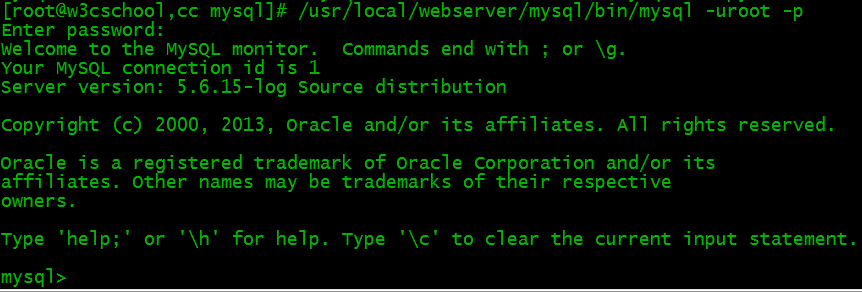
7. Connect to MySQL
$ /usr/local/webserver/mysql/bin/mysql -u root -p
Change MySQL user password
mysqladmin -u用户名 -p旧密码 password 新密码
Or enter the MySQL command line
SET PASSWORD FOR '用户名'@'主机' = PASSWORD(‘密码');
Create a new user and grant privileges:
grant all privileges on *.* to 用户名@'%' identified by '密码' with grant option;
Other commands
- Start: service mysqld start
- Stop: service mysqld stop
- Restart: service mysqld restart
- Reload configuration: service mysqld reload