iOS-Standortoperationen
Einführung
In iOS kann durch Positionierung via CoreLocation der aktuelle Standort des Benutzers ermittelt und auch Bewegungsinformationen des Geräts abgerufen werden.
Beispielschritte
1. Erstellen Sie eine einfache View-basierte Anwendung (View-Anwendung).
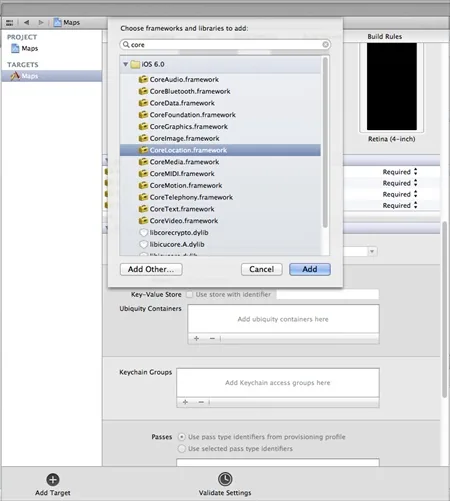
2. Wählen Sie die Projektdatei aus, wählen Sie dann das Target aus und fügen Sie anschließend CoreLocation.framework hinzu, wie unten gezeigt.
3. Fügen Sie zwei Labels in ViewController.xib hinzu, erstellen Sie Labels mit den IBOutlet-Namen latitudeLabel und longitudeLabel.
4. Wählen Sie nun über "File -> New -> File... ->" die Option "Objective C class" aus und klicken Sie auf Next.
5. Legen Sie "sub class of" als NSObject fest und benennen Sie die Klasse LocationHandler.
6. Wählen Sie Create.
7. Aktualisieren Sie LocationHandler.h wie unten gezeigt.
#import <Foundation/Foundation.h>
#import <CoreLocation/CoreLocation.h>

@protocol LocationHandlerDelegate <NSObject>

@required
-(void) didUpdateToLocation:(CLLocation*)newLocation
 fromLocation:(CLLocation*)oldLocation;
@end

@interface LocationHandler : NSObject<CLLocationManagerDelegate>
{
    CLLocationManager *locationManager;
}
@property(nonatomic,strong) id<LocationHandlerDelegate> delegate;

+(id)getSharedInstance;
-(void)startUpdating;
-(void) stopUpdating;

@end
8. Aktualisieren Sie LocationHandler.m wie unten gezeigt.
#import "LocationHandler.h"
static LocationHandler *DefaultManager = nil;

@interface LocationHandler()

-(void)initiate;

@end

@implementation LocationHandler

+(id)getSharedInstance{
    if (!DefaultManager) {
        DefaultManager = [[self allocWithZone:NULL]init];
        [DefaultManager initiate];
    }
    return DefaultManager;
}
-(void)initiate{
    locationManager = [[CLLocationManager alloc]init];
    locationManager.delegate = self;
}

-(void)startUpdating{
    [locationManager startUpdatingLocation];
}

-(void) stopUpdating{
    [locationManager stopUpdatingLocation];
}
-(void)locationManager:(CLLocationManager *)manager didUpdateToLocation:
 (CLLocation *)newLocation fromLocation:(CLLocation *)oldLocation{
    if ([self.delegate respondsToSelector:@selector
    (didUpdateToLocation:fromLocation:)])
    {
        [self.delegate didUpdateToLocation:oldLocation
        fromLocation:newLocation];

    }
}

@end
9. Aktualisieren Sie ViewController.h wie unten gezeigt.
#import <UIKit/UIKit.h>
#import "LocationHandler.h"
@interface ViewController : UIViewController<LocationHandlerDelegate>
{
    IBOutlet UILabel *latitudeLabel;
    IBOutlet UILabel *longitudeLabel;
}
@end
10. Aktualisieren Sie ViewController.m wie unten gezeigt.
#import "ViewController.h"

@interface ViewController ()

@end

@implementation ViewController

- (void)viewDidLoad
{
    [super viewDidLoad];
    [[LocationHandler getSharedInstance]setDelegate:self];
    [[LocationHandler getSharedInstance]startUpdating];
}

- (void)didReceiveMemoryWarning
{
    [super didReceiveMemoryWarning];
    // Dispose of any resources that can be recreated.
}

-(void)didUpdateToLocation:(CLLocation *)newLocation
 fromLocation:(CLLocation *)oldLocation{
    [latitudeLabel setText:[NSString stringWithFormat:
    @"Latitude: %f",newLocation.coordinate.latitude]];
    [longitudeLabel setText:[NSString stringWithFormat:
    @"Longitude: %f",newLocation.coordinate.longitude]];

}

@end
Ausgabe
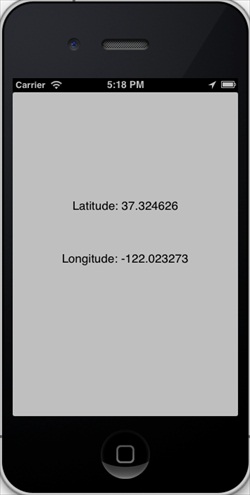
Wenn wir die Anwendung ausführen, erhalten wir die folgende Ausgabe: