Eclipse Java Build Path
Configure Java Build Path
The Java build path is used to find the dependent classes when compiling a Java project, including the following items:
- Source Package
- Project-related JAR packages and class files
- Libraries referenced by the project
We can view and modify the Java build path by using the Java Build Path option in the Java project properties dialog.
The Java project properties dialog can be invoked by right-clicking the specified Java project in the Package Explorer view and selecting the Properties menu item.
Then in the left window select Java Build Path.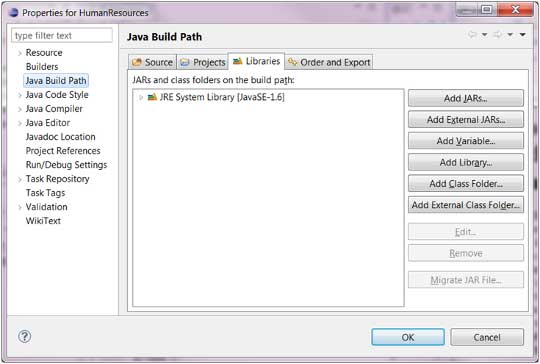
In the Java build path window, we can see the JAR files that have already been referenced.
Referencing JAR files can be done in the Libraries tab. In the Libraries tab, we can click Add JARs to add JAR files that exist in the Eclipse workspace, or click External JARs to import JAR files from other locations.
other extensions