Regular Expressions -Introduction
A regular expression (regex or regexp for short) is a powerful text processing tool. It uses a special string to describe and match a series of strings that conform to a certain syntactic rule.
You can think of it as asuper wildcard. Ordinary wildcards (such as*representing any character) have limited functionality, while regular expressions can define extremely complex and precise text patterns, from simple word matching to complex structured data extraction—almost anything.
For example, you probably use?and*wildcards to find files on your hard drive.?The wildcard matches 0 or 1 character in a filename, while the*wildcard matches zero or more characters. A pattern likedata(\w)?\.datwill find the following files:
Using the*character instead of the?character expands the number of files found.data.*\.datIt matches all of the following files:
Although this search method is useful, it is still limited. By understanding how*wildcards work, the concepts on which regular expressions rely are introduced, but regular expressions are more powerful and more flexible.
Using regular expressions can achieve powerful functionality in a simple way. Here is a simple example:

-
^Matches the beginning of the input string.
-
[0-9]+Matches multiple digits,[0-9]matches a single digit,+matches one or more.
-
abc$Matches the letterabcand ends withabcending,$matches the end of the input string.
When writing a user registration form, if we only allow usernames to containcharacters, digits, underscores, and hyphens -, and set the length of the username, we can use the following regular expression to define it.
^[a-zA-Z0-9_-]{3,15}$

^Matches the beginning of the string.[a-zA-Z0-9_-]Indicates a character set containing lowercase letters, uppercase letters, digits, underscores, and hyphens-。{3,15}Indicates that the preceding character set must appear at least 3 times and at most 15 times, thus limiting the username length to between 3 and 15 characters.$Matches the end of the string.
The above regular expression can matchexample、example1、run-oob、run_oob, but does not matchrubecause it contains letters that are too short—less than 3 characters, so it cannot match. Nor does it matchexample$, because it contains special characters.
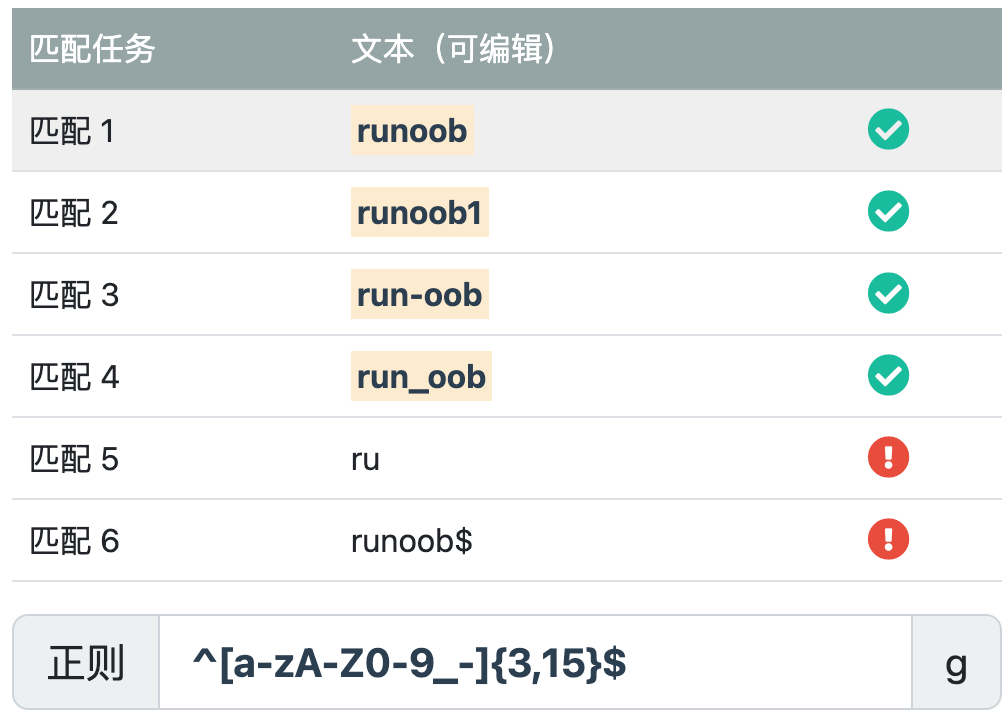
Example
Match strings that start with a digit and end with "abc".:
The text marked below is the expression that obtained the match:
Try it »
Regular Expression Metacharacters and Features
Character Matching
- Ordinary characters: ordinary characters are matched literally. For example, matching the letter "a" will match the character "a" in the text.
- Metacharacters: metacharacters have special meanings. For example,
\dmatches any digit character,\wmatches any alphanumeric character,.matches any character (except newline), etc.
Quantifiers
*: Matches the preceding pattern zero or more times.+: Matches the preceding pattern one or more times.?: Matches the preceding pattern zero or one time.{n}: Matches the preceding pattern exactly n times.{n,}: Matches the preceding pattern at least n times.{n,m}: Matches the preceding pattern at least n times and no more than m times.
Character Classes
[ ]: Matches any one character inside the brackets. For example,[abc]matches the characters "a", "b", or "c".[^ ]: Matches any character except those inside the brackets. For example,[^abc]matches any character except "a", "b", or "c".
Boundary Matching
^: Matches the beginning of the string.$: Matches the end of the string.\b: Matches a word boundary.\B: Matches a non-word boundary.
Grouping and Capturing
( ): Used for grouping and capturing subexpressions.(?: ): Used for grouping but not capturing subexpressions.
Special Characters
\: Escape character, used to match the special character itself..: Matches any character (except newline).|: Used to specify a choice among multiple patterns.
Definition and Uses of Regular Expressions
Technically, a regular expression is a string composed of ordinary characters (such as the letters a to z) and special characters (called metacharacters). This string constitutes asearch pattern, which is used to search, match, replace, or split text.
Main Uses
Regular expressions have three main uses:
- Text search and matching: Quickly determine whether a piece of text contains a substring that conforms to a specific pattern. For example, check whether a string is a valid email address format.
- Text replacement: Replace all parts of the text that match a specific pattern with new content. For example, change all date formats in a document from
YYYY-MM-DDuniformly toMM/DD/YYYY。 - Text extraction and splitting: Precisely extract the parts we care about from a large piece of text, or split the text into an array according to specific delimiters. For example, extract all IP addresses from a log file, or split a CSV string with commas.
Application Scenarios of Regular Expressions
Regular expressions permeate almost every aspect of programming and everyday text processing. Below are some of the most common application scenarios:
1. Data Validation
This is one of the most classic applications of regular expressions, ensuring that user input conforms to the expected format.
- Validating email addresses: Check whether the input looks like
[email protected]。 - Validating phone numbers: Check whether it conforms to the country/region's mobile phone number format (such as China's 11-digit number).
- Validating password strength: Require passwords to contain uppercase and lowercase letters, digits, and special characters.
- Validating date formats: Ensure the date is in valid formats such as
2023-12-25or12/25/2023. - Validating ID card numbers: Match ID card numbers that conform to specific encoding rules.
2. Text Search and Filtering
Quickly locate information in large amounts of text.
- Log analysis: Search server logs for all records at the
ERRORorWARNlevel. - Code search: In an IDE or editor, use regular expressions to search for all function definitions (such as
function xxx(...)) or specific variable names. - Document content lookup: Find all occurrences of phone numbers or URLs in a long document.
3. Text Replacement and Cleaning
Batch modify text content to normalize it.
- Formatting data: Format phone numbers from
12345678901to123-4567-8901。 - Cleaning data: Remove extra whitespace characters from text (such as multiple consecutive spaces or tabs).
- Masking sensitive information: Replace ID card numbers in text with
***, such as110101199001011234->110101********1234。 - Code refactoring: Batch rename variables or function names.
4. Text Extraction and Parsing
Extract structured data from unstructured text.
- Web crawlers: Extract all links from HTML code (
href="...") or image address (src="...")。 - Parse configuration file: read
key = valueconfiguration file in the format of. - Extract specific data: extract all occurrences of amounts from a piece of text (such as
¥100.50or$99.99)。
5. String Splitting
Use complex rules, not just a single character, to split strings.
- Split a sentence using one or more spaces, commas, or semicolons.
- Based on different delimiters (such as
,、;、\t) to parse CSV or TSV data.
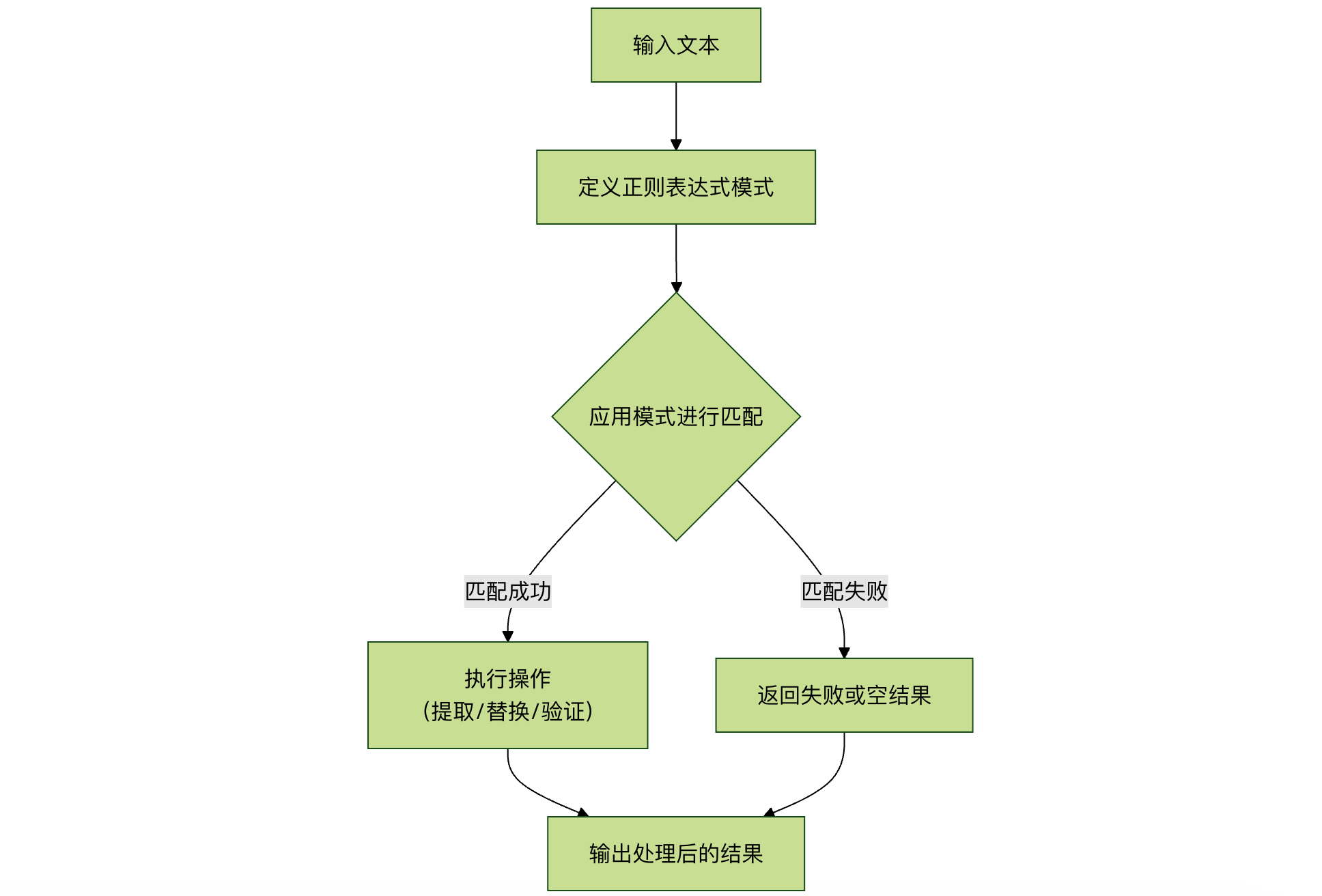
The following flowchart summarizes the core workflow of regular expressions in data processing:
Development History
The ancestors of regular expressions can be traced back to early research on how the human nervous system works. Warren McCulloch and Walter Pitts, two neurophysiologists, developed a mathematical way to describe these neural networks.
In 1951, a mathematician named Stephen Kleene, based on the early work of McCulloch and Pitts, published a paper titled "Representation of Events in Nerve Nets," introducing the concept of regular expressions. Regular expressions are expressions used to describe what he calledthe algebra of regular sets, hence the termregular expressionwas adopted.
Subsequently, it was discovered that this work could be applied to some early research using Ken Thompson's computational search algorithms. Ken Thompson was a principal inventor of Unix. The first practical application of regular expressions was the grep editor in Unix.
The approximate development history is as follows:
1951: Stephen Kleene, one of the founders of computation theory and an American computer scientist, first proposed the concept of regular languages and used formal methods to describe this language. This laid the theoretical foundation for the development of regular expressions.
1960s: Ken Thompson, one of the co-founders of the Unix operating system, developed the first program to actually apply regular expressions, which was part of the grep command in Unix. This marked the practical application of regular expressions.
1970s: Ken Thompson and Rob Pike developed the first regular expression engine, widely used in Unix systems, which played a key role in the popularization of regular expressions.
1986: Philip Hazel developed the PCRE (Perl Compatible Regular Expressions) library, a regular expression library that allows Perl-style regular expressions to be used in different programming languages.
1997: IEEE released the POSIX.2 standard, which includes the standard specification for regular expressions, making the behavior of regular expressions more consistent across different Unix systems.
After the 2000s: Regular expressions have become increasingly popular in computer programming and text processing. Programming languages and tools supporting regular expressions have become richer and more powerful, such as Perl, Python, Java, JavaScript, etc.
Currently: Regular expressions remain an important tool for text processing and data extraction, with wide applications in fields such as data science, text analysis, web crawlers, string search and replacement, and more.
Application Fields
Currently, regular expressions have been widely used in many software systems, including *nix (Linux, Unix, etc.), HP and other operating systems, development environments such as PHP, C#, Java, and many application software; traces of regular expressions can be seen everywhere.
C# Regular Expressions
In our C# tutorial,C# Regular Expressionsthis chapter is dedicated to introducing knowledge about C# regular expressions.
Java Regular Expressions
In our Java tutorial,Java Regular Expressionsthis chapter is dedicated to introducing knowledge about Java regular expressions.
JavaScript Regular Expressions
In our JavaScript tutorial,JavaScript RegExp Objectthis chapter is dedicated to introducing knowledge about JavaScript regular expressions, and we also provide a completeJavaScript RegExp Object Reference。
Python Regular Expressions
In our Python basic tutorial,Python Regular Expressionsthis chapter is dedicated to introducing knowledge about Python regular expressions.
Ruby Regular Expressions
In our Ruby tutorial,Ruby Regular Expressionsthis chapter is dedicated to introducing knowledge about Ruby regular expressions.
| Command or environment | . | [ ] | ^ | $ | \( \) | \{ \} | ? | + | | | ( ) |
| vi | √ | √ | √ | √ | √ | |||||
| Visual C++ | √ | √ | √ | √ | √ | |||||
| awk | √ | √ | √ | √ | awk supports this syntax; just add the --posix or --re-interval parameter on the command line. See interval expression in man awk. | √ | √ | √ | √ | |
| sed | √ | √ | √ | √ | √ | √ | ||||
| delphi | √ | √ | √ | √ | √ | √ | √ | √ | √ | |
| python | √ | √ | √ | √ | √ | √ | √ | √ | √ | √ |
| java | √ | √ | √ | √ | √ | √ | √ | √ | √ | √ |
| javascript | √ | √ | √ | √ | √ | √ | √ | √ | √ | |
| php | √ | √ | √ | √ | √ | |||||
| perl | √ | √ | √ | √ | √ | √ | √ | √ | √ | |
| C# | √ | √ | √ | √ | √ | √ | √ | √ |
The following is a comparison of regular expression support in mainstream programming languages:
| Programming language | Support method | Common classes/modules | Simple example (matching digits) |
|---|---|---|---|
| JavaScript | Native language support | RegExpobject, or using literal/.../ |
/\d+/ornew RegExp("\\d+") |
| Python | Standard libraryreModule |
reModule |
re.compile(r"\d+") |
| Java | Standard libraryjava.util.regexPackage |
PatternandMatcherClass |
Pattern.compile("\\d+") |
| PHP | Built-in PCRE functions | preg_series of functions (such aspreg_match) |
preg_match("/\d+/", $text) |
| C# | System.Text.RegularExpressionsnamespace |
RegexClass |
new Regex(@"\d+") |
| Go | Standard libraryregexpPackage |
regexpPackage |
regexp.MustCompile(\d+) |
| Ruby | Native language support, core class | RegexpClass |
/\d+/ |