Regular Expressions -Metacharacters
Metacharacters in regular expressions are characters with special meanings. They do not represent literal characters, but are used to control the matching pattern.
Basic Metacharacters
.(dot)
-
Matches any single character except newline (
\n) outside any single characterExample:
a.bMatches "aab", "a1b", "a b", etc.
^(caret)
-
Matches the start position of the string
-
Example:
^abcMatches strings starting with "abc"
$(dollar sign)
-
Matches the end position of the string
-
Example:
xyz$Matches strings ending with "xyz"
\(backslash)
-
Escape character, it makes the following character lose its special meaning
-
Example:
\.Matches an actual dot instead of any character
Character Class Metacharacters
[](square brackets)
-
Defines a character set, matches any one character in it
-
Example:
[aeiou]Matches any one vowel letter
[^](negated character class)
-
Matches any character not in the square brackets
-
Example:
[^0-9]Matches any non-digit character
-(hyphen)
-
Represents a range within a character class
-
Example:
[a-z]Matches any lowercase letter
Quantifier Metacharacters
*(asterisk)
-
Matches the preceding subexpression zero or more times
-
Example:
ab*cMatches "ac", "abc", "abbc", etc.
+(plus sign)
-
Matches the preceding subexpression one or more times
-
Example:
ab+cMatches "abc", "abbc" but not "ac"
?(question mark)
-
Matches the preceding subexpression zero or one time
-
Example:
colou?rMatches "color" and "colour"
{n}(curly braces)
-
Match exactly n times
-
Example:
a{3}Matches "aaa"
{n,}
-
Match at least n times
-
Example:
a{2,}Matches "aa", "aaa", etc.
{n,m}
-
Match n to m times
-
Example:
a{2,4}Matches "aa", "aaa", "aaaa"
Grouping and Alternation Metacharacters
()(parentheses)
-
Defines a subexpression or capture group
-
Example:
(ab)+Matches "ab", "abab", etc.
|(vertical bar)
-
Represents an "or" relationship
-
Example:
cat|dogMatches "cat" or "dog"
Special Character Class Metacharacters
\d
-
Matches any digit, equivalent to
[0-9]
\D
-
Matches any non-digit, equivalent to
[^0-9]
\w
-
Matches any word character (letter, digit, underscore), equivalent to
[a-zA-Z0-9_]
\W
-
Matches any non-word character, equivalent to
[^a-zA-Z0-9_]
\s
-
Matches any whitespace character (space, tab, newline, etc.)
\S
-
Matches any non-whitespace character
Boundary Matching Metacharacters
\b
-
Matches a word boundary
-
Example:
\bcat\bMatches "cat" but not "category"
\B
-
Matches a non-word boundary
-
Example:
\Bcat\BMatches "cat" in "scattered" but not the standalone "cat"
Other Metacharacters
\n
-
Matches newline
\t
-
Matches tab
\r
-
Matches carriage return
\f
-
Matches form feed
\v
-
Matches vertical tab
Greedy and Non-Greedy Quantifiers
By default, quantifiers (*, +, ?, {}) are greedy, matching as many characters as possible. Add after the quantifier?to make it non-greedy (lazy) mode:
-
*?: zero or more, but as few as possible -
+?: one or more, but as few as possible -
??: zero or one, but as few as possible -
{n,m}?: n to m times, but as few as possible
Example:<.*?>When matching HTML tags, it does not match across tags
Positive and Negative Lookahead
(?=...)(positive lookahead)
-
Matches a position followed by a specific pattern
-
Example:
Windows(?=95|98)Matches "Windows" followed by 95 or 98
(?!...)(negative lookahead)
-
Matches a position not followed by a specific pattern
-
Example:
Windows(?!95|98)Matches "Windows" not followed by 95 or 98
(?<=...)(positive lookbehind)
-
Matches a position preceded by a specific pattern
-
Example:
(?<=95|98)WindowsMatches "Windows" preceded by 95 or 98
(?<!...)(negative lookbehind)
-
Matches a position not preceded by a specific pattern
-
Example:
(?<!95|98)WindowsMatches "Windows" not preceded by 95 or 98
Examples
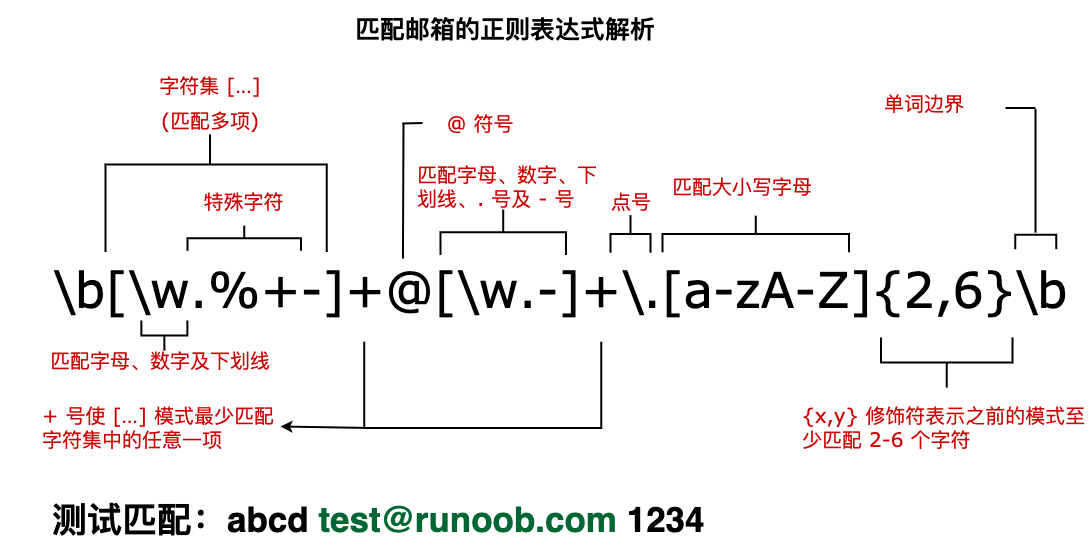
Next, let's analyze a regular expression for matching email addresses, as shown below:
Examples
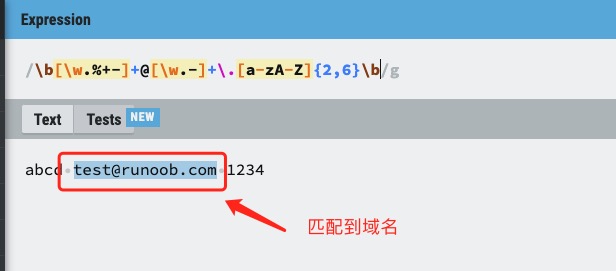
The text marked below is the expression with the obtained matches:
Try it »
The following table contains a complete list of metacharacters and their behavior in the context of regular expressions:
| Character | Description |
|---|---|
| \ | Marks the next character as a special character, a literal character, a backreference, or an octal escape. For example, 'n' matches the character "n". '\n' matches a newline. The sequence '\\' matches "\" and "\(" matches "(". |
| ^ | Matches the start of the input string. If the Multiline property of the RegExp object is set, ^ also matches positions after '\n' or '\r'. |
| $ | Matches the end of the input string. If the Multiline property of the RegExp object is set, $ also matches positions before '\n' or '\r'. |
| * | Matches the preceding subexpression zero or more times. For example, zo* can match "z" as well as "zoo". * is equivalent to {0,}. |
| + | Matches the preceding subexpression one or more times. For example, 'zo+' can match "zo" as well as "zoo", but cannot match "z". + is equivalent to {1,}. |
| ? | Matches the preceding subexpression zero or one time. For example, "do(es)?" can match "do" or "does". ? is equivalent to {0,1}. |
| {n} | n is a non-negative integer. Match exactly n times. For example, 'o{2}' cannot match 'o' in "Bob", but can match the two o's in "food". |
| {n,} | n is a non-negative integer. Match at least n times. For example, 'o{2,}' cannot match 'o' in "Bob", but can match all o's in "foooood". 'o{1,}' is equivalent to 'o+'. 'o{0,}' is equivalent to 'o*'. |
| {n,m} | m and n are both non-negative integers, where n <= m. Matches at least n times and at most m times. For example, "o{1,3}" will match the first three o's in "fooooood". 'o{0,1}' is equivalent to 'o?'. Note that there must be no spaces between the comma and the two numbers. |
| ? | When this character immediately follows any other quantifier (*, +, ?, {n}, {n,}, {n,m}), the matching mode is non-greedy. Non-greedy mode matches as little of the searched string as possible, while the default greedy mode matches as much as possible. For example, for the string "oooo", 'o+?' will match a single "o", while 'o+' will match all 'o's. |
| . | Matches any single character except newline (\n, \r). To match any character including '\n', use a pattern like"(.|\n)" pattern. |
| (pattern) | Match pattern and obtain this match. The obtained match can be retrieved from the resulting Matches collection, using the SubMatches collection in VBScript, and the $0…$9 properties in JScript. To match parenthesis characters, use '\(' or '\)'. |
| (?:pattern) | Matches pattern but does not capture the match result, that is, this is a non-capturing match, not stored for later use. This is useful when using the "or" character (|) to combine the parts of a pattern. For example, 'industr(?:y|ies)' is a more concise expression than 'industry|industries'. |
| (?=pattern) | Positive lookahead assert. Matches the search string at the beginning of any string that matches pattern. This is a non-capturing match, that is, the match does not need to be captured for later use. For example, "Windows(?=95|98|NT|2000)" matches "Windows" in "Windows2000", but cannot match "Windows" in "Windows3.1". Lookahead does not consume characters, that is, after a match occurs, the search for the next match starts immediately after the last match, not from after the characters included in the lookahead. |
| (?!pattern) | Negative lookahead assert. Matches the search string at the beginning of any string that does not match pattern. This is a non-capturing match, that is, the match does not need to be captured for later use. For example, "Windows(?!95|98|NT|2000)" matches "Windows" in "Windows3.1", but cannot match "Windows" in "Windows2000". Lookahead does not consume characters, that is, after a match occurs, the search for the next match starts immediately after the last match, not from after the characters included in the lookahead. |
| (?<=pattern) | Positive lookbehind assert, similar to positive lookahead assert, except the direction is opposite. For example, "(?<=95|98|NT|2000)Windows"can match"2000Windows"in"Windows", but cannot match"3.1Windows"in"Windows"。 |
| (?<!pattern) | Negative lookbehind assert, similar to negative lookahead assert, except the direction is opposite. For example(?<!95|98|NT|2000)Windows"can match"3.1Windows"in"Windows", but cannot match"2000Windows"in"Windows"。 |
| x|y | Matches x or y. For example, 'z|food' can match "z" or "food". '(z|f)ood' matches "zood" or "food". |
| [xyz] | Character set. Matches any one of the included characters. For example, '[abc]' can match 'a' in "plain". |
| [^xyz] | Negated character set. Matches any character not included. For example, '[^abc]' can match 'p', 'l', 'i', 'n' in "plain". |
| [a-z] | Character range. Matches any character within the specified range. For example, '[a-z]' can match any lowercase letter character in the range 'a' to 'z'. |
| [^a-z] | Negated character range. Matches any character not within the specified range. For example, '[^a-z]' matches any character not in the range 'a' to 'z'. |
| \b | Matches a word boundary, that is, the position between a word and a space. For example, 'er\b' can match 'er' in "never", but cannot match 'er' in "verb". |
| \B | Matches a non-word boundary. 'er\B' can match 'er' in "verb", but cannot match 'er' in "never". |
| \cx | Matches a control character indicated by x. For example, \cM matches a Control-M or carriage return. The value of x must be one of A-Z or a-z. Otherwise, treat c as a literal 'c' character. |
| \d | Matches a digit character. Equivalent to [0-9]. |
| \D | Matches a non-digit character. Equivalent to [^0-9]. |
| \f | Matches a form-feed character. Equivalent to \x0c and \cL. |
| \n | Matches a newline character. Equivalent to \x0a and \cJ. |
| \r | Matches a carriage return character. Equivalent to \x0d and \cM. |
| \s | Matches any whitespace character, including space, tab, form feed, etc. Equivalent to [ \f\n\r\t\v]. |
| \S | Matches any non-whitespace character. Equivalent to [^ \f\n\r\t\v]. |
| \t | Matches a tab character. Equivalent to \x09 and \cI. |
| \v | Matches a vertical tab character. Equivalent to \x0b and \cK. |
| \w | Matches letters, digits, underscores. Equivalent to '[A-Za-z0-9_]'. |
| \W | Matches non-letters, digits, underscores. Equivalent to '[^A-Za-z0-9_]'. |
| \xn | Matches n, where n is a hexadecimal escape value. The hexadecimal escape value must be exactly two digits long. For example, '\x41' matches "A". '\x041' is equivalent to '\x04' & "1". ASCII encoding can be used in regular expressions. |
| \num | Matches num, where num is a positive integer. A back-reference to a captured match. For example, '(.)\1' matches two consecutive identical characters. |
| \n | Identifies an octal escape value or a back-reference. If there are at least n captured subexpressions before \n, then n is a back-reference. Otherwise, if n is an octal digit (0-7), then n is an octal escape value. |
| \nm | Identifies an octal escape value or a back-reference. If there are at least nm captured subexpressions before \nm, then nm is a back-reference. If there are at least n captures before \nm, then n is a back-reference followed by literal m. If none of the preceding conditions are met, and n and m are both octal digits (0-7), then \nm matches the octal escape value nm. |
| \nml | If n is an octal digit (0-3), and m and l are both octal digits (0-7), then match the octal escape value nml. |
| \un | Matches n, where n is a Unicode character represented by four hexadecimal digits. For example, \u00A9 matches the copyright symbol (?). |