Pi Agent Non-Interactive Mode
Besides interactive conversation, Pi Agent also provides three non-interactive modes, suitable for script integration, automated workflows, and inter-program communication.
Print Mode (-p)
Print Mode is the most commonly used non-interactive mode; it executes a one-shot Q&A, outputs the result, and exits.
Basic Usage
The simplest form is to put a question directly after -p, and the AI exits after answering.
$ pi -p "帮我总结一下这个项目的结构"
这是一个 TypeScript + Vite 项目,源码集中在 src/ 目录下。
入口文件是 src/main.ts,工具函数位于 src/utils/,共 18 个模块。
Use @ to reference a file so the AI reads the content of the specified file:
$ pi -p @README.md "这段文档的主要内容是什么"
这份 README 介绍了安装步骤、环境变量配置和三条常用命令。
Use a pipe to feed command output directly to the AI, suitable for processing text such as logs and documents:
$ cat README.md | pi -p "用三句话总结这段文字"
1. 项目要求 Node 20 以上版本。
2. 安装依赖后先把 .env.example 复制为 .env。
3. 日常调试用 npm run dev,发布构建用 npm run build。
@ can also reference images, allowing the AI to analyze image content:
$ pi -p @screenshot.png "图片中显示的错误信息是什么"
截图中的报错是 Module not found: Can't resolve './utils/format',
说明 src/index.ts 里的相对路径拼写有误。
Use --name to name the session; you can later continue this thread in interactive mode:
$ pi --name "快速审查" -p "审查 src/ 目录下的代码质量"
代码整体质量良好,有 3 处可以改进:
1. src/api/user.ts 缺少对分页参数的校验。
2. src/utils/format.ts 的日期格式化未处理时区。
3. src/db/query.ts 的裸抛异常建议补充错误码。
Specifying a Model
Use --provider plus --model to specify a model, or combine the two into provider/model form.
$ pi --provider openai --model gpt-4o -p "帮我重构这段代码的逻辑"
重构建议:把 src/service/order.ts 中 120 行的 createOrder 拆成
校验参数、计算金额、落库三个函数,并为每个函数补充单元测试。
The combined form below is fully equivalent to the previous one, just shorter to write:
$ pi --model openai/gpt-4o -p "帮我重构这段代码的逻辑"
Adding a colon and a reasoning level after the model name controls the thinking depth of this call:
$ pi --model sonnet:high -p "这个复杂的算法有什么潜在问题"
主要风险有三点:递归深度没有上限会导致栈溢出;
缓存键未包含用户身份,存在越权读取的可能;
批量写入缺少事务包裹,失败时会出现半提交状态。
In --model,:thinkingthe suffix (such as sonnet:high) and the--thinking--reasoning-effort parameter can both set the reasoning level.
It is recommended to use only one of them to avoid hard-to-debug inconsistencies between the two forms.
Use --models to limit the available model scope, separating multiple models with commas:
$ pi --models "claude-*,gpt-4o" -p "审查代码"
审查完成:共发现 2 个阻塞问题和 5 个改进建议,
详细列表已按严重程度排序。
Tool Control
Controlling which tools the AI can use via command-line parameters is the key to running non-interactive mode safely in scripts.
Pi Agent has 7 built-in tools on non-Windows platforms: read, write, edit, bash, grep, find, ls.
On Windows, bash is replaced by powershell.
Use --tools as a whitelist to keep only the specified tools; for example, a read-only mode that does not change any files:
$ pi --tools read,grep,find,ls -p "审查代码不修改"
审查结果:共 4 个问题,其中 1 个涉及并发写入,
完整报告已输出到终端,本次未修改任何文件。
Use --exclude-tools to exclude specified tools:
$ pi --exclude-tools bash -p "分析代码但不执行命令"
分析结论:该模块的性能瓶颈在循环内的重复文件读取,
建议把目录列表提到循环外,预计可减少 80% 的 I/O。
Use --no-builtin-tools to disable all built-in tools; the AI can only answer based on the conversation content, while extensions and custom tools remain available:
$ pi --no-builtin-tools -p "纯问答"
Quicksort 的平均时间复杂度是 O(n log n),
最坏情况是 O(n^2),出现在已排序数组上选取首元素为主元时。
When you need to disable extensions and custom tools as well, switch to --no-tools.
JSON Mode (--mode json)
JSON mode outputs all events in JSON Lines (JSONL) format, suitable for program parsing and processing.
$ pi --mode json "总结项目结构"
{"type":"session","version":3,"id":"019f8c2e-7a41-7b3d-9e5f-2c6a1d84b0e7","timestamp":"2026-08-31T02-40-11-000Z","cwd":"/Users/example/projects/example-demo"}
{"type":"agent_start"}
{"type":"turn_start"}
{"type":"message_start","message":{...}}
{"type":"message_update","usage":{...},"assistantMessageEvent":{...}}
{"type":"message_end","message":{...}}
{"type":"turn_end","message":{...},"toolResults":[]}
{"type":"agent_end","messages":[...]}
The first line is a session metadata header that records the format version, session ID, timestamp, and working directory.
Each line after that is an independent JSON event, containing the event type and corresponding data.
This mode is suitable for the following scenarios:
| Scenario | Description |
|---|---|
| Data processing pipeline | Feed the event stream into post-processing scripts and parse/process it line by line |
| Behavior monitoring and analysis | Record and analyze every tool call and decision process of the AI |
| Custom toolchain | Build your own automated workflow on top of the event stream |
RPC Mode (--mode rpc)
RPC mode implements inter-process communication through the JSONL protocol over stdin/stdout.
It allows another program to send commands via standard input and read responses from standard output.
RPC mode supports an extended UI protocol, enabling remote clients to present interactive elements such as confirm dialogs and selection lists.
This mode is suitable for the following scenarios:
| Scenario | Description |
|---|---|
| Editor plugins | Integrate Pi Agent into editor extensions such as VS Code |
| Custom frontend | Build your own Pi Agent interface based on the RPC protocol |
| Background services | Embed Pi Agent as a subprocess in a larger system |
RPC mode and JSON mode are advanced features aimed at developers.
As a beginner, you most likely only need interactive mode and Print mode.
When you need to integrate Pi Agent into your toolchain, you can come back and study these two modes in depth.
Mode Comparison
The differences among the three non-interactive modes are mainly reflected in interactivity and output format; just choose according to the table below.
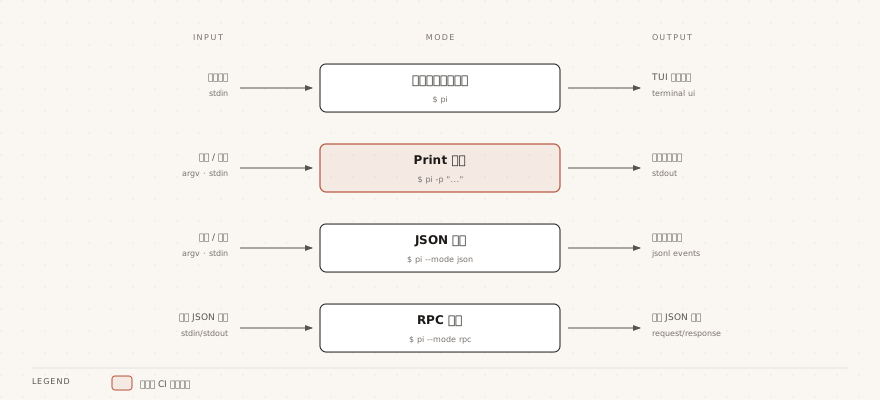
| Mode | Command | Interactivity | Output Format | Applicable Scenarios |
|---|---|---|---|---|
| Interactive Mode | pi (default) | Real-time conversation | Terminal TUI rendering | Daily development, interactive programming |
| Print Mode | pi -p | One-shot answer | Plain text | Script integration, quick queries |
| JSON Mode | pi --mode json | Event stream (non-interactive) | JSONL event stream | Program parsing, pipeline processing |
| RPC Mode | pi --mode rpc | Continuous communication | JSONL bidirectional protocol | Editor integration, process communication |
CLI Parameter Quick Reference
The table below lists common parameters of the pi command grouped by purpose, and they can be used together with the commands in interactive mode.
| Category | Parameter | Description |
|---|---|---|
| Model Options | --provider name | Specify the AI provider |
| Model Options | --model pattern | Specify the model ID; supports provider/id and :thinking formats |
| Model Options | --api-key key | Pass the API Key directly (highest priority) |
| Model Options | --thinking level | Reasoning level: off/minimal/low/medium/high/xhigh/max |
| Model Options | --models patterns | Comma-separated list of models, limiting the Ctrl+P cycling range |
| Session Options | -c, --continue | Continue the most recent session |
| Session Options | -r, --resume | Browse and select historical sessions |
| Session Options | --session path|id | Use the specified session file or UUID |
| Session Options | --fork path|id | Fork a new session from the specified session |
| Session Options | --name, -n name | Set the session display name |
| Session Options | --no-session | Do not record the session |
| Session Options | --export <input> [output] | Export the session as HTML (output path can be omitted) |
| Tool Options | --tools, -t list | Whitelist specific tools |
| Tool Options | --exclude-tools, -xt list | Disable specific tools |
| Tool Options | --no-builtin-tools, -nbt | Disable all built-in tools |
| Tool Options | --no-tools, -nt | Disable all tools (pure conversation mode) |
| Resource Options | -e, --extension source | Load extensions (repeatable) |
| Resource Options | --skill path | Load Skills (repeatable) |
| Resource Options | --theme path | Load themes (repeatable) |
| Other Options | -a, --approve | Trust project-local files for this run |
| Other Options | --no-context-files, -nc | Disable automatic loading of AGENTS.md/CLAUDE.md |