Pi Agent Event System
The event system is the core mechanism for extensions.
By listening to lifecycle events, you can insert custom logic at various stages of the AI's work.
Lifecycle Overview
Below are all events triggered during Pi Agent's lifecycle from startup to exit:
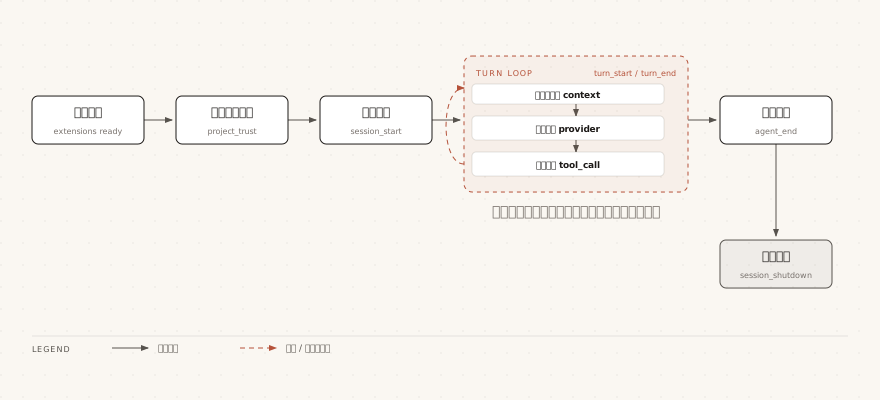
Within each turn, the context, provider, and tool events fire in sequence, looping through multiple rounds when tool calls are made.
The dashed parts indicate that the stage can be triggered multiple times by multiple events.
For the trigger timing of other events such as input, before_agent_start, resources_discover, and agent_settled, see the full event quick reference below.
Core Events Explained
This section picks the 5 most frequently used events and explains their trigger timing and return value conventions.
input — Input Interception
Triggered before user input is processed; you can transform, intercept, or directly handle the input:
Example
// The following snippet is inside the extension factory function body
pi.on("input", async (event, ctx) => {
// event.text - raw input text
// event.images - attached images
// event.source - "interactive" | "rpc" | "extension"
// Transform input: prepend an instruction to the input
if (event.text.startsWith("?quick ")) {
return {
action: "transform",
text:`Brief reply: ${event.text.slice(7)}`
};
}
// Handle directly: respond without going through the LLM
if (event.text === "ping") {
ctx.ui.notify("pong", "info");
return { action: "handled" };
}
// Skip messages injected by the extension
if (event.source === "extension") {
return { action: "continue" };
}
return { action: "continue" }; // Default: process normally
});
| action value | Effect |
|---|---|
| "continue" | Does not change the input; continues the normal processing flow |
| "transform" | Continues processing after modifying the input; transformations from multiple handlers chain together |
| "handled" | Takes over completely, skipping the LLM call (the first handler that returns this value takes effect) |
The actual effects of two typical implementations are as follows.
Input?quick hello worldwhen , the text actually sent to the LLM has been rewritten:
简短回复:hello world
Inputpingwhen , the LLM is not called; only a notification pops up in the terminal:
pong
The input event fires before Skill and template expansionbefore, so what you see is the raw input.
/skill:foo and /template are not yet expanded at this point.
tool_call — Tool Call Interception
Triggered before the tool executes; you can modify arguments or block execution:
Example
// import statements go at the top of the module; the pi.on snippet below is inside the extension factory function body
// isToolCallEventType is a type guard and must be imported from the official package
import { isToolCallEventType } from "@earendil-works/pi-coding-agent";
pi.on("tool_call", async (event, ctx) => {
// Block dangerous bash commands
if (isToolCallEventType("bash", event)) {
// event.input is { command: string; timeout?: number }
const dangerous = ["rm -rf /", "mkfs.", "dd if=", "> /dev/sda"];
// First check whether it is dangerous, then decide whether to allow it
if (dangerous.some(cmd =>
event.input.command.includes(cmd))) {
return { block: true, reason: "Dangerous command has been blocked" };
}
// Append environment variable loading only after the check passes
event.input.command = `source ~/.profile\n${event.input.command}`;
}
// Log all file read operations
if (isToolCallEventType("read", event)) {
// event.input is { path: string; offset?: number; limit?: number }
ctx.ui.notify(`Reading file: ${event.input.path}`, "info");
}
});
If the AI attempts to runrm -rf /, the tool will not run, and the terminal will show the blocking reason:
Dangerous command has been blocked.
event.inputis mutable — modifying it directly affects tool execution.
tool_result — Modifying Tool Results
Triggered after the tool finishes executing; you can modify the result returned to the LLM:
Example
// The following snippet is inside the extension factory function body
pi.on("tool_result", async (event, ctx) => {
// event.toolName - tool name
// event.content - content returned to the LLM
// event.details - detail data
// event.isError - whether it is an error
// Example: add line numbers to read results
if (event.toolName === "read" && !event.isError) {
const lines = event.content
.filter(c => c.type === "text")
.map(c => c.text)
.join("\n")
.split("\n")
.map((line, i) => `${i + 1}: ${line}`)
.join("\n");
return {
content: [{ type: "text", text: lines }],
};
}
});
The original two-line file content becomes a line-numbered form when handed to the LLM:
1: import { readFile } from "node:fs/promises";
2: export async function load() {
context — Modifying LLM Context
Triggered before each LLM call; you can filter or modify messages:
Example
// The following snippet is inside the extension factory function body
pi.on("context", async (event, ctx) => {
// event.messages - deep copy of the current context messages; safe to modify
// Filter out messages of a specific type
const filtered = event.messages.filter(m => {
// Remove messages with the custom type "debug"
if (m.type === "custom" && m.customType === "debug") {
return false;
}
return true;
});
return { messages: filtered };
});
before_agent_start — Injecting Messages
Triggered before the AI starts processing user input; you can inject extra messages or modify the system prompt:
Example
// The following snippet is inside the extension factory function body
pi.on("before_agent_start", async (event, ctx) => {
// event.prompt - the user's prompt text
// event.systemPrompt - the currently configured system prompt
return {
// Inject a persistent message (stored in the session and sent to the LLM)
message: {
customType: "my-context",
content:`Current time is ${new Date().toISOString()}`,
display: true,
},
// Append to the system prompt
systemPrompt: event.systemPrompt
+ "\n\nPlease use Chinese in all replies.",
};
});
Full Event Quick Reference
Several events also appeared in the ASCII diagram in the previous section; here they are listed together in trigger order for easy reference.
| Event | Trigger Timing | Modifiable | Blockable |
|---|---|---|---|
| project_trust | Before loading project resources; confirm whether to trust the current project | no | Yes (project extensions are not loaded if rejected) |
| session_start | When the session starts or resumes | no | no |
| resources_discover | Triggered after session_start (on startup/reload) | Yes (can only append Skills, prompt templates, and theme paths; cannot add or remove extensions) | no |
| input | Before user input is processed | Yes (can transform input) | Yes (handled takes over) |
| before_agent_start | Before the AI starts processing user input | Yes (can inject messages, modify system prompt) | no |
| agent_start | When the agent loop starts | no | no |
| message_start / message_update | During message generation (message_update is the assistant's streaming delta) | no | no |
| message_end | When user, assistant, and toolResult messages are finalized | Yes (can return { message } to replace the final message; role must match) | no |
| turn_start | At the start of each turn | no | no |
| context | Before each LLM call | Yes (can filter messages) | no |
| before_provider_headers | Before sending HTTP request headers | Yes (can add or modify request headers) | no |
| before_provider_request | Before the request body is sent to the model | Yes (returning a non-undefined value replaces the entire request payload, rather than aborting the request) | no |
| after_provider_response | After receiving the HTTP response, before the streaming body is consumed | No (can only read status/headers for observation) | no |
| tool_execution_start | When the tool starts executing | no | no |
| tool_call | Before the tool executes | Yes (event.input is mutable) | Yes (block: true) |
| tool_execution_update | When progress is generated during tool execution | no | no |
| tool_result | After tool execution completes | Yes (return content can be modified) | no |
| tool_execution_end | When tool execution ends | no | no |
| turn_end | At the end of each turn | no | no |
| agent_end | When the agent loop ends | no | no |
| agent_settled | After a round of interaction fully settles | no | no |
| session_before_switch | Before /new or /resume is executed | no | Yes (return { cancel: true }) |
| session_before_fork | Before /fork or /clone is executed | no | Yes (return { cancel: true }) |
| session_before_compact | Before compression executes (manual /compact, threshold, context overflow) | Yes (customizable compression summary) | Yes (return { cancel: true }) |
| session_shutdown | Triggered before session destruction; quit, /new, /resume, /fork, /reload all trigger it (reason is quit/reload/new/resume/fork) | no | no |
Event Handling Key Points
When writing event handlers, the following points determine whether the code is robust.
| Method | Purpose |
|---|---|
| Multiple extensions listen to the same event | Executed in sequence according to extension load order; the previous return value affects subsequent handlers |
| Return{ block: true, reason: "..." } | Block the operation; the reason will be shown to the user and AI |
| Return{ cancel: true } | Cancel operations such as session switching |
| Usectx.signal | Respond to cancel signals in asynchronous operations; abort when the user presses Escape |
| Usectx.uiSeries of methods | Interact with the user, such as notify, confirm, select, etc. |
| usectx.hasUIGuard dialog calls | In Print/JSON/RPC modes, dialog-type methods are unavailable or no-ops; check before calling |
| usectx.mode === "tui"Guard TUI-specific APIs | custom(), component factories, terminal input, etc. are only valid in interactive mode |
Other extensionsDo not start background resources (processes, sockets, timers, etc.) in the extension factory function.
Defer resource startup to thesession_startevent, and clean up insession_shutdown.