React Introduction
React is a JavaScript library developed by Facebook (now Meta) and open-sourced in 2013, specifically for building user interfaces, especially single-page applications (SPA).
React allows developers to build reusable UI components in a declarative way.
The Positioning of React
- Not a framework, but a library: React focuses on the view layer (the V in MVC), unlike Angular which provides a complete framework solution
- Component-based thinking: Breaking the UI into independent, reusable components
- JavaScript-centric: Everything is JavaScript, including structure, style, and logic
Core Features of React
1. Declarative Programming
Traditional imperative programming: Telling the computer how to do it
// 原生 JavaScript(命令式)
const button = document.getElementById('myButton');
button.addEventListener('click', function() {
  const counter = document.getElementById('counter');
  const currentValue = parseInt(counter.textContent);
  counter.textContent = currentValue + 1;
});
React declarative programming: Telling the computer what result you want
// React(声明式)
function Counter() {
  const [count, setCount] = useState(0);
  return <button onClick={() => setCount(count + 1)}>{count}</button>;
}
Advantages:
- Code is more concise and intuitive
- Easier to understand and maintain
- Reduces errors from manually manipulating the DOM
- State and UI stay in sync
2. Component-Based
The core of React is component-based thinking, breaking the UI into independent, reusable, and composable components, just like building blocks. Each component only cares about its own state and props, making the logic clear and easy to maintain.
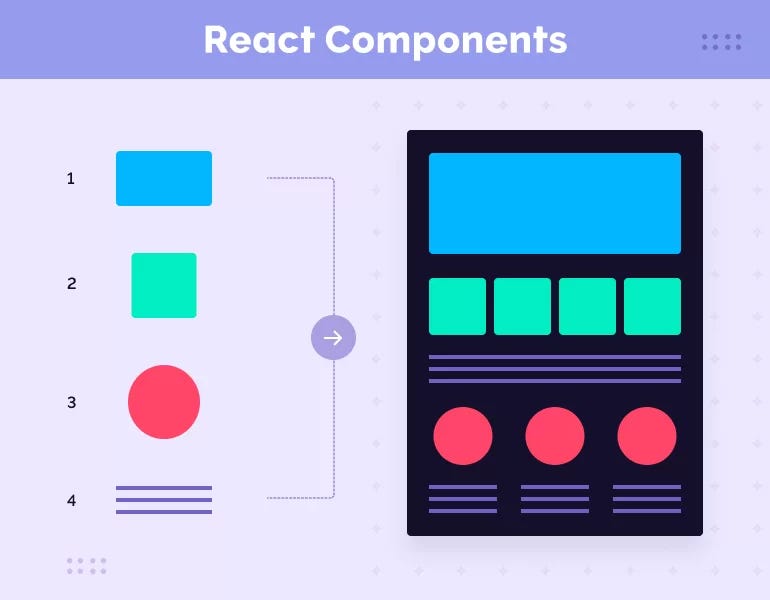
React applications are made up of independent components, each of which:
- Encapsulates its own structure, style, and logic
- Can receive input (props)
- Can maintain internal state
- Can be reused and composed
Example
function Welcome({ name }) {
return <h1>Hello, {name}!</h1>;
}
// Reuse and composition of components
function App() {
return (
<div>
<Welcome name="Alice" />
<Welcome name="Bob" />
<Welcome name="Charlie" />
</div>
);
}
Advantages of component-based architecture:
- Reusability: The same component can be used in multiple places
- Maintainability: Modifying a component does not affect other parts
- Testability: Independent components are easy to unit test
- Collaboration: Team members can develop different components in parallel
3. Virtual DOM
What is the Virtual DOM?
The Virtual DOM is a JavaScript object representation of the real DOM, a lightweight in-memory data structure.
How it works:
1. 状态改变
   ↓
2. 生成新的虚拟 DOM 树
   ↓
3. 与旧虚拟 DOM 树进行对比(Diffing)
   ↓
4. 计算出最小差异(Reconciliation)
   ↓
5. 只更新真实 DOM 中变化的部分
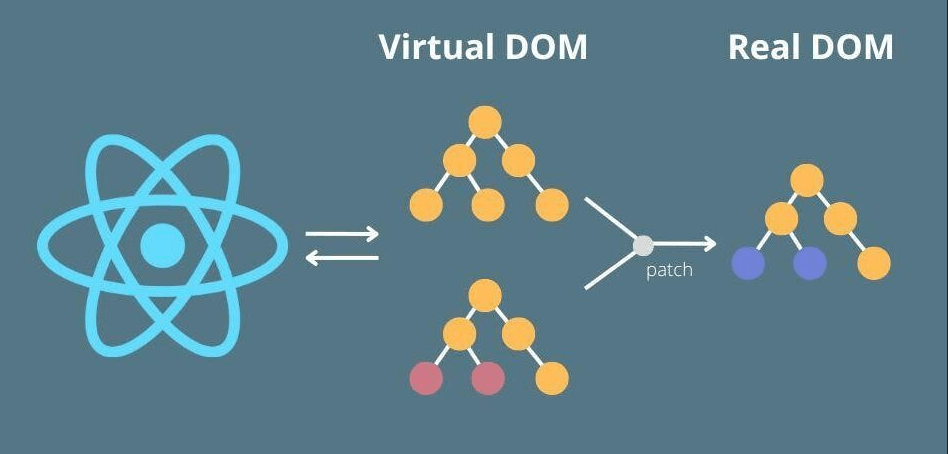
Diagram explanation:
- The Virtual DOM is a lightweight JavaScript object representation of the browser DOM.
- When the state changes, the framework (such as React) first computes and compares in the Virtual DOM (diff algorithm).
- Then, through the patch process, only the minimal necessary updates are applied to the Real DOM.
Why do we need the Virtual DOM?
Problems with real DOM operations:
- DOM operations are very slow (compared to JavaScript operations)
- Frequent DOM operations cause page reflow and repaint
- Direct DOM manipulation is error-prone
Advantages of the Virtual DOM:
- Performance optimization: Batch updates, reducing the number of real DOM operations
- Cross-platform: The Virtual DOM can render to different platforms (Web, mobile, desktop)
- Declarative: Developers only need to care about state, not manually manipulate the DOM
Example comparison:
// 假设要更新 1000 个列表项
const items = Array(1000).fill(0).map((_, i) => i);

// 传统方式:每次都操作真实 DOM(慢)
items.forEach(item => {
  const li = document.createElement('li');
  li.textContent = item;
  ul.appendChild(li); // 1000 次 DOM 操作
});

// React 方式:通过虚拟 DOM 批量更新
function ItemList() {
  return (
    <ul>
      {items.map(item => <li key={item}>{item}</li>)}
    </ul>
  );
}
// React 会智能地批量更新 DOM
4. Unidirectional Data Flow
React data flows unidirectionally downward, Parent → Child, and Child cannot go back to Parent:
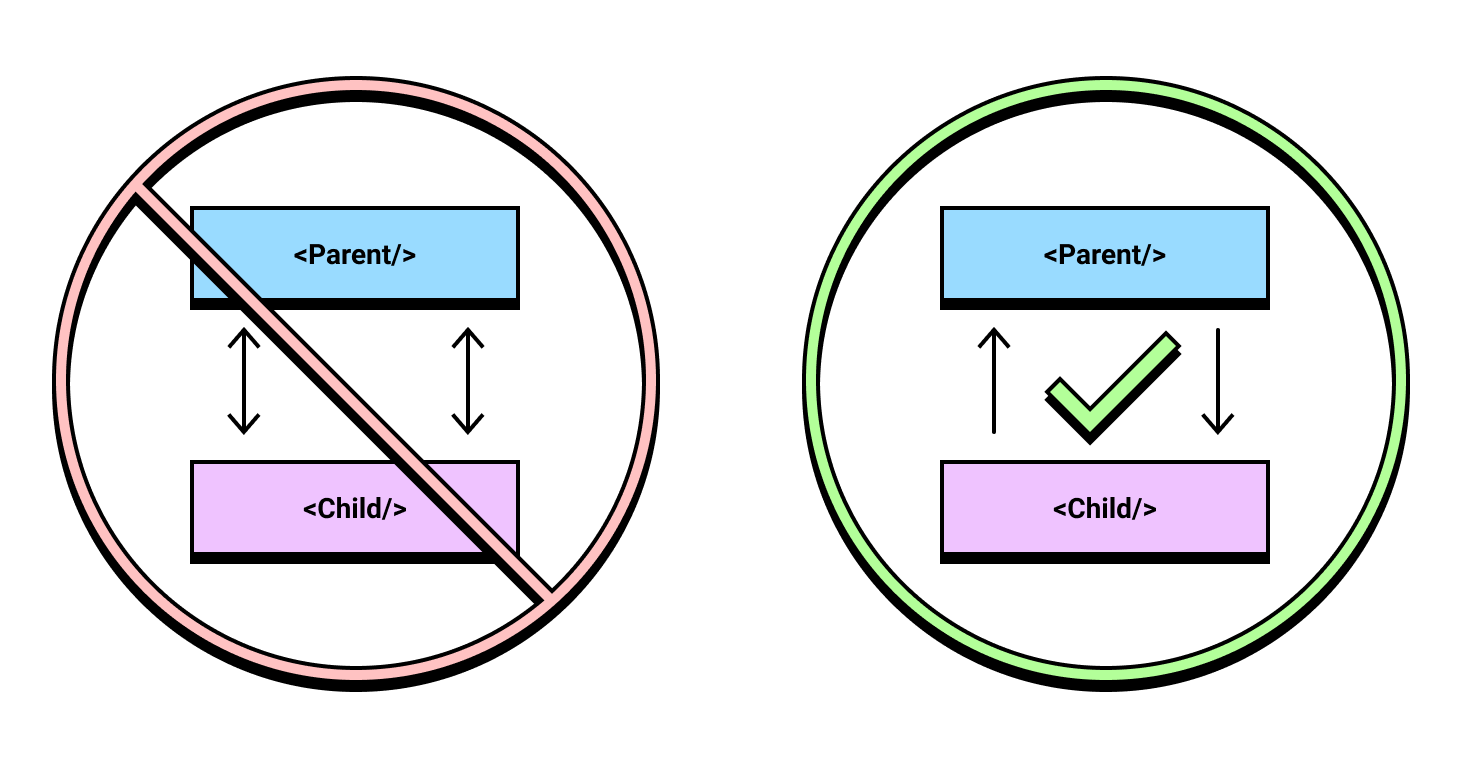
React uses a top-down data flow approach:
父组件
  ↓ (props)
子组件
  ↓ (props)
孙组件
Characteristics:
- Data flows from parent components to child components
- Child components communicate with parent components through callback functions
- Data flow is clear, making it easy to track and debug
Example
const [message, setMessage] = useState('Hello');
return (
<Child
message={message} // Data passed downward
onUpdate={setMessage} // Communicating upward via callbacks
/>
);
}
function Child({ message, onUpdate }) {
return (
<div>
<p>{message}</p>
<button onClick={() => onUpdate('Updated!')}>
Update
</button>
</div>
);
}
Main Advantages of React
1. Relatively Gentle Learning Curve
- Fewer core APIs
- Primarily uses JavaScript knowledge
- Clear concepts, well-documented
2. Powerful Ecosystem
- Routing:React Router
- State management:Redux, Zustand, Jotai
- UI libraries:Material-UI, Ant Design, Chakra UI
- Toolchain:Create React App, Vite, Next.js
3. Broad Community Support
- One of the most popular front-end libraries on GitHub
- A large number of third-party components and tools
- Active community and abundant learning resources
4. Excellent Performance
- Virtual DOM optimization
- On-demand rendering
- Code splitting and lazy loading support
5. Cross-Platform Capabilities
- React Native: Develop mobile applications
- React Native for Windows: Desktop applications
- React 360: VR applications
6. Enterprise-Level Application Support
Used by many well-known companies:
- Facebook/Meta
- Netflix
- Airbnb
- Uber
- Tencent, Alibaba, etc.
Suitable Use Cases for React
Scenarios suitable for React:
- Single-page applications (SPA)
- Dynamic interfaces that require frequent updates
- Complex interactive UIs
- Large projects that require component reuse
- Applications that require cross-platform development
Less suitable scenarios:
- Simple static websites (may be over-engineered)
- Websites with extremely high SEO requirements (need to be combined with SSR solutions such as Next.js)
- Teams unfamiliar with JavaScript
Comparison of React with Other Frameworks
| Feature | React | Vue | Angular |
|---|---|---|---|
| Type | library | Progressive framework | Complete framework |
| Learning curve | Medium | Relatively gentle | Relatively steep |
| Flexibility | High | Medium | Low (many conventions) |
| Ecosystem | Very rich | Rich | Full integration |
| Enterprise support | Meta | Independent | |
| TypeScript | Well supported | Well supported | Native support |
History of React Development
- 2013: React open-sourced
- 2015: React Native released
- 2016: React 16 (Fiber architecture)
- 2019: React Hooks officially released
- 2020: Concurrent Mode experimental version
- 2022: React 18 (concurrent rendering)
- 2024-2025: New features such as React Compiler, Server Components