React Components
React components are the basic building blocks of React applications. A component can be understood as a reusable, independent UI unit. Each component encapsulates its own structure, styles, logic, and state.
React components are the cornerstone of building applications. A component can be as small as a button or as large as an entire page.
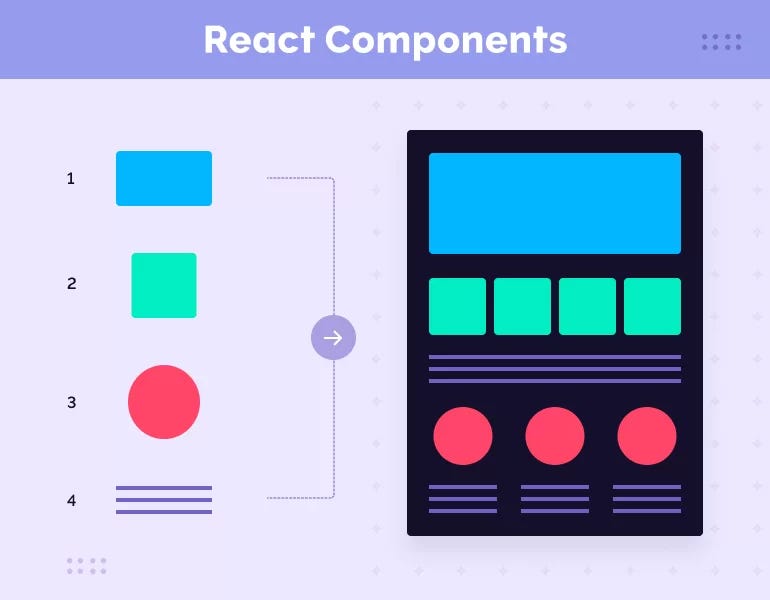
Components can be divided into:Function componentsandClass components。
Technically, a React component is a JavaScript function or class that returns a React element (usually JSX).
// 最简单的组件
function Hello() {
  return <h1>Hello, World!</h1>;
}
Break complex UI into a component tree:
App
├── Header
│   ├── Logo
│   └── Navigation
│       ├── NavItem
│       └── NavItem
├── Main
│   ├── Sidebar
│   └── Content
│       ├── Article
│       └── Article
└── Footer
Function Components
Function components are a concise way to define components.
A function component is a JavaScript function that accepts props and returns a React element.
Basic syntax:
// 方式 1:函数声明
function Welcome(props) {
  return <h1>Hello, {props.name}</h1>;
}

// 方式 2:箭头函数
const Welcome = (props) => {
  return <h1>Hello, {props.name}</h1>;
};

// 方式 3:简化写法(单行返回)
const Welcome = (props) => <h1>Hello, {props.name}</h1>;
Create a simple function component:
src/Welcome.js file:
// Define a function component
function Welcome(props) {
return <h1>Hello, {props.name}!</h1>;
}
export default Welcome;
Render the component in src/index.js:
src/index.js file:
import ReactDOM from 'react-dom';
import './index.css';
import Welcome from './Welcome';
const root = ReactDOM.createRoot(document.getElementById("root"));
// Render the Welcome component and pass the name prop
root.render(<Welcome name="World" />);
This example shows a simple component that accepts a name prop and displays "Hello, World!" on the page.
Class Components
Class components are defined using ES6 class syntax, typically used when you need to manage state or use lifecycle methods.
Basic syntax:
import React, { Component } from 'react';
class Welcome extends Component {
  render() {
    return <h1>Hello, {this.props.name}</h1>;
  }
}
Create a class component:
Example
class Welcome extends Component {
render() {
return <h1>Hello, {this.props.name}!</h1>;
}
}
export default Welcome;
Render the component in src/index.js:
Example
import ReactDOM from 'react-dom';
import './index.css';
import Welcome from './Welcome';
const root = ReactDOM.createRoot(document.getElementById("root"));
// Render the Welcome component and pass the name prop
root.render(<Welcome name="World" />);
Test Example
Next, we will create a component that outputs "Hello World!", named HelloMessage:
React Example
Try it »
Example Analysis:
1. We can define a component using a function:
function HelloMessage(props) {
    return <h1>Hello World!</h1>;
}
You can also use an ES6 class to define a component:
class Welcome extends React.Component {
  render() {
    return <h1>Hello World!</h1>;
  }
}
2、const element = <HelloMessage />is a user-defined component.
Note that native HTML element names start with lowercase letters, while custom React class names start with uppercase letters. For example, HelloMessage cannot be written as helloMessage. In addition, a component class can only contain one top-level tag; otherwise, an error will be reported.
If we need to pass parameters to a component, we can usethis.propsobject, example as follows:
React Example
Try it »
In the above example,namethe prop, throughprops.nameis obtained.
Note: When adding attributes, the class attribute needs to be written as className, and the for attribute needs to be written as htmlFor. This is because class and for are reserved words in JavaScript.
Composite Components
We can combine multiple components to create one component, that is, separate the different functional aspects of a component.
The following example implements a component that outputs the website name and URL:
React Example
Try it »
In the example, the App component uses the Name, Url, and Nickname components to output the corresponding information.
Props (Properties)
Props are a way to pass data between components, similar to function parameters.
Basic Usage
// 父组件传递 props
function App() {
  return (
    <div>
      <Greeting name="Alice" age={25} />
      <Greeting name="Bob" age={30} />
    </div>
  );
}
// 子组件接收 props
function Greeting(props) {
  return (
    <div>
      <h1>Hello, {props.name}!</h1>
      <p>Age: {props.age}</p>
    </div>
  );
}
Props Destructuring
// 推荐:直接解构
function Greeting({ name, age }) {
  return (
    <div>
      <h1>Hello, {name}!</h1>
      <p>Age: {age}</p>
    </div>
  );
}
// 带默认值的解构
function Button({ text = "Submit", variant = "primary", disabled = false }) {
  return (
    <button className={variant} disabled={disabled}>
      {text}
    </button>
  );
}
Types of Props
Props can be any JavaScript value:
function Demo() {
  const user = { name: "Alice", age: 25 };
  const numbers = [1, 2, 3, 4, 5];
  const handleClick = () => alert("Clicked!");
  return (
    <MyComponent
      // 字符串
      title="Hello"
      // 数字
      count={42}
      // 布尔值
      isActive={true}
      // 数组
      items={numbers}
      // 对象
      user={user}
      // 函数
      onClick={handleClick}
      // JSX
      children={<p>This is content</p>}
    />
  );
}
Children Props
Special props used to pass the child content of a component:
// 方式 1:使用 props.children
function Card(props) {
  return (
    <div className="card">
      <div className="card-body">
        {props.children}
      </div>
    </div>
  );
}
// 方式 2:解构 children
function Card({ children, title }) {
  return (
    <div className="card">
      {title && <h2>{title}</h2>}
      <div className="card-body">{children}</div>
    </div>
  );
}
// 使用
function App() {
  return (
    <Card title="My Card">
      <p>This is the card content</p>
      <button>Click me</button>
    </Card>
  );
}
Immutability of Props
Important principle: Never modify props!
// 错误:修改 props
function BadComponent(props) {
  props.name = "Changed"; // 绝对不要这样做!
  return <h1>{props.name}</h1>;
}
// 正确:将 props 视为只读
function GoodComponent({ name }) {
  const displayName = name.toUpperCase(); // 创建新值
  return <h1>{displayName}</h1>;
}
Component Composition and Reuse
Composition Pattern
// 基础组件
function Avatar({ src, alt }) {
  return <img src={src} alt={alt} className="avatar" />;
}
function UserInfo({ name, email }) {
  return (
    <div>
      <h3>{name}</h3>
      <p>{email}</p>
    </div>
  );
}
// 组合成复杂组件
function UserCard({ user }) {
  return (
    <div className="user-card">
      <Avatar src={user.avatar} alt={user.name} />
      <UserInfo name={user.name} email={user.email} />
    </div>
  );
}
Container Component Pattern
// 容器组件:处理逻辑和状态
function Panel({ title, children, collapsible = false }) {
  const [isOpen, setIsOpen] = useState(true);
  return (
    <div className="panel">
      <div className="panel-header">
        <h2>{title}</h2>
        {collapsible && (
          <button onClick={() => setIsOpen(!isOpen)}>
            {isOpen ? "Collapse" : "Expand"}
          </button>
        )}
      </div>
      {isOpen && (
        <div className="panel-content">
          {children}
        </div>
      )}
    </div>
  );
}
// 使用
function App() {
  return (
    <Panel title="Settings" collapsible>
      <p>Your settings here...</p>
    </Panel>
  );
}
Higher-Order Component Concept (implemented through composition)
// 通用的加载状态包装
function WithLoading({ isLoading, children }) {
  if (isLoading) {
    return <div>Loading...</div>;
  }
  return children;
}
// 使用
function UserList({ users, isLoading }) {
  return (
    <WithLoading isLoading={isLoading}>
      <ul>
        {users.map(user => (
          <li key={user.id}>{user.name}</li>
        ))}
      </ul>
    </WithLoading>
  );
}
Component Naming Conventions
Naming Rules
// 正确:大写字母开头(PascalCase)
function UserProfile() { }
function BlogPost() { }
function NavBar() { }
// 错误:小写字母开头
function userProfile() { } // React 会将其视为 HTML 标签
File Naming
// 推荐的文件结构
src/
├── components/
│   ├── Button.jsx          // 或 Button.js
│   ├── UserCard.jsx
│   ├── Navigation/
│   │   ├── Navigation.jsx
│   │   ├── NavItem.jsx
│   │   └── index.js        // 导出 Navigation
Exporting and Importing Components
Default Export
// Button.jsx
export default function Button({ text }) {
  return <button>{text}</button>;
}
// App.jsx
import Button from './Button';
Named Export
// components.jsx
export function Button({ text }) {
  return <button>{text}</button>;
}
export function Input({ value, onChange }) {
  return <input value={value} onChange={onChange} />;
}
// App.jsx
import { Button, Input } from './components';
Mixed Export
// Card.jsx
export default function Card({ children }) {
  return <div className="card">{children}</div>;
}
export function CardHeader({ title }) {
  return <div className="card-header">{title}</div>;
}
export function CardBody({ children }) {
  return <div className="card-body">{children}</div>;
}
// App.jsx
import Card, { CardHeader, CardBody } from './Card';
Component Design Principles
1. Single Responsibility Principle
Each component should do one thing.
// 不好:组件做太多事情
function UserDashboard() {
  // 获取用户数据
  // 处理表单
  // 显示图表
  // 处理导航
  // ...
}
// 好:拆分成多个组件
function UserDashboard() {
  return (
    <div>
      <UserProfile />
      <UserStats />
      <UserActivity />
    </div>
  );
}
2. Keep Components Simple
Component code should not exceed 200-300 lines.
// 好:提取子组件
function ProductCard({ product }) {
  return (
    <div className="product-card">
      <ProductImage src={product.image} />
      <ProductInfo name={product.name} price={product.price} />
      <ProductActions productId={product.id} />
    </div>
  );
}
3. Use Props Reasonably
Do not pass too many props.
// 不好:props 过多
function User({ name, age, email, address, phone, company, role, ... }) { }
// 好:使用对象
function User({ user }) {
  const { name, age, email } = user;
  // ...
}
4. Avoid Deep Nesting
Excessively deep component nesting can cause the props drilling problem.
// 问题:props 需要层层传递
<App>
  <Layout user={user}>
    <Sidebar user={user}>
      <Menu user={user}>
        <MenuItem user={user} />
      </Menu>
    </Sidebar>
  </Layout>
</App>
// 解决:使用 Context 或状态管理
Other Extensions