Perl goto Statement
 Perl Loops
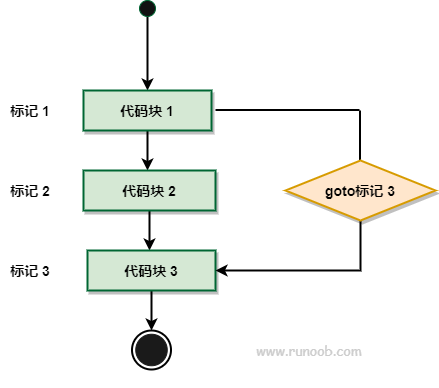
gotoIt is a control flow statement in the Perl programming language that allows you to jump program execution to a specified label.
Perl has threegotoforms:goto LABLE, goto EXPR, and goto &NAME:
| No. | goto type |
|---|---|
| 1 | goto LABEL Find the statement marked as LABEL and re-execute from there. |
| 2 | goto EXPR The goto EXPR form is just a general form of goto LABEL. It expects the expression to generate a label name, and jumps to that label for execution. |
| 3 | goto &NAME It replaces the currently running subroutine with a call to a named subroutine. |
Syntax
The syntax format is as follows:
goto LABEL

或

goto EXPR

或

goto &NAME
Flowchart
Example
The following two examples skip output when variable $a is 15.
The following is a common goto example:
Example
Execute the above program, and the output result is:
a = 10
a = 11
a = 12
a = 13
a = 14
跳出输出
a = 16
a = 17
a = 18
a = 19
The following example uses the goto EXPR form. We used two strings and concatenated them with the dot (.) operator.
Example
Execute the above program, and the output result is:
a = 10
a = 11
a = 12
a = 13
a = 14
a = 16
a = 17
a = 18
a = 19
Other extensionsNote:Using goto often makes code difficult to understand and maintain. Therefore, in most cases, you should avoid using it and try to use structured control flow statements (such as if, else, while, for, etc.) to write code.