Perl Socket Programming
Socket, also known as "socket", is commonly used by applications to send requests to the network or respond to network requests, enabling communication between hosts or between processes on one computer.
In this chapter, we introduce how to use Socket services in Perl.
Creating a Server
Usesocketfunction to create the socket service.
Usebindfunction to bind the port.
Uselistenfunction to listen on the port.
Useacceptfunction to accept client requests.
Creating a Client
Usesocketfunction to create the socket service.
Useconnectfunction to connect to the socket server.
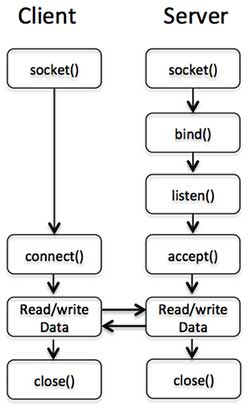
The following diagram illustrates the communication flow between the client and the server:
Server Socket Functions
socket() Function
In Perl, we use the socket() function to create a socket. The syntax is as follows:
socket( SOCKET, DOMAIN, TYPE, PROTOCOL );
Parameter explanation:
DOMAINThe created socket specifies the protocol family. For example:
AF_INETrepresents the IPv4 network protocolAF_INET6represents IPv6AF_UNIXrepresents a local socket (using a file)
TYPEThe socket type can be SOCK_STREAM or SOCK_DGRAM, depending on whether it is connection-oriented or connectionless
PROTOCOLshould be(getprotobyname('tcp'))[2]. Specify the actual transport protocol to be used.
So the socket function call is as follows:
use Socket     # 定义了 PF_INET 和 SOCK_STREAM

socket(SOCKET,PF_INET,SOCK_STREAM,(getprotobyname('tcp'))[2]);
bind() Function
Use bind() to assign an address to the socket:
bind( SOCKET, ADDRESS );
SOCKET is a socket descriptor. ADDRESS is the socket address (TCP/IP) containing three elements:
Address family (TCP/IP, i.e., AF_INET, which may be 2 on your system)
Port number (e.g., 21)
Network address (e.g., 10.12.12.168)
After creating a socket with socket(), only the protocol to be used is assigned, not an address. Before accepting connections from other hosts, bind() must be called to assign an address to the socket.
A simple example is as follows:
use Socket        # 定义了 PF_INET 和 SOCK_STREAM

$port = 12345;    # 监听的端口
$server_ip_address = "10.12.12.168";
bind( SOCKET, pack_sockaddr_in($port, inet_aton($server_ip_address)))
   or die "无法绑定端口! \n";
or dieThis is executed if binding the address fails.
By setting the setsockopt() option SO_REUSEADDR, the port can be reused immediately.
pack_sockaddr_in()The function converts the address to binary format.
listen() Function
When the socket is bound to an address, the listen() function starts listening for possible connection requests. However, this can only be used when a reliable data stream is guaranteed:
listen( SOCKET, QUEUESIZE );
SOCKET: a socket descriptor.
QUEUESIZE: an integer that determines the size of the listening queue. When a connection request arrives, it enters this listening queue; when a connection request is accepted by accept(), it is removed from the listening queue; when the queue is full, new connection requests return an error.
Returns 0 on success, or -1 on error.
accept() Function
The accept() function accepts the requested socket connection. On success it returns the packed network address, otherwise it returns FALSE:
accept( NEW_SOCKET, SOCKET );
NEW_SOCKET: a socket descriptor.
SOCKET: a socket descriptor.
accept() is usually used in an infinite loop:
while(1) {
   accept( NEW_SOCKET, SOCKT );
   .......
}
The above example can monitor client requests in real time.
Client Functions
connect() Function
The connect() system call sets up a connection for a socket, with parameters including the file descriptor and the host address.
connect( SOCKET, ADDRESS );
The following creates an example of connecting to a server socket:
$port = 21;    #  ftp 端口
$server_ip_address = "10.12.12.168";
connect( SOCKET, pack_sockaddr_in($port, inet_aton($server_ip_address)))
    or die "无法绑定端口! \n";
Complete Example
Next, let's understand the application of all socket functions through a complete example:
Server side server.pl code:
Example
Open a terminal and run the following code:
$ perl sever.pl
访问启动:7890
Client side client.pl code:
Example
Open another terminal and run the following code:
$ perl client.pl
我是来自服务端的信息
Other Extensions