Perl Database Connection
In this chapter, we will introduce you to Perl database connections.
In Perl 5, we can use the DBI module to connect to databases.
DBI's full English name is Database Independent Interface, known in Chinese as the database-independent interface.
As the standard interface for communication between the Perl language and databases, DBI defines a series of methods, variables, and constants, providing a database persistence layer independent of any specific database platform.
DBI Structure
DBI is independent of specific database platforms, and we can apply it to databases such as Oracle, MySQL, or Informix.
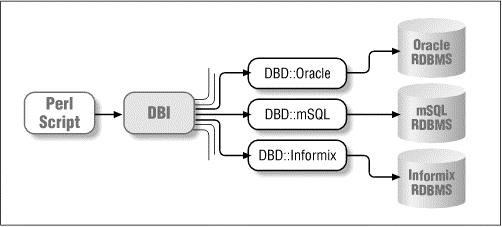
In the diagram, DBI receives all SQL data sent from the API (Application Programming Interface), distributes it to the corresponding drivers for execution, and finally retrieves and returns the data.
Variable Naming Conventions
The following are some commonly used variable naming conventions:
$dsn    驱动程序对象的句柄
$dbh    一个数据库对象的句柄
$sth    一个语句或者一个查询对象的句柄
$h      通用的句柄 ($dbh, $sth, 或 $drh),依赖于上下文
$rc     操作代码返回的布什值(true 或 false)
$rv     操作代码返回的整数值
@ary    查询返回的一行值的数组(列表)
$rows   操作代码返回的行数值
$fh     文件句柄
undef   NULL 值表示未定义
\%attr  引用属性的哈希值并传到方法上
Database Connection
Next, we use the MySQL database as an example to demonstrate how Perl performs database operations.
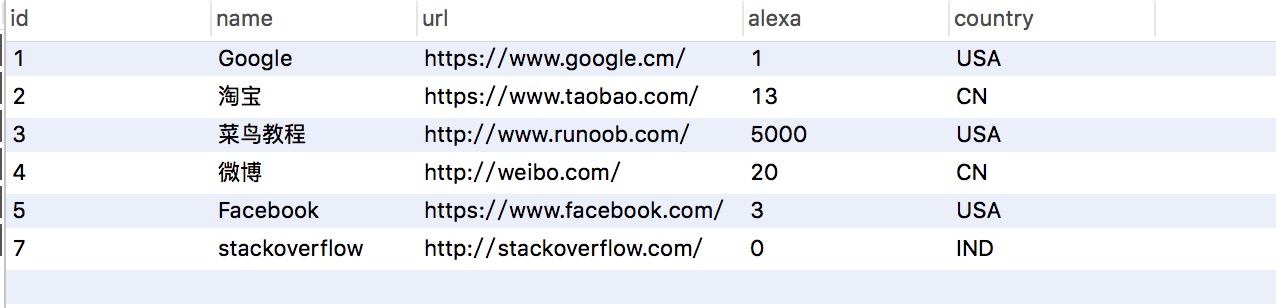
Here, we create the EXAMPLE database in MySQL, with the data table named Websites. The table structure and data are shown in the figure below:
Download this data table:https://static.jyshare.com/download/websites_perl.sql
Next, we use the following code to connect to the database:
Example
Insert Operation
Execution steps:
- Use the prepare() API to prepare the SQL statement.
- Use the execute() API to execute the SQL statement.
- Use the finish() API to release the statement handle.
- Finally, if all goes well, the above executed operations will be committed.
my $sth = $dbh->prepare("INSERT INTO Websites
                       (name, url, alexa, country )
                        values
                       ('Twitter', 'https://twitter.com/', 10, 'USA')");
$sth->execute() or die $DBI::errstr;
$sth->finish();
$dbh->commit or die $DBI::errstr;
Applications can also bind output and input parameters. The following example executes an insert query by replacing the ? placeholders with variables:
my $name = "Twitter";
my $url = "https://twitter.com/";
my $alexa = 10;
my $country = "USA";
my $sth = $dbh->prepare("INSERT INTO Websites
                       (name, url, alexa, country )
                        values
                       (?,?,?,?)");
$sth->execute($name,$url,$alexa, $country)
          or die $DBI::errstr;
$sth->finish();
$dbh->commit or die $DBI::errstr;
Update Operation
Execution steps:
- Use the prepare() API to prepare the SQL statement.
- Use the execute() API to execute the SQL statement.
- Use the finish() API to release the statement handle.
- Finally, if all goes well, the above executed operations will be committed.
my $sth = $dbh->prepare("UPDATE Websites
                        SET   alexa = alexa + 1
                        WHERE country = 'CN'");
$sth->execute() or die $DBI::errstr;
print "更新的记录数 :" + $sth->rows;
$sth->finish();
$dbh->commit or die $DBI::errstr;
Applications can also bind output and input parameters. The following example executes an update query by replacing the ? placeholders with variables:
$name = 'Example';

my $sth = $dbh->prepare("UPDATE Websites
                        SET   alexa = alexa + 1
                        WHERE name = ?");
$sth->execute('$name') or die $DBI::errstr;
print "更新的记录数 :" + $sth->rows;
$sth->finish();
Of course, we can also bind the values to be set, as shown below, changing the alexa of all records with country CN to 1000:
$country = 'CN';
$alexa = 1000:;
my $sth = $dbh->prepare("UPDATE Websites
                        SET   alexa = ?
                        WHERE country = ?");
$sth->execute( $alexa, '$country') or die $DBI::errstr;
print "更新的记录数 :" + $sth->rows;
$sth->finish();
Delete Data
Execution steps:
- Use the prepare() API to prepare the SQL statement.
- Use the execute() API to execute the SQL statement.
- Use the finish() API to release the statement handle.
- Finally, if all goes well, the above executed operations will be committed.
The following deletes all data from Websites where alexa is greater than 1000:
$alexa = 1000;
my $sth = $dbh->prepare("DELETE FROM Websites
                        WHERE alexa = ?");
$sth->execute( $alexa ) or die $DBI::errstr;
print "删除的记录数 :" + $sth->rows;
$sth->finish();
$dbh->commit or die $DBI::errstr;
Using the do Statement
doThe do statement can execute UPDATE, INSERT, or DELETE operations. It is concise; it returns true on success and false on failure. An example is as follows:
$dbh->do('DELETE FROM Websites WHERE alexa>1000');
COMMIT Operation
commit is used to commit the transaction and complete database operations:
$dbh->commit or die $dbh->errstr;
ROLLBACK Operation
If an error occurs during SQL execution, you can roll back the data without making any changes:
$dbh->rollback or die $dbh->errstr;
Transactions
Like other languages, Perl DBI also supports transaction processing for database operations. There are two ways to implement it:
1. Start a transaction when connecting to the database
$dbh = DBI->connect($dsn, $userid, $password, {AutoCommit => 0}) or die $DBI::errstr;
The above code sets AutoCommit to false when connecting. This means that when you perform update operations on the database, it will not automatically write those updates directly to the database. Instead, the program must use $dbh->commit to actually write the data to the database, or $dbh->rollback to roll back the previous operations.
2. Start a transaction with the $dbh->begin_work() statement
This approach does not require setting AutoCommit = 0 when connecting to the database.
You can perform multiple transaction operations with a single database connection, without needing to connect to the database for the start of every transaction.
$rc  = $dbh->begin_work  or die $dbh->errstr;

#####################
##这里执行一些 SQL 操作
#####################

$dbh->commit;    # 成功后操作
-----------------------------
$dbh->rollback;  # 失败后回滚
Disconnecting from the Database
If we need to disconnect from the database, we can use the disconnect API:
$rc = $dbh->disconnect or warn $dbh->errstr;Other Extensions