Perl File Operations
Perl uses a type of variable called a file handle to operate on files.
Reading or writing data from a file requires a file handle.
File handleis aI/Oname of a connection.
Perl provides three file handles:STDIN,STDOUT,STDERRwhich respectively representstandard input、standard outputandstandard error output。
In Perl, files can be opened in the following ways:
open FILEHANDLE, EXPR
open FILEHANDLE

sysopen FILEHANDLE, FILENAME, MODE, PERMS
sysopen FILEHANDLE, FILENAME, MODE
Parameter description:
- FILEHANDLE: The file handle, used to store a unique identifier for a file.
- EXPR: An expression composed of the filename and file access type.
- MODE: File access type.
- PERMS: Permission bits.
open Function
In the following code, we use the open function in read-only mode<to open the file file.txt:
open(DATA, "<file.txt");
<indicates read-only mode.
DATA in the code is the file handle used to read the file. The following example opens the file and outputs its contents:
Example
The following code opens the file file.txt in write>mode:
open(DATA, ">file.txt") or die "file.txt 文件无法打开, $!";
>indicates write mode.
If you need to open a file in read-write mode, you can add a + sign before the > or < character:
open(DATA, "+<file.txt"); or die "file.txt 文件无法打开, $!";
This mode does not delete the original contents of the file. If you want to delete them, the format is as follows:
open DATA, "+>file.txt" or die "file.txt 文件无法打开, $!";
If you want to append data to a file, you only need to open the file in append mode before appending the data:
open(DATA,">>file.txt") || die "file.txt 文件无法打开, $!";
>>indicates appending data to the end of an existing file. If you need to read the file content being appended, you can add a + sign:
open(DATA,"+>>file.txt") || die "file.txt 文件无法打开, $!";
The following table lists the different access modes:
| Mode | Description |
|---|---|
| < or r | Open in read-only mode, pointing the file pointer to the beginning of the file. |
| > or w | Open in write mode, pointing the file pointer to the beginning of the file and truncating the file size to zero. If the file does not exist, try to create it. |
| >> or a | Open in write mode, pointing the file pointer to the end of the file. If the file does not exist, try to create it. |
| +< or r+ | Open in read-write mode, pointing the file pointer to the beginning of the file. |
| +> or w+ | Open in read-write mode, pointing the file pointer to the beginning of the file and truncating the file size to zero. If the file does not exist, try to create it. |
| +>> or a+ | Open in read-write mode, pointing the file pointer to the end of the file. If the file does not exist, try to create it. |
Sysopen Function
sysopenThis function is similar to the open function, except that their parameter forms are different.
The following example opens a file in read-write (+<filename) mode:
sysopen(DATA, "file.txt", O_RDWR);
If you need to clear the file before updating it, the syntax is as follows:
sysopen(DATA, "file.txt", O_RDWR|O_TRUNC );
You can use O_CREAT to create a new file, O_WRONLY for write-only mode, and O_RDONLY for read-only mode.
The PERMSThe parameter is an octal attribute value, indicating the permissions after the file is created. The default is0x666。
The following table lists the possible mode values:
| Mode | Description |
|---|---|
| O_RDWR | Open in read-write mode, pointing the file pointer to the beginning of the file. |
| O_RDONLY | Open in read-only mode, pointing the file pointer to the beginning of the file. |
| O_WRONLY | Open in write mode, pointing the file pointer to the beginning of the file and truncating the file size to zero. If the file does not exist, try to create it. |
| O_CREAT | Create file |
| O_APPEND | Append file |
| O_TRUNC | Truncate file size to zero |
| O_EXCL | If the file exists when O_CREAT is used, an error message is returned; it can test whether the file exists. |
| O_NONBLOCK | Non-blocking I/O makes our operation either succeed or immediately return an error without being blocked. |
Close Function
After using a file, you should close it to flush the input/output buffers associated with the file handle. The syntax for closing a file is as follows:
close FILEHANDLE
close
FILEHANDLE is the specified file handle; it returns true if the close is successful.
close(DATA) || die "无法关闭文件";
Reading and Writing Files
There are several different ways to read and write information to/from files:
<FILEHANDL> Operator
The main method for reading information from an opened file handle is the <FILEHANDLE> operator. In scalar context, it returns a single line from the file handle. For example:
Example
After the above program runs, the following information will be displayed. After we enter the URL, the print statement will output:
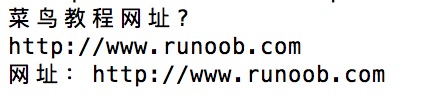
When we use the <FILEHANDLE> operator, it returns a list of each line in the file handle. For example, we can import all lines into an array.
First create the import.txt file with the following content:
$ cat import.txt
1
2
3
Read import.txt and put each line into the @lines array:
Example
After running the above program, the output is:
1
2
3
getc Function
The getc function returns a single character from the specified FILEHANDLE, or from STDIN if none is specified:
getc FILEHANDLE
getc
If an error occurs, or if the file handle is at the end of the file, it returns undef.
read Function
The read function is used to read information from a buffered file handle.
This function is used to read binary data from a file.
read FILEHANDLE, SCALAR, LENGTH, OFFSET
read FILEHANDLE, SCALAR, LENGTH
Parameter description:
- FILEHANDLE: The file handle, used to store a unique identifier for a file.
- SCALAR: Stores the result. If OFFSET is not specified, the data is placed at the beginning of SCALAR. Otherwise, the data is placed after OFFSET bytes in SCALAR.
- LENGTH: The length of the content to read.
- OFFSET: The offset.
If successful, returns the number of bytes read; returns 0 at end of file; returns undef if an error occurs.
print Function
For all functions that read information from a file handle, the main underlying write function is print:
print FILEHANDLE LIST
print LIST
print
Using the file handle and the print function, the results of the program can be sent to the output device (STDOUT: standard output), for example:
print "Hello World!\n";
File Copy
In the following example, we will open an existing file file1.txt, read each of its lines, and write them to file2.txt:
Example
File Rename
In the following example, we rename the existing file file1.txt to file2.txt, in the specified directory /usr/example/test/:
#!/usr/bin/perl

rename ("/usr/example/test/file1.txt", "/usr/example/test/file2.txt" );
The functionrenamesaccepts only two parameters and renames only existing files.
Deleting Files
In the following example, we demonstrate how to use theunlinkfunction to delete a file:
Example
Specifying File Position
You can use thetellfunction to get the file position, and use theseekfunction to specify the position within the file:
tell Function
The tell function is used to get the file position:
tell FILEHANDLE
tell
If FILEHANDLE is specified, the function returns the position of the file pointer in bytes. If not specified, it returns the default selected file handle.
seek Function
The seek() function reads or writes files by moving the file read/write pointer via the file handle, reading and writing in bytes:
seek FILEHANDLE, POSITION, WHENCE
Parameter description:
- FILEHANDLE: File handle, used to store a unique identifier for a file.
- POSITION: Indicates the number of bytes the file handle (read/write position pointer) should move.
- WHENCE: Indicates the starting position when the file handle (read/write position pointer) begins to move. It can take values 0, 1, 2; representing the beginning of the file, the current position, and the end of the file respectively.
The following example reads 256 bytes from the beginning of the file:
seek DATA, 256, 0;
File Information
Perl's file operations can also first test whether a file exists, whether it is readable or writable, etc.
We can first create a file1.txt file, with the following contents:
$ cat file1.txt
www.example.com
Example
After executing the above program, the output is:
file1.txt 信息:是一个文本文件, 15 字节
The file test operators are shown in the following table:
| Operator | Description |
|---|---|
| -A | Time the file was last accessed (in days) |
| -B | Is it a binary file |
| -C | File (inode) index node modification time (in days) |
| -M | Time the file was last modified (in days) |
| -O | File is owned by the real UID |
| -R | File or directory can be read by the real UID/GID |
| -S | Is a socket |
| -T | Is it a text file |
| -W | File or directory can be written to by the real UID/GID |
| -X | File or directory can be executed by the real UID/GID |
| -b | Is a block-special file (such as a mounted disk) |
| -c | Is a character-special file (such as an I/O device) |
| -d | Is a directory |
| -e | File or directory name exists |
| -f | Is a regular file |
| -g | File or directory has the setgid attribute |
| -k | File or directory has the sticky bit set |
| -l | Is a symbolic link |
| -o | File is owned by the effective UID |
| -p | File is a named pipe (FIFO) |
| -r | File can be read by the effective UID/GID |
| -s | File or directory exists and is not 0 (returns byte count) |
| -t | File handle is a TTY (return result of the system function isatty(); cannot use this test on a filename) |
| -u | File or directory has the setuid attribute |
| -w | File can be written to by the effective UID/GID |
| -x | File can be executed by the effective UID/GID |
| -z | File exists, size is 0 (directories are always false), i.e., whether it is an empty file |