MongoDBPHP Extension
This tutorial will introduce how to install the MongoDB extension on Linux, Windows, and Mac platforms.
Installing MongoDB PHP Extension on Linux
Install from Terminal
You can run the following command in Linux to install the MongoDB PHP extension driver.
$ sudo pecl install mongodb
Using PHP's pecl install command requires a working network connection and root privileges.
Installation Manual
If you want to compile the extension driver from source, you must manually compile the source package. The advantage of doing this is that the latest bug fixes are included in the source package.
You can download the MongoDB PHP driver package from the PHP official website. Download URL:http://pecl.php.net/package/mongodb。

The complete installation commands are as follows:
$ wget http://pecl.php.net/get/mongodb-1.5.2.tgz
$ cd /mongodb-1.5.2
$ phpize
$ ./configure
$ make && make install
If your PHP was compiled by yourself, the installation method is as follows (assuming it is compiled in the /usr/local/php directory):
$ wget http://pecl.php.net/get/mongodb-1.5.2.tgz
$ cd /mongodb-1.5.2
$ /usr/local/php/bin/phpize
$ ./configure --with-php-config=/usr/local/php/bin/php-config
$ make && make install
After successful installation, output similar to the following installation directory information will be shown:
...
Installing shared extensions:     /usr/lib/php/extensions/debug-non-zts-20151012/
After executing the above commands, you need to modify the php.ini file and add the mongo configuration in the php.ini file. The configuration is as follows:
extension_dir=/usr/lib/php/extensions/debug-non-zts-20151012/
extension=mongodb.so
Note:You need to specify the path of the extension_dir configuration item.
You can check the directory address with the following command:
$ php -i | grep extension_dir
  extension_dir => /usr/lib/php/extensions/debug-non-zts-20151012 =>
                   /usr/lib/php/extensions/debug-non-zts-20151012
Installing MongoDB PHP Extension on Windows
PECL already provides precompiled PHP MongoDB driver binary packages for the Windows platform (download URL:https://pecl.php.net/package/mongodb). You can download the version corresponding to your PHP, but you need to pay attention to the following points:
- VC6 is for running on Apache servers
- Thread safe runs as a module on Apache. If you run PHP in CGI mode, please choose non-thread safe mode.
- VC9 is for running on IIS servers.
- After downloading the required binary package, unzip the archive and add the php_mongodb.dll file to your PHP extension directory (ext). The ext directory is usually located under the PHP installation directory.
Open the PHP configuration file php.ini and add the following configuration:
extension=php_mongodb.dll
Restart the server.
Access phpinfo through a browser. If the installation is successful, you will see information like the following:
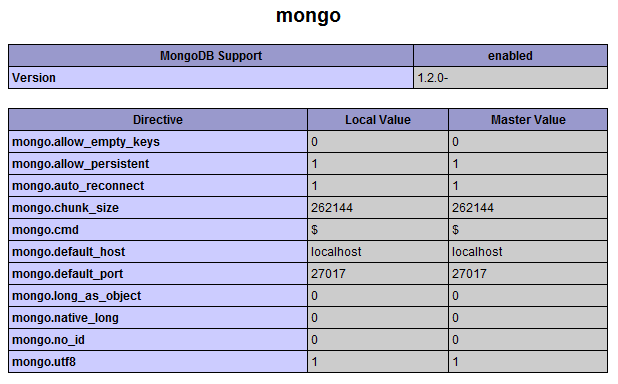
Installing MongoDB PHP Extension Driver on Mac
You can useautoconfto install the MongoDB PHP extension driver.
You can useXcodeto install the MongoDB PHP extension driver.
If you use XAMPP, you can use the following command to install the MongoDB PHP extension driver:
sudo /Applications/XAMPP/xamppfiles/bin/pecl install mongo
If the above commands do not work in XAMPP or MAMP, you need to download a compatible precompiled package from GitHub.
Then add the extension=mongodb.so configuration to your php.ini file.
Other Extensions