MongoDB Concept Analysis
No matter what database we learn, we should learn its basic concepts. In MongoDB, the basic concepts are documents, collections, and databases. We will introduce them one by one below.
The following table will help you better understand some concepts in MongoDB:
| SQL Terms/Concepts | MongoDB Terms/Concepts | Explanation/Description |
|---|---|---|
| database | database | Database |
| table | collection | Database table/Collection |
| row | document | Data record row/Document |
| column | field | Data field/Field |
| index | index | Index |
| table joins | Table joins, not supported by MongoDB | |
| primary key | primary key | Primary key, MongoDB automatically sets the _id field as the primary key |
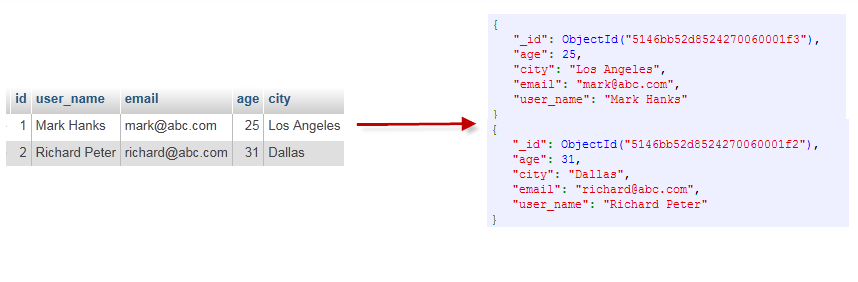
Through the example in the figure below, we can also understand some concepts in MongoDB more intuitively:
Complete term list:
-
Document: The basic data unit of MongoDB, usually a JSON-like structure that can contain multiple data types.
-
Collection: Similar to a table in a relational database, a collection is a container for a group of documents. In MongoDB, documents in a collection do not need to have a fixed schema.
-
Database: A MongoDB instance that contains one or more collections.
-
BSON: The abbreviation for Binary JSON; it is the binary form of JSON that MongoDB uses to store and transmit documents.
-
Index: A data structure used to optimize query performance. Indexes can be created based on one or more fields in a collection.
-
Sharding: A method of distributing data across multiple servers (called shards) to handle large datasets and high-throughput applications.
-
Replica Set: A group of MongoDB servers that maintain the same dataset, providing redundant data backup and high availability.
-
Primary: The server in a replica set responsible for handling all write operations.
-
Secondary: A server in a replica set used for reading data and taking over as primary when the primary node fails.
-
MongoDB Shell: The command-line interface provided by MongoDB for interacting with MongoDB instances.
-
Aggregation Framework: A series of operations used to perform complex data processing and aggregation operations.
-
Map-Reduce: A programming model used for parallel computing over large datasets.
-
GridFS: A specification for storing and retrieving files larger than the BSON document size limit.
-
ObjectId: A unique identifier automatically generated by MongoDB for each document.
-
CRUD Operations: Operations for Create, Read, Update, and Delete.
-
Transactions: Supported starting from MongoDB 4.0, allowing a group of operations to be executed as an atomic unit.
-
Operators: Special fields used to query and update documents.
-
Join: MongoDB allows the use of
$lookupoperator to implement join operations similar to SQL. -
TTL(Time-To-Live): You can set TTL on certain fields in a collection to automatically delete old data.
-
Storage Engine: The underlying technology MongoDB uses for data storage and management, such as WiredTiger and MongoDB's old storage engine MMAPv1.
-
MongoDB Compass: MongoDB's graphical interface tool for visualizing and managing MongoDB data.
-
MongoDB Atlas: A cloud service provided by MongoDB that allows hosting MongoDB databases in the cloud.
Database
Multiple databases can be created in one MongoDB.
If no database is specified during operations, MongoDB will use a database namedtestas the default database, which is stored in the data directory.
A single instance of MongoDB can host multiple independent databases, each with its own collections and permissions. Different databases are also placed in different files.
Starting from MongoDB 4.0, multi-document transactions on a single database are supported.
"show dbs"The command can display a list of all databases.
$ ./mongo
MongoDB shell version: 3.0.6
connecting to: test
> show dbs
local  0.078GB
test   0.078GB
>
Execute"db"The command can display the current database object or collection.
$ ./mongo
MongoDB shell version: 3.0.6
connecting to: test
> db
test
>
Running the "use" command connects to a specified database.
> use local
switched to db local
> db
local
>
In the example command above, "local" is the database you want to connect to.
In the next chapter, we will explain in detail the use of commands in MongoDB.
Databases are also identified by name. A database name can be any UTF-8 string that satisfies the following conditions.
- Cannot be an empty string ("").
- Must not contain ' ' (space), ., $, /, \, and \0 (null character).
- Should be all lowercase.
- At most 64 bytes.
Some database names are reserved and can directly access these special-purpose databases.
- admin: From a permissions perspective, this is the "root" database. If you add a user to this database, the user automatically inherits permissions for all databases. Some specific server-side commands can only be run from this database, such as listing all databases or shutting down the server.
- local:This database is never replicated and can be used to store any collections limited to a single local server.
- config: When MongoDB is used in sharding setups, the config database is used internally to save sharding-related information.
Document
A document is a set of key-value pairs (i.e., BSON). MongoDB documents do not need to have the same fields, and the same fields do not need the same data types. This is a major difference from relational databases and is a very prominent feature of MongoDB.
A simple example of a document is as follows:
{"site":"www.example.com", "name":"Example"}
The following table lists the corresponding terms between RDBMS and MongoDB:
| RDBMS | MongoDB |
|---|---|
| Database | Database |
| Table | Collection |
| line | Document |
| Column | Field |
| Table joins | Embedded document |
| Primary key | Primary key (MongoDB provides the key as _id) |
| Database server and client | |
| Mysqld/Oracle | mongodb |
| mysql/sqlplus | mongo |
It should be noted that:
- The key/value pairs in a document are ordered.
- Values in a document can not only be strings enclosed in double quotes, but also several other data types (even an entire embedded document).
- MongoDB distinguishes between types and case.
- MongoDB documents cannot have duplicate keys.
- The keys of a document are strings. With a few exceptions, keys can use any UTF-8 characters.
Document key naming conventions:
- Keys cannot contain \0 (null character). This character is used to indicate the end of a key.
- . and $ have special meanings and can only be used in specific circumstances.
- Keys starting with an underscore "_" are reserved (not strictly required).
Collection
A collection is a group of MongoDB documents, similar to a table in RDBMS (Relational Database Management System).
Collections exist in databases and do not have a fixed structure. This means you can insert data of different formats and types into a collection, but under normal circumstances, the data we insert into a collection has some relevance.
For example, we can insert documents with the following different data structures into a collection:
{"site":"www.baidu.com"}
{"site":"www.google.com","name":"Google"}
{"site":"www.example.com","name":"Example","num":5}
When the first document is inserted, the collection is created.
Valid Collection Names
- A collection name cannot be an empty string "".
- A collection name cannot contain the \0 character (null character). This character represents the end of the collection name.
- A collection name cannot start with "system."; this is a prefix reserved for system collections.
- Collection names created by users cannot contain reserved characters. Some drivers do support including $ in collection names, because some system-generated collections contain this character. Unless you need to access such system-created collections, never use $ in your collection names.
The following example:
db.col.findOne()
capped collections
Capped collections are fixed-size collections.
They have high performance and queue expiration characteristics (expiration in insertion order). This is somewhat similar to the "RRD" concept.
Capped collections are high-performance and automatically maintain the insertion order of objects. They are very suitable for functions like logging. Unlike standard collections, you must explicitly create a capped collection and specify the size of the collection in bytes. The data storage space of the collection is pre-allocated.
Capped collections can store documents in insertion order, and their positions on disk are also saved in insertion order. Therefore, when we update documents in a Capped collection, the updated document cannot exceed the size of the previous document. This ensures that the positions of all documents on disk remain unchanged.
Since a Capped collection determines the insertion position by document insertion order rather than using indexes, this can improve the efficiency of adding data. MongoDB's operation log file oplog.rs is implemented using Capped Collections.
Note that the specified storage size includes the database header information.
db.createCollection("mycoll", {capped:true, size:100000})
- In a capped collection, you can add new objects.
- Updates are possible; however, objects will not increase storage space. If they do, the update will fail.
- With a Capped Collection, you cannot delete a document. You can use the drop() method to delete all rows in the collection.
- After deletion, you must explicitly recreate the collection.
- On 32-bit machines, the maximum storage of a capped collection is 1e9 (1X10⁹) bytes.
Metadata
Database information is stored in collections. They use the system namespace:
dbname.system.*
In MongoDB, the namespace <dbname>.system.* is a special collection (Collection) that contains various system information, as follows:
| Collection namespace | Description |
|---|---|
| dbname.system.namespaces | List all namespaces. |
| dbname.system.indexes | List all indexes. |
| dbname.system.profile | Contains database profile information. |
| dbname.system.users | List all users of accessible databases. |
| dbname.local.sources | Contains server information and status of replication peers (slaves). |
There are the following restrictions on modifying objects in system collections.
Inserting data into {{system.indexes}} can create an index. But apart from that, the information in this table is immutable (the special drop index command will automatically update related information).
{{system.users}} is modifiable. {{system.profile}} is deletable.
MongoDB Data Types
The following table lists several commonly used data types in MongoDB.
| Data type | Description |
|---|---|
| String | String. A common data type for storing data. In MongoDB, only UTF-8 encoded strings are valid. |
| Integer | Integer. Used to store numeric values. Depending on the server you use, it can be 32-bit or 64-bit. |
| Boolean | Boolean. Used to store Boolean values (true/false). |
| Double | Double. Used to store floating-point values. |
| Min/Max keys | Compares a value against the lowest and highest values of BSON (Binary JSON) elements. |
| Array | Used to store an array, list, or multiple values as one key. |
| Timestamp | Timestamp. Records the specific time when a document is modified or added. |
| Object | Used for embedded documents. |
| Null | Used to create a null value. |
| Symbol | Symbol. This data type is basically equivalent to the string type, but the difference is that it is generally used in languages that adopt a special symbol type. |
| Date | Date. Stores the current date or time in UNIX time format. You can specify your own date and time: create a Date object and pass in year, month, and day information. |
| Object ID | Object ID. Used to create the ID of a document. |
| Binary Data | Binary data. Used to store binary data. |
| Code | Code type. Used to store JavaScript code in a document. |
| Regular expression | Regular expression type. Used to store regular expressions. |
The following explains several important data types.
ObjectId
ObjectId is similar to a unique primary key; it can be quickly generated and sorted. It contains 12 bytes, meaning:
- The first 4 bytes represent the creationunixtimestamp, Greenwich Mean TimeUTCtime, 8 hours behind Beijing time
- The next 3 bytes are the machine identifier code
- The next two bytes consist of the process ID (PID)
- The last three bytes are a random number

Documents stored in MongoDB must have an _id key. The value of this key can be of any type; by default, it is an ObjectId object.
Since the ObjectId contains the creation timestamp, you do not need to save a timestamp field for your document. You can use the getTimestamp function to get the document's creation time:
> var newObject = ObjectId()
> newObject.getTimestamp()
ISODate("2017-11-25T07:21:10Z")
Convert ObjectId to string
> newObject.str
5a1919e63df83ce79df8b38f
String
BSON strings are UTF-8 encoded.
Timestamp
BSON has a special timestamp type used internally by MongoDB, which is not related to the ordinary Date type. A timestamp value is a 64-bit value. Among them:
- The first 32 bits are a time_t value (the number of seconds since the Unix epoch)
- The last 32 bits are an incrementing ordinal for operations within a given second
Ordinal number
In a single mongod instance, timestamp values are usually unique.
In a replica set, oplog has a ts field. The value in this field uses a BSON timestamp to represent the operation time.
The BSON timestamp type is mainly used internally by MongoDB. In most application development situations, you can use the BSON date type.
Date
Represents the number of milliseconds since the Unix epoch (January 1, 1970). The date type is signed; negative numbers represent dates before 1970.
> var mydate1 = new Date()     //格林尼治时间
> mydate1
ISODate("2018-03-04T14:58:51.233Z")
> typeof mydate1
object
> var mydate2 = ISODate() //格林尼治时间
> mydate2
ISODate("2018-03-04T15:00:45.479Z")
> typeof mydate2
object
The time created this way is a date type, and you can use the methods of the Date type in JS.
Returns a string of time type:
> var mydate1str = mydate1.toString()
> mydate1str
Sun Mar 04 2018 14:58:51 GMT+0000 (UTC)
> typeof mydate1str
string
or
> Date()
Sun Mar 04 2018 15:02:59 GMT+0000 (UTC)
Other extensions