MongoDB PHP
To use MongoDB in PHP, you must use the MongoDB PHP driver.
For MongoDB PHP installation and driver package download on various platforms, please see:Installing MongoDB extension driver for PHP
If you are using PHP 7, please refer to:PHP7 MongoDB Installation and Usage。
Ensure connection and select a database
To ensure proper connection, you need to specify the database name. If the database does not exist in MongoDB, MongoDB will automatically create it.
The code snippet is as follows:
<?php
$m = new MongoClient(); // 连接默认主机和端口为:mongodb://localhost:27017
$db = $m->test; // 获取名称为 "test" 的数据库
?>
Create collection
The code snippet for creating a collection is as follows:
<?php
$m = new MongoClient(); // 连接
$db = $m->test; // 获取名称为 "test" 的数据库
$collection = $db->createCollection("example");
echo "集合创建成功";
?>
Executing the above program, the output result is as follows:
Collection created successfully
Insert document
In MongoDB, use the insert() method to insert a document:
The code snippet for inserting a document is as follows:
<?php
$m = new MongoClient();    // 连接到mongodb
$db = $m->test;            // 选择一个数据库
$collection = $db->example; // 选择集合
$document = array(
    "title" => "MongoDB",
    "description" => "database",
    "likes" => 100,
    "url" => "http://www.example.com/mongodb/",
    "by", "Example"
);
$collection->insert($document);
echo "数据插入成功";
?>
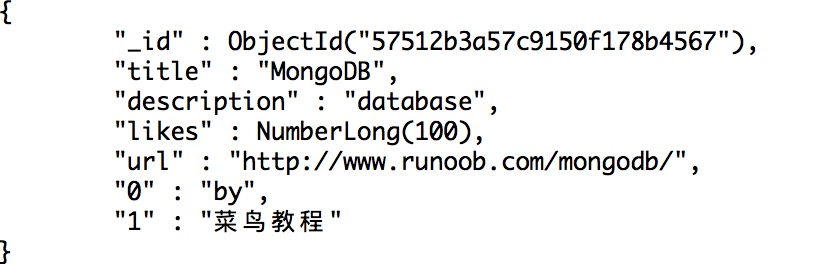
Executing the above program, the output result is as follows:
Data inserted successfully
Then on the mongo client, use thedb.example.find().pretty();command to view the data:
Find documents
Use the find() method to read documents in a collection.
The code snippet for reading documents is as follows:
<?php
$m = new MongoClient();    // 连接到mongodb
$db = $m->test;            // 选择一个数据库
$collection = $db->example; // 选择集合

$cursor = $collection->find();
// 迭代显示文档标题
foreach ($cursor as $document) {
    echo $document["title"] . "\n";
}
?>
Executing the above program, the output result is as follows:
MongoDB
Update document
Use the update() method to update documents.
The following example will update the document with the title ' MongoDB Tutorial'. The code snippet is as follows:
<pre>
<?php
$m = new MongoClient();    // 连接到mongodb
$db = $m->test;            // 选择一个数据库
$collection = $db->example; // 选择集合
// 更新文档
$collection->update(array("title"=>"MongoDB"), array('$set'=>array("title"=>"MongoDB 教程")));
// 显示更新后的文档
$cursor = $collection->find();
// 循环显示文档标题
foreach ($cursor as $document) {
    echo $document["title"] . "\n";
}
?>
Executing the above program, the output result is as follows:
MongoDB 教程
Then on the mongo client, use thedb.example.find().pretty();command to view the data:
Delete document
Use the remove() method to delete documents.
In the following example, we will remove a data record whose 'title' is 'MongoDB Tutorial'. The code snippet is as follows:
<?php
$m = new MongoClient();    // 连接到mongodb
$db = $m->test;            // 选择一个数据库
$collection = $db->example; // 选择集合

// 移除文档
$collection->remove(array("title"=>"MongoDB 教程"), array("justOne" => true));

// 显示可用文档数据
$cursor = $collection->find();
foreach ($cursor as $document) {
    echo $document["title"] . "\n";
}
?>
In addition to the above examples, in PHP you can also use methods such as findOne(), save(), limit(), skip(), sort() to operate on the MongoDB database.
For more operation methods, you can refer to the MongoDB core classes:http://php.net/manual/zh/mongo.core.php。
Other extensions