JavaScript Promise
Before learning this chapter, you need to understand what asynchronous programming is. You can refer to:JavaScript Asynchronous Programming
Promise is a class provided by ECMAScript 6, designed to write complex asynchronous tasks more elegantly.
Promise is an object in JavaScript used to handle asynchronous operations. It represents the eventual completion (or failure) of an asynchronous operation and its resulting value.
In simple terms, a Promise is a "commitment" that a result will be returned at some point in the future (either a successful result or a reason for failure).
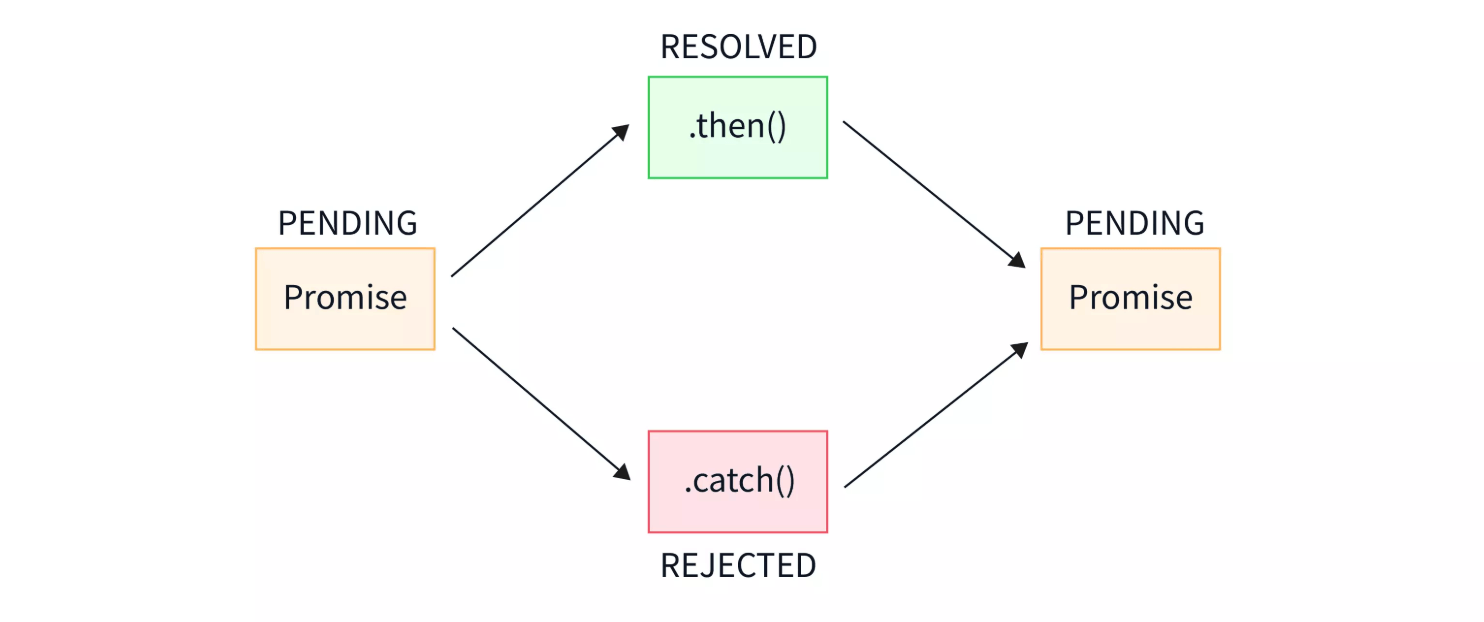
A Promise has three states:
- pending: initial state, neither fulfilled nor rejected
- fulfilled: means the operation completed successfully
- rejected: means the operation failed
Example
// asynchronous operation code
if (/* Operation successful */) {
resolve('Success result'); // Change the Promise state to fulfilled
} else {
reject('Reason for failure'); // Change the Promise state to rejected
}
});
Browser Support
Since Promise is newly added in ES6, some older browsers do not support it. Apple Safari 10 and Windows Edge 14 and above started to support ES6 features.
The following shows the browser support for Promise:
| Chrome 58 | Edge 14 | Firefox 54 | Safari 10 | Opera 55 |
How to Use Promise
then() Method
then()This method is used to specify callback functions when the Promise state changes to fulfilled or rejected.
Example
(result) => {
// Handle success case
console.log('Success:', result);
},
(error) => {
// Handle failure case
console.error('Failure:', error);
}
);
catch() Method
catch()This method is specifically used to handle cases where the Promise is rejected.
Example
.then((result) => {
console.log('Success:', result);
})
.catch((error) => {
console.error('Failure:', error);
});
finally() Method
finally()This method executes regardless of the final state of the Promise.
Example
.then((result) => {
console.log('Success:', result);
})
.catch((error) => {
console.error('Failure:', error);
})
.finally(() => {
console.log('Operation complete');
});
Promise Chaining
A powerful feature of Promise is that multiple asynchronous operations can be chained.
Example
.then((result) => doSecondThing(result))
.then((newResult) => doThirdThing(newResult))
.then((finalResult) => {
console.log('Final result:', finalResult);
})
.catch((error) => {
console.error('Error somewhere in the chain:', error);
});
Promise Static Methods
Promise.all()
Wait for all Promises to complete, or for any one Promise to fail.
Example
.then((results) => {
// results is an array containing all Promise results
console.log(results);
})
.catch((error) => {
// Enters here if any Promise fails
console.error(error);
});
Promise.race()
Returns the result of the first Promise to settle (regardless of success or failure).
Example
.then((result) => {
// Use the result of the first settled Promise
console.log(result);
})
.catch((error) => {
// If the first settled Promise is rejected
console.error(error);
});
Promise.resolve() and Promise.reject()
Quickly create a resolved or rejected Promise.
Example
const rejectedPromise = Promise.reject('Immediately rejected reason');
Practical Application Examples
Example 1: Using Promise to Handle AJAX Requests
Example
return new Promise((resolve, reject) => {
const xhr = new XMLHttpRequest();
xhr.open('GET', url);
xhr.onload = () => {
if (xhr.status === 200) {
resolve(xhr.response);
} else {
reject(new Error(xhr.statusText));
}
};
xhr.onerror = () => reject(new Error('Network error'));
xhr.send();
});
}
fetchData('https://api.example.com/data')
.then((data) => {
console.log('Data fetched successfully:', data);
})
.catch((error) => {
console.error('Failed to fetch data:', error);
});
Example 2: Using Promise Chain to Handle Multiple Asynchronous Operations
Example
return fetch(`/users/${userId}`);
}
function getPosts(userId) {
return fetch(`/users/${userId}/posts`);
}
getUser(123)
.then((user) => {
console.log('Fetching user info:', user);
return getPosts(user.id);
})
.then((posts) => {
console.log('Fetching user posts:', posts);
})
.catch((error) => {
console.error('Operation failed:', error);
});
Common Issues and Best Practices
1. Avoid Promise Nesting
Wrong approach (the Promise version of callback hell):
Example
doSecondThing(firstResult).then((secondResult) => {
doThirdThing(secondResult).then((thirdResult) => {
console.log(thirdResult);
});
});
});
Correct approach (use chaining):
Example
.then(doSecondThing)
.then(doThirdThing)
.then((finalResult) => {
console.log(finalResult);
});
2. Always Handle Rejections
Forgetting to handle Promise rejections will cause "uncaught promise rejection" errors. Always use.catch()ortry/catch(in async/await) to handle errors.
3. Promises Are Not Cancellable
Once created, a Promise cannot be cancelled. If you need cancellation functionality, consider using AbortController or other patterns.
4. FAQ
Q: Can the sequence of then, catch, and finally be reversed?
A: Yes, the effect is exactly the same. But it is not recommended; it's best to write the program in the order of then-catch-finally.
Q: Besides the then block, can the other two blocks be used multiple times?
A: Yes. finally, like then, executes in order, but only the first catch block will execute unless there is an exception in the catch block. So it's best to arrange only one catch and one finally block.
Q: How to interrupt a then block?
A: A then block executes sequentially downward by default; return cannot interrupt it. You can use throw to jump to catch to achieve interruption.
Q: When is it appropriate to use Promise instead of traditional callback functions?
A: When multiple asynchronous operations need to be executed sequentially. For example, if you want to check a username and password sequentially through asynchronous methods, you need to asynchronously check the username first, then asynchronously check the password — that's a situation well-suited for Promise.
Q: Is Promise a method to convert asynchronous to synchronous?
A: Not at all. Promise is just a better programming style.
Q: When do we need to write another then instead of continuing programming in the current then?
A: When you need to call another asynchronous task.
Promise and async/await
ES2017 introduced async/await, which is based on Promise and provides a more intuitive syntax for handling asynchronous operations.
Example
try {
const user = await getUser(123);
const posts = await getPosts(user.id);
console.log('User posts:', posts);
} catch (error) {
console.error('Failed to fetch data:', error);
}
}
Although async/await is more readable, understanding the basic concepts of Promise is still very important, because it is the foundation of async/await.
Other Extensions