JavaScript HTML DOM
Through the HTML DOM, JavaScript can access all elements of an HTML document.
HTML DOM (Document Object Model)
When a web page is loaded, the browser creates the page's Document Object Model.
HTML DOMThe model is constructed as anobjecttree:
HTML DOM Tree
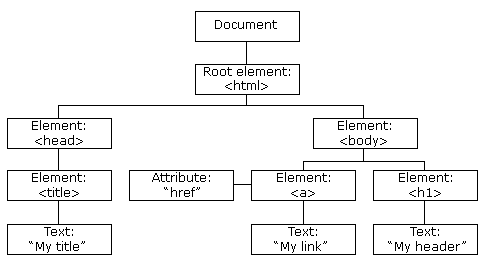
Through the programmable object model, JavaScript has gained enough power to create dynamic HTML.
- JavaScript can change all HTML elements in the page
- JavaScript can change all HTML attributes in the page
- JavaScript can change all CSS styles in the page
- JavaScript can react to all events in the page
Finding HTML Elements
Typically, through JavaScript, you need to manipulate HTML elements.
To do this, you must first find the element. There are three ways to do this:
- Finding HTML elements by id
- Finding HTML elements by tag name
- Finding HTML elements by class name
Finding HTML Elements by id
The easiest way to find an HTML element in the DOM is by using the element's id.
This example finds the element with id="intro":
If the element is found, the method will return the element as an object (in x).
If the element is not found, x will contain null.
Finding HTML Elements by Tag Name
This example finds the element with id="main", and then finds all <p> elements inside the id="main" element:
Finding HTML Elements by Class Name
This example usesgetElementsByClassNamea function to find elements with class="intro":
HTML DOM Tutorial
In the rest of this tutorial, you will learn:
- How to change the content of HTML elements (innerHTML)
- How to change the style of HTML elements (CSS)
- How to react to HTML DOM events
- How to add or delete HTML elements