ASP.NET Web Pages - Global Pages
This chapter introduces global pages AppStart and PageStart.
Before the Web Starts: _AppStart
Most server-side code is written in individual web pages. For example, if a web page contains an input form, then the page usually contains server-side code to read the form data.
However, you can create a page named _AppStart in the root directory of your site so that code can execute before the site starts. If this page exists, ASP.NET will run this page first when other pages in the site are requested.
The typical use of _AppStart is to run startup code and initialize global values (such as counters and global names).
Note 1:The file extension of _AppStart is the same as your web pages, e.g., _AppStart.cshtml.
Note 2:_AppStart has an underscore prefix. Therefore, these files cannot be browsed directly.
Before Every Page: _PageStart
Just as _AppStart runs before your site starts, you can write code that runs before any page in each folder.
For every folder in your website, you can add a file named _PageStart.
The typical use of _PageStart is to set a layout page for all pages in a folder, or to check whether a user is already logged in before running a page.
How does it work?
The following diagram shows how it works:
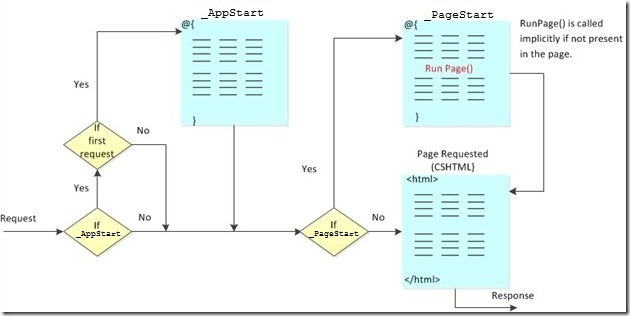
When a request is received, ASP.NET first checks whether _AppStart exists. If _AppStart exists and this is the first request received by the site, then _AppStart runs.
Then ASP.NET checks whether _PageStart exists. If _PageStart exists, it runs before the other requested pages run.
You can call RunPage() in _PageStart to specify where the requested page runs. Otherwise, by default, the requested page runs after _PageStart has run.
Other Extensions