ASP.NET MVC - Controller
To learn ASP.NET MVC, we will build an Internet application.
Part 4: Adding a Controller.
Controllers folder
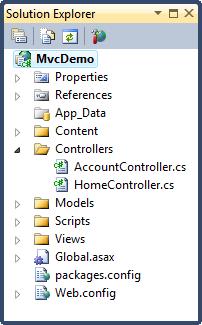
Controllers folderContains controller classes responsible for handling user input and responses.
MVC requires that all controller file names end with "Controller".
In our example, Visual Web Developer has already created the following files:HomeController.cs(for the Home page and About page) andAccountController.cs(for the login page):
Web servers usually map incoming URL requests directly to disk files on the server. For example: the URL request "http://www.w3cschool.cc/index.php" will be directly mapped to the file "index.php" in the server root directory.
The MVC framework maps differently. MVC maps URLs to methods. These methods are called "controllers" in classes.
Controllers are responsible for handling incoming requests, processing input, saving data, and sending responses back to the client.
Home controller
The controller files in our applicationHomeController.csdefine two controlsIndexandAbout。
Replace the contents of the HomeController.cs file with:
using System.Collections.Generic;
using System.Linq;
using System.Web;
using System.Web.Mvc;
namespace MvcDemo.Controllers
{
public class HomeController : Controller
{
public ActionResult Index()
{return View();}
public ActionResult About()
{return View();}
}
}
Controller Views
The files in the Views folderIndex.cshtmlandAbout.cshtmldefine the ActionResult views Index() and About() in the controller.
Other Extensions