ASP.NET MVC - Application Folders
To learn ASP.NET MVC, we will build an Internet application.
Part 2: Exploring the application folders.
MVC Folders
The folder contents of a typical ASP.NET MVC web application are shown below:
|
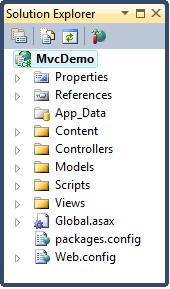
All MVC applications have the same folder names. The MVC framework is based on default naming. Controllers are written in the Controllers folder, views are written in the Views folder, and models are written in the Models folder. You do not have to use folder names in your application code.
Standardized naming reduces the amount of code while helping developers understand MVC projects.
The following is a brief overview of the contents of each folder:
App_Data Folder
App_DataThis folder is used to store application data.
We will cover adding a SQL database to the App_Data folder in a later chapter of this tutorial.
Content Folder
ContentThis folder is used to store static files, such as style sheets (CSS files), icons, and images.
Visual Web Developer automatically adds athemesfolder to the Content folder. The themes folder stores jQuery styles and images. In your project, you can delete this themes folder.
Visual Web Developer will also add a standard style sheet file to the project: the one in the content folderSite.cssfile. This style sheet file is the file you need to edit when you want to change the application's style.
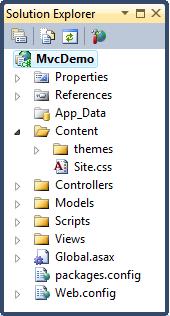
We will edit this style sheet file (Site.css) in the next chapter of this tutorial.
Controllers Folder
The Controllers folder contains controller classes that handle user input and responses.
MVC requires that all controller file names end with "Controller".
Visual Web Developer has already created a Home controller (for the Home page and About page) and an Account controller (for the Login page):
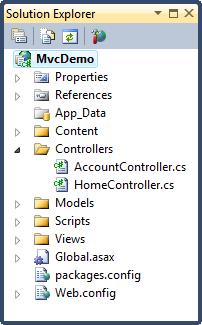
We will create more controllers in later chapters of this tutorial.
Models Folder
The Models folder contains classes that represent the application models. Models control and manipulate application data.
We will create models (classes) in later chapters of this tutorial.
Views Folder
The Views folder is used to store HTML files related to the display of the application (user interface).
The Views folder contains one folder for each controller.
In the Views folder, Visual Web Developer has created an Account folder, a Home folder, and a Shared folder.
The Account folder contains pages for user account registration and login.
The Home folder is used to store application pages such as the Home page and About page.
The Shared folder is used to store views shared between controllers (master pages and layout pages).
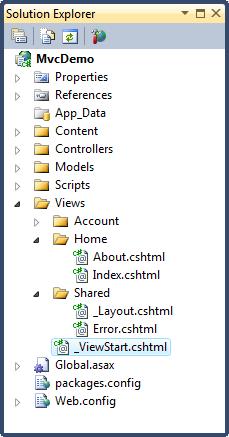
We will edit these layout files in the next chapter of this tutorial.
Scripts Folder
The Scripts folder stores the application's JavaScript files.
By default, Visual Web Developer places standard MVC, Ajax, and jQuery files in this folder:
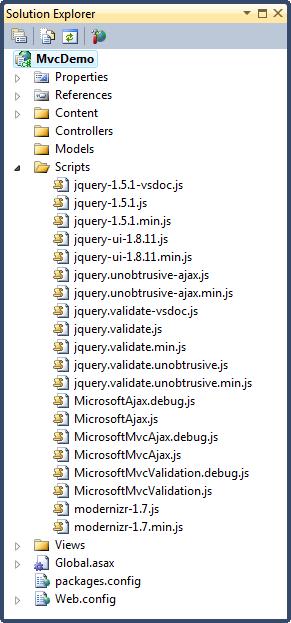
Notes:The file named "modernizr" is a JavaScript file used to support HTML5 and CSS3 in the application.
Other extensions