Vue.js Installation
1. Standalone Version
We can directly download vue.min.js from the official Vue.js website and use<script>tag to include it.
2. Using CDN Method
The following recommends two relatively stable CDNs abroad. No particularly good domestic one has been found yet, so for now it is still recommended to download locally.
-
cdnjs : https://cdnjs.cloudflare.com/ajax/libs/vue/2.1.8/vue.min.js
-
Staticfile CDN (Domestic) : https://cdn.staticfile.net/vue/2.2.2/vue.min.js
3. NPM Method
Since npm installation is slow, this tutorial uses Taobao's mirror and its command cnpm. For installation and usage instructions, refer to:Using Taobao NPM Mirror。
The npm version needs to be greater than 3.0. If it is lower than this version, you need to upgrade it:
# 查看版本
$ npm -v
2.3.0

#升级 npm
cnpm install npm -g


# 升级或安装 cnpm
npm install cnpm -g
When building large applications with Vue.js, it is recommended to use cnpm for installation:
# 最新稳定版
$ cnpm install vue
Command Line Tool
Vue.js provides an official command-line tool that can be used to quickly build large single-page applications.
# 全局安装 vue-cli
$ cnpm install --global vue-cli
# 创建一个基于 webpack 模板的新项目
$ vue init webpack my-project
# 这里需要进行一些配置,默认回车即可
This will install Vue 2.x version of the template.

For Vue 1.x use: vue init webpack#1.0 my-project

? Project name my-project
? Project description A Vue.js project
? Author example <[email protected]>
? Vue build standalone
? Use ESLint to lint your code? Yes
? Pick an ESLint preset Standard
? Setup unit tests with Karma + Mocha? Yes
? Setup e2e tests with Nightwatch? Yes

   vue-cli · Generated "my-project".

   To get started:

     cd my-project
     npm install
     npm run dev

   Documentation can be found at https://vuejs-templates.github.io/webpack
Enter the project, install and run:
$ cd my-project
$ cnpm install
$ cnpm run dev
 DONE  Compiled successfully in 4388ms

> Listening at http://localhost:8080
After successfully executing the above commands, visit http://localhost:8080/, and the output result is as follows:
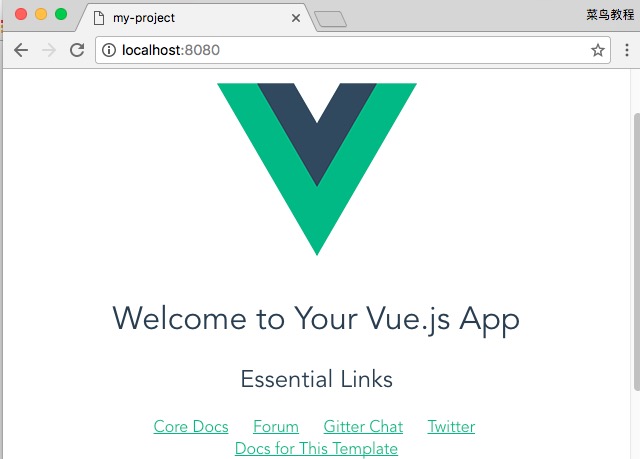
Note:Vue.js does not support IE8 and earlier IE versions.
Vue Project Packaging
Use the following command to package a Vue project:
npm run build
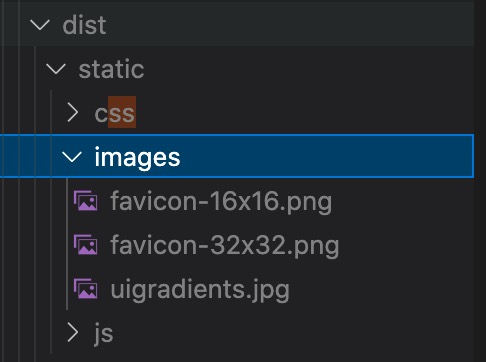
After execution completes, it will generate adistdirectory under the Vue project. It generally contains the index.html file and the static directory. The static directory contains static files js, css, and the images directory.
If you directly double-click index.html to open it in a browser, the page may be blank. To display it correctly, you can modify the paths of the js and css files in the index.html file.
For example, when we open the dist/index.html file, we see the paths are absolute paths:
<link href=/static/css/app.33da80d69744798940b135da93bc7b98.css rel=stylesheet>
<script type=text/javascript src=/static/js/app.717bb358ddc19e181140.js></script>
We modify the js and css paths to relative paths:
<link href=static/css/app.33da80d69744798940b135da93bc7b98.css rel=stylesheet>
<script type=text/javascript src=static/js/app.717bb358ddc19e181140.js></script>
In this way, you can directly double-click the dist/index.html file to see the effect in the browser.
Editor
VS Code
VS Code (full name Visual Studio Code) is a free, open-source, cross-platform code editor launched by Microsoft.
VS Code supports Windows, macOS, and Linux, and has powerful features and flexible extensibility.
VS Code Tutorial:https://www.example.com/vscode/vscode-tutorial.html
In addition, domestic Alibaba and ByteDance also have AI IDEs developed based on VS Code:
- ByteDance Trae:https://www.trae.cn/