Vue.js Components
Components are one of the most powerful features of Vue.js.
Components can extend HTML elements and encapsulate reusable code.
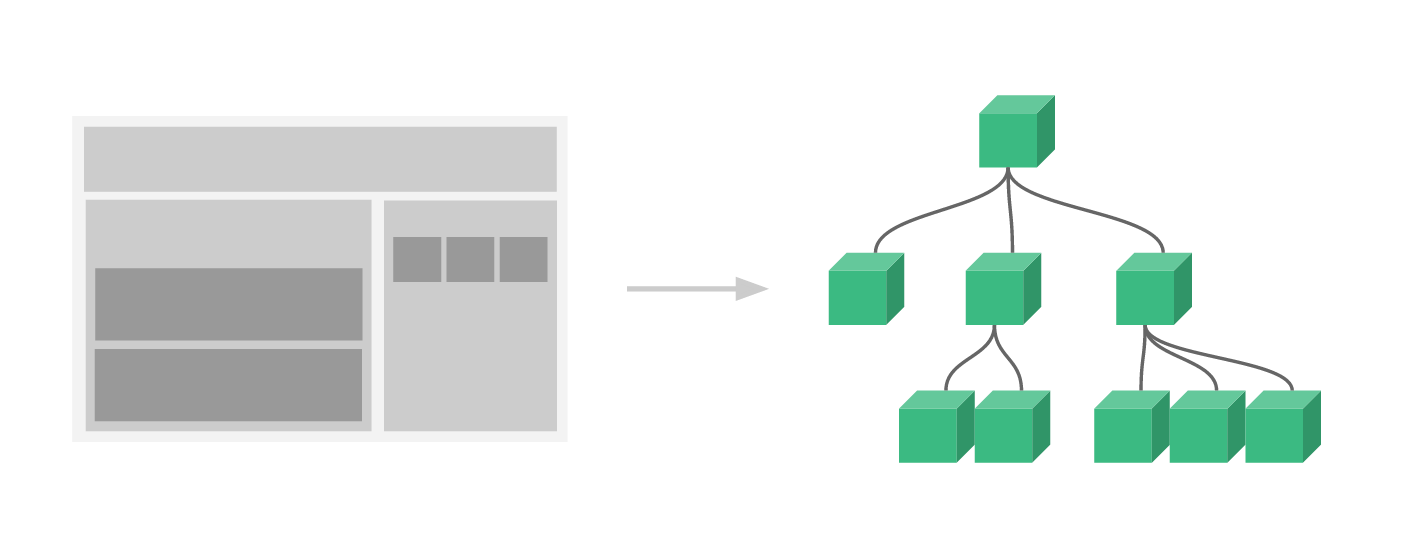
The component system allows us to build large applications using independent, reusable small components. Almost any type of application interface can be abstracted into a component tree:
The syntax for registering a global component is as follows:
Vue.component(tagName, options)
tagName is the component name, and options are the configuration options. After registration, we can use the following way to call the component:
<tagName></tagName>
Global Component
All instances can use global components.
Global Component Example
Register a simple global component 'example' and use it:
Try it »
Local Component
We can also register local components in the instance options, so that the component can only be used in this instance:
Local Component Example
Register a simple local component 'example' and use it:
Try it »
Prop
prop is a custom attribute used by child components to accept data passed from parent components.
The parent component needs to pass data to the child component via props, and the child component needs to explicitly declare "prop" using the props option:
Prop Example
Try it »
Dynamic Prop
Similar to using v-bind to bind HTML attributes to an expression, you can also use v-bind to dynamically bind prop values to parent component data. Whenever the parent component's data changes, the change is also passed down to the child component:
Prop Example
Try it »
In the following example, the v-bind directive is used to pass the todo to each repeated component:
Prop Example
Try it »
Note: prop is one-way binding: when the parent component's properties change, it is passed to the child component, but not the other way around.
Prop Validation
Components can specify validation requirements for props.
To customize the validation method for props, you can provide an object with validation requirements for the values in props, instead of an array of strings. For example:
Vue.component('my-component', {
  props: {
    // 基础的类型检查 (`null` 和 `undefined` 会通过任何类型验证)
    propA: Number,
    // 多个可能的类型
    propB: [String, Number],
    // 必填的字符串
    propC: {
      type: String,
      required: true
    },
    // 带有默认值的数字
    propD: {
      type: Number,
      default: 100
    },
    // 带有默认值的对象
    propE: {
      type: Object,
      // 对象或数组默认值必须从一个工厂函数获取
      default: function () {
        return { message: 'hello' }
      }
    },
    // 自定义验证函数
    propF: {
      validator: function (value) {
        // 这个值必须匹配下列字符串中的一个
        return ['success', 'warning', 'danger'].indexOf(value) !== -1
      }
    }
  }
})
When prop validation fails, Vue (in development build) will produce a console warning.
type can be one of the following native constructors:
StringNumberBooleanArrayObjectDateFunctionSymbol
type can also be a custom constructor, detected using instanceof.
Other Extensions