Использование табличного представления
Табличное представление iOS состоит из ячеек (как правило, переиспользуемых) и используется для отображения вертикально прокручиваемого представления.
В iOS табличные представления используются для отображения списков данных, таких как контакты, списки дел или списки покупок.
Важные свойства
- delegate
- dataSource
- rowHeight
- sectionFooterHeight
- sectionHeaderHeight
- separatorColor
- tableHeaderView
- tableFooterView
Важные методы
- (UITableViewCell *)cellForRowAtIndexPath:(NSIndexPath *)indexPath
- (void)deleteRowsAtIndexPaths:(NSArray *)indexPaths
   withRowAnimation:(UITableViewRowAnimation)animation
- (id)dequeueReusableCellWithIdentifier:(NSString *)identifier
- (id)dequeueReusableCellWithIdentifier:(NSString *)identifier
   forIndexPath:(NSIndexPath *)indexPath
- (void)reloadData
- (void)reloadRowsAtIndexPaths:(NSArray *)indexPaths
   withRowAnimation:(UITableViewRowAnimation)animation
- (NSArray *)visibleCells
Пример кода и шаги
1. Добавьте табличное представление в ViewController.xib, как показано ниже

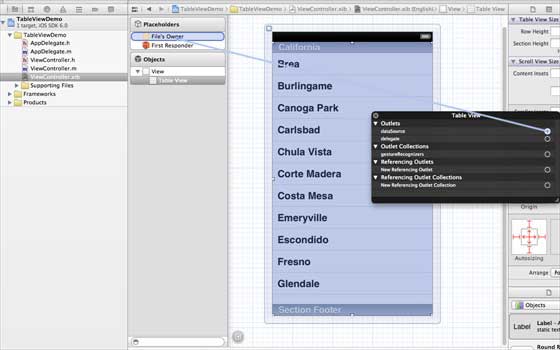
2. Назначьте делегатом и источником данных «File's Owner», щёлкнув правой кнопкой мыши и выбрав data source и delegate. Задайте источник данных, как показано ниже
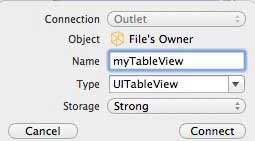
3. Создайте IBOutlet для табличного представления и назовите его myTableView, как показано на изображении ниже
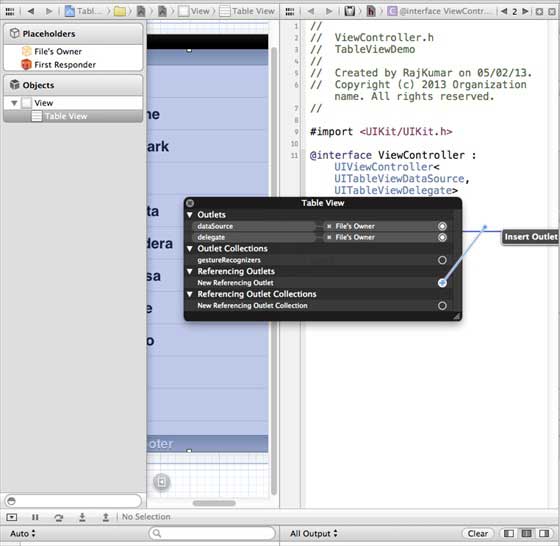
4. Чтобы были данные, добавьте NSMutableArray, чтобы их можно было отобразить в табличном представлении
5. ViewController должен поддерживать протоколы UITableViewDataSource и UITableViewDelegate. Код ViewController.h выглядит следующим образом
#import <UIKit/UIKit.h>

@interface ViewController : UIViewController<UITableViewDataSource,
UITableViewDelegate>
{

    IBOutlet UITableView *myTableView;
    NSMutableArray *myData;
}

@end
6. Реализуйте обязательные методы делегата и источника данных табличного представления. Обновите ViewController.m, как показано ниже
#import "ViewController.h"

@interface ViewController ()

@end

@implementation ViewController

- (void)viewDidLoad
{
    [super viewDidLoad];
    // table view data is being set here
    myData = [[NSMutableArray alloc]initWithObjects:
    @"Data 1 in array",@"Data 2 in array",@"Data 3 in array",
    @"Data 4 in array",@"Data 5 in array",@"Data 5 in array",
    @"Data 6 in array",@"Data 7 in array",@"Data 8 in array",
    @"Data 9 in array", nil];
    // Do any additional setup after loading the view, typically from a nib.
}

- (void)didReceiveMemoryWarning
{
    [super didReceiveMemoryWarning];
    // Dispose of any resources that can be recreated.
}

#pragma mark - Table View Data source
- (NSInteger)tableView:(UITableView *)tableView numberOfRowsInSection:
  (NSInteger)section{
    return [myData count]/2;
}

- (UITableViewCell *)tableView:(UITableView *)tableView cellForRowAtIndexPath:
  (NSIndexPath *)indexPath{
    static NSString *cellIdentifier = @"cellID";

    UITableViewCell *cell = [tableView dequeueReusableCellWithIdentifier:
    cellIdentifier];
    if (cell == nil) {
        cell = [[UITableViewCell alloc]initWithStyle:
        UITableViewCellStyleDefault reuseIdentifier:cellIdentifier];
    }
    NSString *stringForCell;
    if (indexPath.section == 0) {
        stringForCell= [myData objectAtIndex:indexPath.row];

    }
    else if (indexPath.section == 1){
        stringForCell= [myData objectAtIndex:indexPath.row+ [myData count]/2];

    }
    [cell.textLabel setText:stringForCell];
    return cell;
}

// Default is 1 if not implemented
- (NSInteger)numberOfSectionsInTableView:(UITableView *)tableView{
    return 2;
}

- (NSString *)tableView:(UITableView *)tableView titleForHeaderInSection:
  (NSInteger)section{
    NSString *headerTitle;
    if (section==0) {
        headerTitle = @"Section 1 Header";
    }
    else{
        headerTitle = @"Section 2 Header";

    }
    return headerTitle;
}
- (NSString *)tableView:(UITableView *)tableView titleForFooterInSection:
  (NSInteger)section{
    NSString *footerTitle;
    if (section==0) {
        footerTitle = @"Section 1 Footer";
    }
    else{
        footerTitle = @"Section 2 Footer";

    }
    return footerTitle;
}

#pragma mark - TableView delegate

-(void)tableView:(UITableView *)tableView didSelectRowAtIndexPath:
 (NSIndexPath *)indexPath{
    [tableView deselectRowAtIndexPath:indexPath animated:YES];
    UITableViewCell *cell = [tableView cellForRowAtIndexPath:indexPath];
    NSLog(@"Section:%d Row:%d selected and its data is %@",
    indexPath.section,indexPath.row,cell.textLabel.text);
}


@end
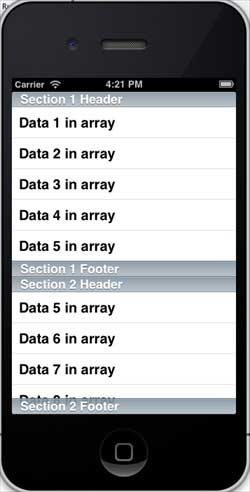
7. Теперь, когда мы запустим приложение, мы получим следующий вывод