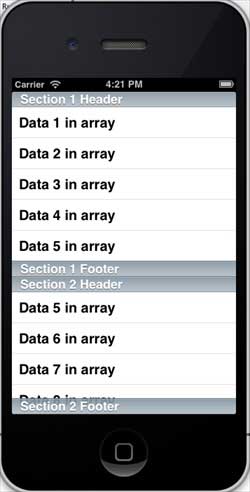
Utilisation de la vue table
La vue table d'iOS est constituée de cellules (généralement réutilisables) et est utilisée pour afficher une vue à défilement vertical.
Sous iOS, les vues table sont utilisées pour afficher des listes de données, telles que des contacts, des tâches à effectuer ou des listes d'articles à acheter.
Propriétés importantes
- delegate
- dataSource
- rowHeight
- sectionFooterHeight
- sectionHeaderHeight
- separatorColor
- tableHeaderView
- tableFooterView
Méthodes importantes
- (UITableViewCell *)cellForRowAtIndexPath:(NSIndexPath *)indexPath
- (void)deleteRowsAtIndexPaths:(NSArray *)indexPaths
   withRowAnimation:(UITableViewRowAnimation)animation
- (id)dequeueReusableCellWithIdentifier:(NSString *)identifier
- (id)dequeueReusableCellWithIdentifier:(NSString *)identifier
   forIndexPath:(NSIndexPath *)indexPath
- (void)reloadData
- (void)reloadRowsAtIndexPaths:(NSArray *)indexPaths
   withRowAnimation:(UITableViewRowAnimation)animation
- (NSArray *)visibleCells
Exemple de code et étapes
1. Ajoutez une vue tableau à ViewController.xib, comme indiqué ci-dessous

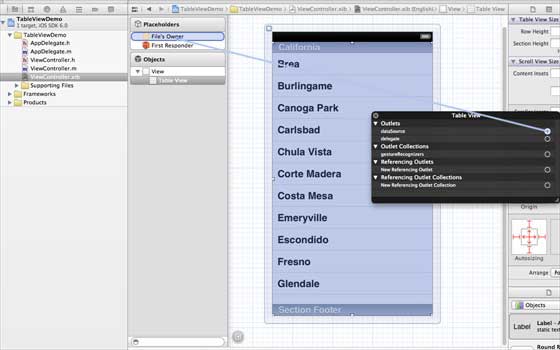
2. Définissez le délégué et la source de données sur « File's Owner » en effectuant un clic droit et en sélectionnant data source et delegate. Définissez la source de données comme indiqué ci-dessous
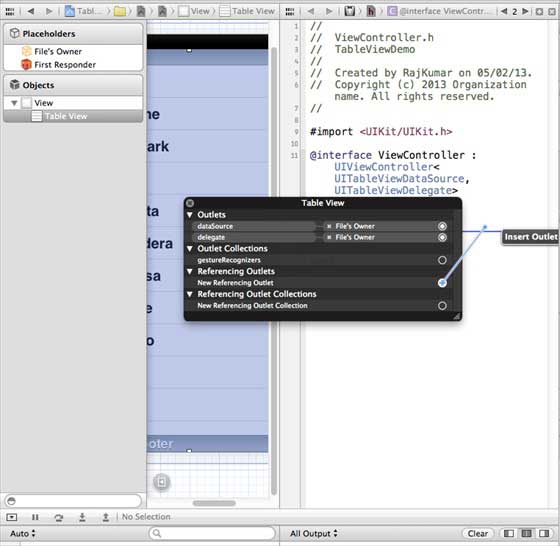
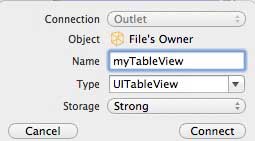
3. Créez un IBOutlet pour la vue tableau et nommez-le myTableView, comme illustré dans l'image ci-dessous
4. Pour avoir des données, ajoutez un NSMutableArray afin qu'elles puissent être affichées dans la vue tableau
5. ViewController doit adopter les protocoles UITableViewDataSource et UITableViewDelegate. Le code de ViewController.h est le suivant
#import <UIKit/UIKit.h>

@interface ViewController : UIViewController<UITableViewDataSource,
UITableViewDelegate>
{

    IBOutlet UITableView *myTableView;
    NSMutableArray *myData;
}

@end
6. Implémentez les méthodes requises du délégué et de la source de données de la vue tableau. Mettez à jour ViewController.m, comme indiqué ci-dessous
#import "ViewController.h"

@interface ViewController ()

@end

@implementation ViewController

- (void)viewDidLoad
{
    [super viewDidLoad];
    // table view data is being set here
    myData = [[NSMutableArray alloc]initWithObjects:
    @"Data 1 in array",@"Data 2 in array",@"Data 3 in array",
    @"Data 4 in array",@"Data 5 in array",@"Data 5 in array",
    @"Data 6 in array",@"Data 7 in array",@"Data 8 in array",
    @"Data 9 in array", nil];
    // Do any additional setup after loading the view, typically from a nib.
}

- (void)didReceiveMemoryWarning
{
    [super didReceiveMemoryWarning];
    // Dispose of any resources that can be recreated.
}

#pragma mark - Table View Data source
- (NSInteger)tableView:(UITableView *)tableView numberOfRowsInSection:
  (NSInteger)section{
    return [myData count]/2;
}

- (UITableViewCell *)tableView:(UITableView *)tableView cellForRowAtIndexPath:
  (NSIndexPath *)indexPath{
    static NSString *cellIdentifier = @"cellID";

    UITableViewCell *cell = [tableView dequeueReusableCellWithIdentifier:
    cellIdentifier];
    if (cell == nil) {
        cell = [[UITableViewCell alloc]initWithStyle:
        UITableViewCellStyleDefault reuseIdentifier:cellIdentifier];
    }
    NSString *stringForCell;
    if (indexPath.section == 0) {
        stringForCell= [myData objectAtIndex:indexPath.row];

    }
    else if (indexPath.section == 1){
        stringForCell= [myData objectAtIndex:indexPath.row+ [myData count]/2];

    }
    [cell.textLabel setText:stringForCell];
    return cell;
}

// Default is 1 if not implemented
- (NSInteger)numberOfSectionsInTableView:(UITableView *)tableView{
    return 2;
}

- (NSString *)tableView:(UITableView *)tableView titleForHeaderInSection:
  (NSInteger)section{
    NSString *headerTitle;
    if (section==0) {
        headerTitle = @"Section 1 Header";
    }
    else{
        headerTitle = @"Section 2 Header";

    }
    return headerTitle;
}
- (NSString *)tableView:(UITableView *)tableView titleForFooterInSection:
  (NSInteger)section{
    NSString *footerTitle;
    if (section==0) {
        footerTitle = @"Section 1 Footer";
    }
    else{
        footerTitle = @"Section 2 Footer";

    }
    return footerTitle;
}

#pragma mark - TableView delegate

-(void)tableView:(UITableView *)tableView didSelectRowAtIndexPath:
 (NSIndexPath *)indexPath{
    [tableView deselectRowAtIndexPath:indexPath animated:YES];
    UITableViewCell *cell = [tableView cellForRowAtIndexPath:indexPath];
    NSLog(@"Section:%d Row:%d selected and its data is %@",
    indexPath.section,indexPath.row,cell.textLabel.text);
}


@end
7. Maintenant, lorsque nous exécutons l'application, nous obtenons le résultat suivant