iOSタブバーの使用
これは通常、同じビュー内の各サブタスク、ビュー、またはモデルを切り替えるために使用されます。
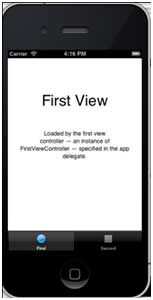
タブバーの例は次のとおりです:

重要なプロパティ
- backgroundImage
- items
- selectedItem
サンプルコードと手順
1. 新しいプロジェクトを作成し、選択しますTabbed Application代替ビューアプリケーションを選択し、次へをクリックし、プロジェクト名を入力して選択しますcreate.
2. ここではデフォルトで2つのビューコントローラーとタブバーが作成され、アプリケーションに追加されます。
3. AppDelegate.m didFinishLaunchingWithOptions方法は次のとおりです:
- (BOOL)application:(UIApplication *)application didFinishLaunchingWithOptions:(NSDictionary *)launchOptions
{
    self.window = [[UIWindow alloc] initWithFrame:[[UIScreen mainScreen]
    bounds]];
    // Override point for customization after application launch.
    UIViewController *viewController1 = [[FirstViewController alloc]
    initWithNibName:@"FirstViewController" bundle:nil];
    UIViewController *viewController2 = [[SecondViewController alloc]
    initWithNibName:@"SecondViewController" bundle:nil];
    self.tabBarController = [[UITabBarController alloc] init];
    self.tabBarController.viewControllers = @[viewController1,
    viewController2];
    self.window.rootViewController = self.tabBarController;
    [self.window makeKeyAndVisible];
    return YES;
}
4. 2つのビューコントローラーがタブバーコントローラーのビューコントローラーとして割り当てられます
5. アプリケーションを実行すると、次の結果が得られます: