IOS GameKit
概要
GameKitはiOS SDKでよく使われるフレームワークです。その中核となる機能は3つあります:
- インタラクティブなゲームプラットフォーム Game Center、
- P2Pデバイス通信機能
- In-Game Voice。
サンプル手順
1. iTunesにリンクする際は、一意のApp ID(unique App ID)を所有していることを確認してください。App IDは、アプリケーションのbundle IDを更新するとき、およびXcodeのコード署名と対応するプロビジョニングプロファイルで使用する必要があります。
2. 新しいアプリケーションを作成し、アプリケーション情報を更新します。新しいアプリケーションの追加に関するドキュメントで詳細を確認できます。
3. 申請したアプリケーションを開き、Manage Game Centerオプションをクリックします。入ったらEnable Game CenterをクリックしてGame Centerを有効にします。次に、自分のLeaderboardとAchievementsを設定します。
4. 次のステップでは、コードを処理し、アプリケーションのユーザーインターフェースを作成します。
5. single view applicationを作成し、bundle identifierを入力します。
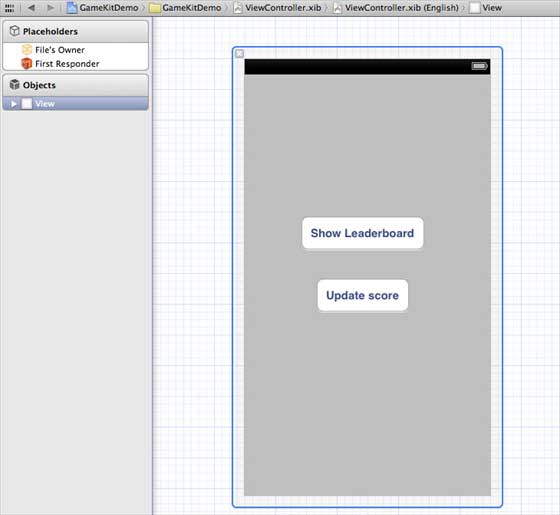
6. ViewController.xibを以下のように更新します。
7. プロジェクトファイルを選択し、ターゲットを選択し、GameKit.frameworkを追加します。
8. 追加したボタン用にIBActionsを作成します。
9. ViewController.hファイルを以下のように更新します。
#import <UIKit/UIKit.h>
#import <GameKit/GameKit.h>

@interface ViewController : UIViewController
<GKLeaderboardViewControllerDelegate>

-(IBAction)updateScore:(id)sender;
-(IBAction)showLeaderBoard:(id)sender;

@end
10. ViewController.mを以下のように更新します。
#import "ViewController.h"

@interface ViewController ()

@end

@implementation ViewController

- (void)viewDidLoad
{
    [super viewDidLoad];
    if([GKLocalPlayer localPlayer].authenticated == NO)
    {
      [[GKLocalPlayer localPlayer]
      authenticateWithCompletionHandler:^(NSError *error)
      {
         NSLog(@"Error%@",error);
      }];
    }
}

- (void)didReceiveMemoryWarning
{
    [super didReceiveMemoryWarning];
    // Dispose of any resources that can be recreated.
}
- (void) updateScore: (int64_t) score
forLeaderboardID: (NSString*) category
{
    GKScore *scoreObj = [[GKScore alloc]
    initWithCategory:category];
    scoreObj.value = score;
    scoreObj.context = 0;
    [scoreObj reportScoreWithCompletionHandler:^(NSError *error) {
        // Completion code can be added here
        UIAlertView *alert = [[UIAlertView alloc]
        initWithTitle:nil message:@"Score Updated Succesfully"
        delegate:self cancelButtonTitle:@"Ok" otherButtonTitles: nil];
        [alert show];

    }];
}
-(IBAction)updateScore:(id)sender{
    [self updateScore:200 forLeaderboardID:@"サンプル"];
}
-(IBAction)showLeaderBoard:(id)sender{
    GKLeaderboardViewController *leaderboardViewController =
    [[GKLeaderboardViewController alloc] init];
    leaderboardViewController.leaderboardDelegate = self;
    [self presentModalViewController:
    leaderboardViewController animated:YES];

}
#pragma mark - Gamekit delegates
- (void)leaderboardViewControllerDidFinish:
(GKLeaderboardViewController *)viewController{
    [self dismissModalViewControllerAnimated:YES];
}

@end
出力
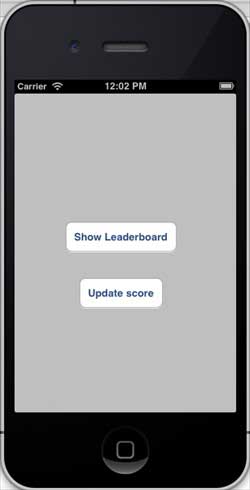
アプリケーションを実行すると、出力結果は次のようになります。
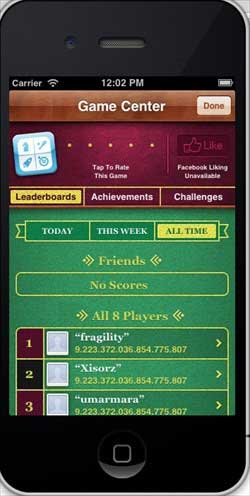
「ランキングを表示」をクリックすると、画面には次のように表示されます。
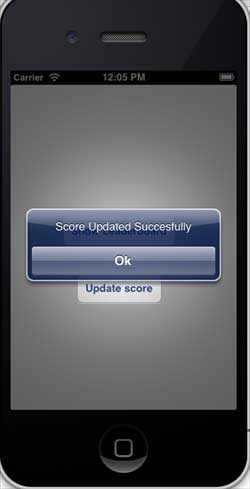
「スコアを更新」をクリックすると、スコアはランキングに更新され、次の図のようなメッセージが表示されます。