HTML Table
HTML Table and by<table>The <table> tag defines it.
An HTML table is a markup language element used to display structured data.
Each table has several rows (defined by the <tr> tag), each row is divided into several cells (defined by the <td> tag), and a table can contain a header row (defined by the <th> tag) to define column titles.<tr>:tr stands for table row, representing a row in the table.<td>:td stands for table data, representing a data cell in the table.<th>:th stands for table header, representing a header cell in the table.
- trData cells can contain text, images, lists, paragraphs, forms, horizontal lines, tables, etc.
- tdHTML Table Generator:
- thHere is a simple HTML table example:
Instance
Column Title 1https://www.jyshare.com/front-end/7688/。
Here is a simple HTML table example:
Instance
<thead>
<tr>
<th>Row 1, Column 1</th>
<th>Row 1, Column 2</th>
<th>Row 1, Column 3</th>
</tr>
</thead>
<tbody>
<tr>
<td>Row 2, Column 1</td>
<td>Row 2, Column 2</td>
<td>Row 2, Column 3</td>
</tr>
<tr>
<td>In the example code above, the <table> element represents the entire table, which includes two main parts: <thead> and <tbody>.</td>
<td><thead> is used to define the table's header section:</td>
<td>In <thead>, the <th> element is used to define column titles. In the example, the column titles are "Column Title 1", "Column Title 2", and "Column Title 3".</td>
</tr>
</tbody>
</table>
<tbody> is used to define the table's body section:
In <tbody>, the <tr> element is used to define rows, and <td> elements are used to define cell data. In the example, there are two rows of data, each containing three cells.By using the <th> element to define column titles, they can be displayed in bold and separated from regular cells.
HTML tables can also have other parts such as <tfoot> (table footer) and <caption> (table title). <tfoot> is used to define summary, statistical information, etc. at the bottom of the table. <caption> is used to define a title for the entire table.HTML tables support merging cells and spanning rows/columns, as well as applying other styles and attributes to meet various needs.
We can also use CSS to further customize the style and appearance of the table.
Online Instance
Instance
One Column:

Online Instance
Instance
Instance
Instance
Table Instance
Instance
HTML Table and Border Properties
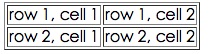
HTML Table and Border Properties
Use the border property to display a table with a border:
Instance
Instance
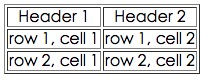
HTML Table Headers
Table headers are defined using the <th> tag.
Most browsers will display headers as bold, centered text:
Instance
In the browser, it displays as follows:
More Instances
Borderless Table
This example demonstrates a table without a border.
Table Headers (Heading) in the Table
This example demonstrates how to display table headers.
Table with a Title (caption)
This example demonstrates a table with a title.
Cross-row or cross-column table cells
This example demonstrates how to define cross-row or cross-column table cells.
Table Tags within Cells
This example demonstrates how to display elements within different elements.
Cell Padding (Cell padding)
This example demonstrates how to use cell padding to create space between cell content and the cell border.
Cell Spacing (Cell spacing)
This example demonstrates how to use cell spacing to increase the distance between cells.
HTML Table Tags
| Tag | Description |
|---|---|
| <table> | Defines a table |
| <th> | Defines a table header |
| <tr> | Defines a table row |
| <td> | Defines a table cell |
| <caption> | Defines a table title |
| <colgroup> | Defines a group of columns for a table |
| <col> | Defines attributes for table columns |
| <thead> | Defines a table footer |
| <tbody> | Defines a table body |
| <tfoot> | Defines a table footer |