TypeScript Conditional Statements
Conditional statements are used to perform different actions based on different conditions.
TypeScript conditional statements determine the code block to execute based on the result (True or False) of one or more statements.
The execution process of conditional statements can be briefly understood through the following diagram:
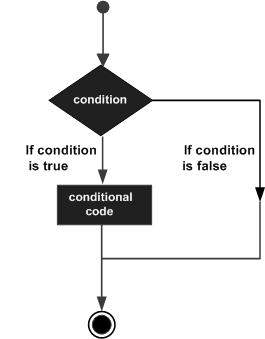
Conditional Statements
Usually when writing code, you always need to perform different actions for different decisions. You can use conditional statements in your code to accomplish this task.
In TypeScript, we can use the following conditional statements:
- if statement- Use this statement to execute code only when the specified condition is true
- if...else statement- Execute code when the condition is true, and execute other code when the condition is false
- if...else if....else statement- Use this statement to select one of multiple code blocks to execute
- switch statement- Use this statement to select one of multiple code blocks to execute
if statement
A TypeScript if statement consists of a boolean expression followed by one or more statements.
Syntax
The syntax format is as follows:
if(boolean_expression){
    # 在布尔表达式 boolean_expression 为 true 执行
}
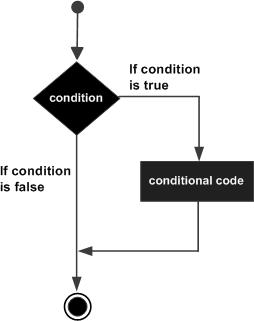
If the boolean expression boolean_expression is true, the code block inside the if statement will be executed. If the boolean expression is false, the first set of code after the if statement (after the closing brace) will be executed.
Flowchart
Example
Compiling the above code produces the following JavaScript code:
Executing the above JavaScript code produces the output result:
The number is positive
if...else statement
An if statement can be followed by an optional else statement. The else statement executes when the boolean expression is false.
Syntax
The syntax format is as follows:
if(boolean_expression){
   # 在布尔表达式 boolean_expression 为 true 执行
}else{
   # 在布尔表达式 boolean_expression 为 false 执行
}
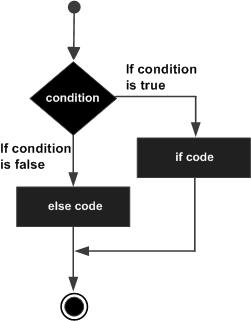
If the boolean expression boolean_expression is true, the code inside the if block is executed. If the boolean expression is false, the code inside the else block is executed.
Flowchart
Example
TypeScript
Compiling the above code produces the following JavaScript code:
JavaScript
Executing the above JavaScript code produces the output result:
Even number
if...else if....else statement
The if...else if....else statement is useful when there are multiple judgment conditions to execute.
Syntax
The syntax format is as follows:
if(boolean_expression 1) {
    # 在布尔表达式 boolean_expression 1 为 true 执行
} else if( boolean_expression 2) {
    # 在布尔表达式 boolean_expression 2 为 true 执行
} else if( boolean_expression 3) {
    # 在布尔表达式 boolean_expression 3 为 true 执行
} else {
    # 布尔表达式的条件都为 false 时执行
}
Note the following points:
Aifjudgment statement can have 0 or 1elsestatement, it must be afterelse..ifthe statement.
Aifjudgment statement can have 0 or moreelse..if, these statements must be beforeelsebefore.
Once executedelse..ifthe code within, the followingelse..iforelsewill no longer be executed.
Example
TypeScript
Compiling the above code produces the following JavaScript code:
JavaScript
Executing the above JavaScript code produces the output result:
2 是正数
switch...case statement
Aswitchstatement allows testing a variable against multiple values. Each value is called a case, and the variable being tested is checked against eachswitch casecase.
switchThe syntax of the statement:
switchThe statement must follow the rules below:
- switchIn the statement, theexpressionis an expression to be compared, and can be of any type, including primitive data types (such as number, string, boolean), object types (such as object, Array, Map), and custom types (such as class, interface, enum), etc.
- In a switch statement, there can be any number of case statements. Each case is followed by a value to be compared and a colon.
- The case'sconstant-expressionmust have the same or compatible data type as the variable expression in the switch.
- When the variable being tested equals the constant in the case, the statements following that case will be executed untilbreakthe statement is reached.
- When abreakstatement is encountered, the switch terminates, and the control flow jumps to the next line after the switch statement.
- Not every case needs to contain abreak. If the case statement does not containbreak, the control flow willcontinuethrough the subsequent cases until a break is encountered.
- Aswitchstatement can have an optionaldefaultcase, which appears at the end of the switch. The default keyword indicates the code block to execute when the expression's value does not match any of the case values. Thebreakstatement in the default case is not required.
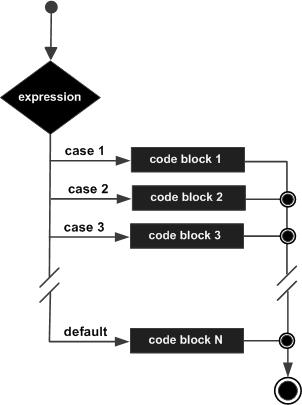
Flowchart
Example
TypeScript
Compiling the above code produces the following JavaScript code:
JavaScript
Executing the above JavaScript code produces the output result:
ExcellentOther Extensions