TypeScript Declaration Files
The declaration file is thetranslator between TypeScript and JavaScript libraries, which tells TypeScript what functions a JavaScript library exposes, what types the parameters are, and what types the return values are.
Let's start with a problem.
Suppose you are writing a project in TypeScript and need to include a third-party JavaScript library (such as jQuery). You might write code like this:
$('#foo');
// 或
jQuery('#foo');
This code works perfectly fine in a pure JavaScript project, but in a TypeScript file it will directly cause an error:
jQuery('#foo');

// index.ts(1,1): error TS2304: Cannot find name 'jQuery'.
Why does it cause an error? Because TypeScript doesn't recognize$andjQuerywhat it is.
TypeScript's core feature is type checking—it needs to know the type of every variable and every function at compile time. But jQuery is a pure JavaScript library with no type information, so TypeScript naturally cannot understand it.
Quick fix: the declare keyword
The simplest way is to use thedeclarekeyword to manually tell TypeScript: "This variable exists, and its type is like this":
declare var jQuery: (selector: string) => any;

jQuery('#foo');
The meaning of this line of code is: declare a variablejQuery, which is a function that takes astringtype parameter, and the return value can be any type (any)。
Now TypeScript won't report an error, because the compiler already knows what type jQuery is.
declareTypes declared with the keyword only take effect at compile time; they are completely removed in the compiled JavaScript code and do not affect runtime behavior.
The compiled JavaScript code of the above example is:
jQuery('#foo');
As you can see,declarethe statement disappeared, leaving only the actual calling code.
ButdeclareIt can only solve the temporary problem of a single file. If a library has many methods and many classes, it is obviously unrealistic to write declare manually in every file. This is where declaration files come into play.
Declaration files: a once-and-for-all solution
A declaration file puts all thedeclaredeclarations into a single separate file, and any TypeScript file in the project can reference it.
File naming conventions
Declaration files uniformly use.d.tsas the suffix,dwhich stands for declaration. For example:
example.d.ts
Basic syntax
The syntax for declaring a module is as follows:
declare module Module_Name {
}
In a TypeScript file, use the triple-slash directive to include the declaration file:
/// <reference path = "example.d.ts" />
The triple-slash directive is TypeScript-specific syntax used to tell the compiler to include the specified declaration file during compilation.
Declaration files for many popular third-party libraries (such as jQuery, Lodash) are already maintained by the community and stored inDefinitelyTypedthe project. You just need to install the corresponding@types/xxxpackage via npm and you can use it without writing it manually.
Complete example: creating declaration files from scratch
The following complete example demonstrates the entire process of creating and using a declaration file.
The entire process involves the following files:
| File | Purpose |
|---|---|
| CalcThirdPartyJsLib.js | Third-party JavaScript library (pure JS, no type information) |
| Calc.d.ts | Declaration file (manually written, describes the library's types) |
| CalcTest.ts | TypeScript business code (references the declaration file, calls the library) |
| CalcTest.js | Compiled output (JS file compiled by tsc) |
| example.html | Final page running in the browser |
Step 1: Create the third-party JavaScript library
Suppose we have a third-party library that provides cumulative summation functionality. It uses the namespaceExampleto organize code and avoid variable name conflicts:
CalcThirdPartyJsLib.js file code:
// This is a simulated third-party JavaScript library
// Declare the Example namespace variable (create an empty object if it does not exist)
var Example;
// Use an immediately invoked function expression (IIFE) to encapsulate the code and prevent internal variables from leaking into the global scope
(function(Example) {
// Calc constructor, used to create calculator objects
var Calc = (function () {
function Calc() {
// No initialization parameters are needed for now; keep the constructor for future extension
}
})
// doSum method: calculates the sum of all integers from 0 to limit
// limit (required): the upper bound of the sum, inclusive
// Example: when limit=10, calculates 0+1+2+...+10 = 55
Calc.prototype.doSum = function (limit) {
var sum = 0;
for (var i = 0; i <= limit; i++) {
sum = sum + i;
}
return sum;
}
// Attach the Calc constructor to the Example namespace
// This way, the outside can create instances via new Example.Calc()
Example.Calc = Calc;
return Calc;
})(Example || (Example = {}));
// Internal self-test code of the library
var test = new Example.Calc();
This library uses a common pattern: the immediately invoked function expression (IIFE). In plain terms, it wraps the code in a function and runs it immediately, so variables defined inside the function do not leak out, avoiding name conflicts with other code.
Step 2: Write the declaration file
Now we have a JS library, but it has no type information. We need to create a declaration file that only describes the "shape" of the library—what classes there are, what methods there are, what types the parameters and return values are—but does not contain any actual code logic:
Calc.d.ts file code:
// This is a declaration file; it contains only type information, not any executable code
// Declare the Example module, corresponding to the Example namespace in the JS library
declare module Example {
// Declare the Calc class, telling TypeScript that this class can be instantiated with new
export class Calc {
// Declare the doSum method: takes a number parameter and returns a number
// Note: only the method signature is declared here, without a method body (braces)
doSum(limit: number): number;
}
}
The biggest difference between a declaration file and a normal .ts file: a declaration file has only type signatures, no implementation code. It only answers "what this function looks like", not "what this function does".
Step 3: Use it in TypeScript code
Now write business code. After referencing the declaration file, you can use this third-party JS library just like a native TypeScript library:
CalcTest.ts file code:
// Triple-slash directive: tells the TypeScript compiler to include the declaration file
/// <reference path = "Calc.d.ts" />
// Create a Calc instance; TypeScript can now correctly identify the type of obj
var obj = new Example.Calc();
// obj.doSum("Hello"); // Compilation error! "Hello" is a string, but doSum requires a number argument
console.log(obj.doSum(10)); // Correct call: pass 10, expecting 55
Pay attention to that commented-out line:
obj.doSum("Hello");
If you uncomment this line, TypeScript will report an error during compilation, because the declaration file already specifies that doSum only accepts a parameter of type number. This is type checking protecting you—errors are exposed while writing code, instead of crashing at runtime in the browser.
Step 4: Compile TypeScript
Use the built-intsccommand to compile:
tsc CalcTest.ts
After compilation, it will generateCalcTest.jsfile, with the following content:
CalcTest.js compiled output:
/// <reference path = "Calc.d.ts" />
var obj = new Example.Calc();
//obj.doSum("Hello"); // Compilation error
console.log(obj.doSum(10)); // Output: prints 55 to the console
It can be seen that the triple-slash directives and type information in the declaration files are gone from the compiled output, leaving only pure JavaScript runtime code.
Step 5: Run in the browser
Finally, create an HTML page to link all the JS files together:
Example
<html>
<head>
<meta charset="utf-8">
<title>Example Tutorial (example.com)</title>
<!-- Step 1: Load the third-party library to make the Example namespace globally available -->
<script src = "CalcThirdPartyJsLib.js"></script>
<!-- Step 2: Load the compiled business code -->
<script src = "CalcTest.js"></script>
</head>
<body>
<h1>Declaration File Test</h1>
<p>Let's give it a try.</p>
</body>
</html>
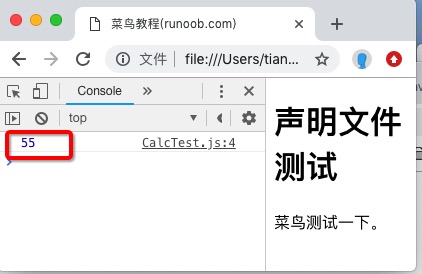
Open this HTML file in a browser, open the console (F12), and you can see the output:
55
This is the return value of doSum(10): 0+1+2+...+10 = 55.
Summary
A declaration file is essentially a "type manual" that allows TypeScript to understand and check pure JavaScript libraries.
The entire workflow can be summarized in three steps:
1. Get a JS library and analyze which APIs it exposes.
2. Write.d.tsa declaration file, describing the type signatures of these APIs.
3. Reference the declaration file in TypeScript code to enjoy full type-checking protection.
Other ExtensionsFor commonly used third-party libraries in daily development, the vast majority already have ready-made declaration files (installed vianpm install @types/xxx). Only when you use a very obscure library or an internal private library do you need to manually write declaration files.