TypeScript Loops
Sometimes, we may need to execute the same block of code multiple times. In general, statements are executed sequentially: the first statement in a function executes first, followed by the second, and so on.
Programming languages provide various control structures that allow for more complex execution paths.
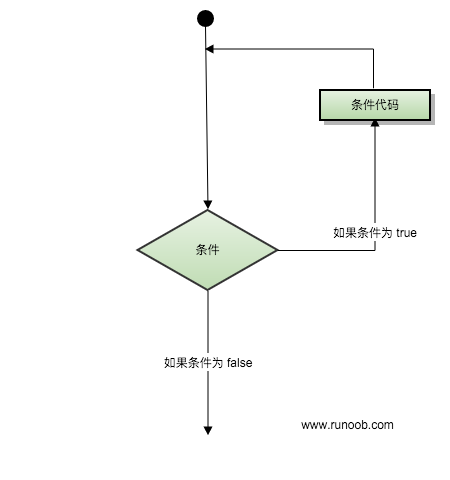
Loop statements allow us to execute a statement or a group of statements multiple times. Below is a flowchart of loop statements in most programming languages:
for Loop
The TypeScript for loop is used to execute a sequence of statements multiple times, simplifying the code that manages loop variables.
Syntax
The syntax format is as follows:
for ( init; condition; increment ){
    statement(s);
}
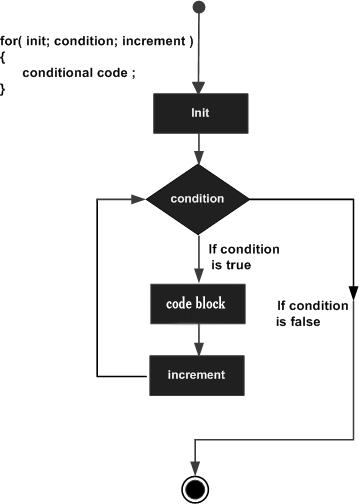
The following is an analysis of the for loop control flow:
- initIt is executed first and only once. This step allows you to declare and initialize any loop control variables. You may also leave this part empty, as long as a semicolon appears.
- Next, evaluatecondition. If it is true, the loop body is executed. If it is false, the loop body is not executed, and the control flow jumps to the next statement immediately following the for loop.
- After the for loop body is executed, the control flow jumps back to the aboveincrementstatement. This statement allows you to update the loop control variable. This statement can be left empty, as long as a semicolon appears after the condition.
- The condition is evaluated again. If it is true, the loop executes, and this process repeats continuously (loop body, then increment step value, then re-evaluate the condition). When the condition becomes false, the for loop terminates.
Here, statement(s) can be a single statement or a block of statements.
condition can be any expression. When the condition is true, the loop executes; when the condition is false, the loop exits.
Flowchart
Example
The following example calculates the factorial of 5. The for loop generates numbers from 5 down to 1 and calculates the product of the numbers in each loop iteration.
TypeScript
Compiling the above code produces the following JavaScript code:
JavaScript
Executing the above JavaScript code produces the following output result:
120
for...in Loop
The for...in statement is used to iterate over a collection or list of values for output.
Syntax
The syntax format is as follows:
for (var val in list) {
    //语句
}
val needs to be of type string or any.Example
TypeScript
Compiling the above code produces the following JavaScript code:
JavaScript
Executing the above JavaScript code produces the following output result:
a

b

c
for…of, forEach, every, and some Loops
Additionally, TypeScript also supports for…of, forEach, every, and some loops.
The for...of statement creates a loop to iterate over iterable objects. The for...of loop introduced in ES6 replaces for...in and forEach(), and supports the new iteration protocol. for...of allows you to traverse iterable data structures such as Arrays, Strings, Maps, Sets, etc.
TypeScript for...of Loop
forEach, every, and some are JavaScript loop syntax. Since TypeScript is a syntactic superset of JavaScript, it naturally supports them by default.
Because forEach cannot return during iteration, you can use every and some to replace forEach.
TypeScript forEach Loop
TypeScript every Loop
while Loop
The while statement repeatedly executes a statement or group of statements while the given condition is true. The condition is tested before the loop body is executed.
Syntax
The syntax format is as follows:
while(condition)
{
   statement(s);
}
Here, statement(s) can be a single statement or a block of statements.
condition can be any expression. When the condition is true, the loop executes. When the condition is false, the program flow exits the loop.
Flowchart
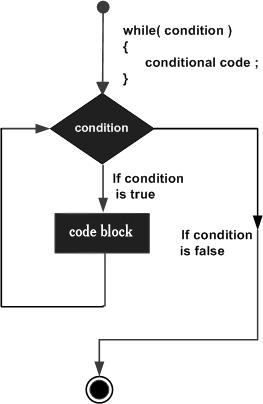
In the diagram,whileThe key point of the loop is that it may not execute even once. When the condition is false, the loop body is skipped, and the next statement immediately following the while loop is executed directly.
Example
TypeScript
Compiling the above code produces the following JavaScript code:
JavaScript
Executing the above JavaScript code produces the following output result:
5 的阶乘为:120
do...while Loop
Unlikeforandwhileloops, which test the loop condition at the head of the loop.do...whileThe loop checks its condition at the tail of the loop.
Syntax
The syntax format is as follows:
do
{
   statement(s);
}while( condition );
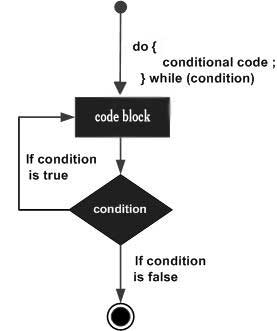
Please note that the conditional expression appears at the tail of the loop, so the statement(s) in the loop will execute at least once before the condition is tested.
If the condition is true, the control flow jumps back to the do above, and the statement(s) in the loop are executed again. This process repeats continuously until the given condition becomes false.
Flowchart
Example
TypeScript
Compiling the above code produces the following JavaScript code:
JavaScript
Executing the above JavaScript code produces the following output result:
10
9
8
7
6
5
4
3
2
1
0
break Statement
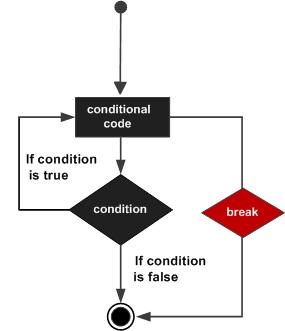
breakThe break statement has the following two uses:
- WhenbreakWhen the break statement appears inside a loop, the loop terminates immediately, and the program flow continues to execute the next statement immediately following the loop.
- It can be used to terminateswitcha case in the switch statement.
If you are using nested loops (i.e., one loop nested inside another), the break statement stops executing the innermost loop, and then starts executing the next line of code after the block.
Syntax
The syntax format is as follows:
break;
Flowchart
Example
TypeScript
Compiling the above code produces the following JavaScript code:
JavaScript
Executing the above JavaScript code produces the following output result:
在 1~10 之间第一个被 5 整除的数为 : 5
continue Statement
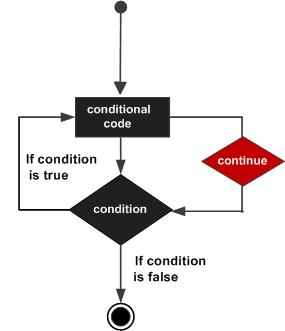
continueThe continue statement is somewhat likebreakthe break statement. But it is not a forced termination; continue skips the code in the current loop and forces the start of the next iteration.
Forforloops,continueafter the continue statement is executed, the increment statement will still be executed. Forwhileanddo...whileloops,continuethe continue statement re-executes the conditional evaluation statement.
Syntax
The syntax format is as follows:
continue;
Flowchart
Example
TypeScript
Compiling the above code produces the following JavaScript code:
JavaScript
Execute the above JavaScript code, the output result is:
0 ~20 之间的奇数个数为: 10
Infinite Loop
An infinite loop is a loop that keeps running and never stops. Both for and while loops can create infinite loops.
Syntax for creating an infinite loop with for:
for(;;) {
   // 语句
}
Example
for(;;) {
   console.log("这段代码会不停的执行")
}
Syntax for creating an infinite loop with while:
while(true) {
   // 语句
}
Example
while(true) {
   console.log("这段代码会不停的执行")
}
Other Extensions