Next.js Pages and Routing
Next.js uses file-system routing, meaning that the pages in your application are automatically determined by the structure of the file system. Each file and folder corresponds to a route, so you don't need to explicitly configure every path like in traditional React routing. This makes the development process more intuitive and simpler.
Relationship between pages and routes:In Next.js, each page is automatically mapped to a route by a file in the app/ or pages/ directory. The path and filename of each file determine the URL of that page.
-
Basic page structure:In Next.js, a page is any .tsx or .js file in the app/ or pages/ directory. Each page file automatically becomes a route in the application.
Next.js's routing system is very flexible, supporting static pages, dynamic routes, and nested routes, allowing developers to easily implement complex application structures.
- File-system routing: Pages and routes are automatically mapped via
app/orpages/the file structure in the directory. - Dynamic routes: You can use square brackets (
[ ]) to create dynamic routes and handle dynamic parameters in the URL. - Nested routes: You can create nested routes using subdirectories to implement multi-level route structures.
- Route navigation: Use the
next/linkcomponent to implement navigation between pages.
Next.js 13 introduced a new app directory, which coexists with the traditional pages directory and provides a more flexible way to organize routes and layouts.
Assume the project directory structure is as follows:
app/
├── page.tsx             # 对应根路径 /
├── about/
│   └── page.tsx         # 对应 /about
├── [slug]/
│   └── page.tsx         # 对应动态路径,如 /[slug]
page.tsxfile: Each page will have apage.tsxfile. This file is the component content corresponding to that route.- Dynamic routes: If there are dynamic parameters in the page path, you can use square brackets (
[ ]) to define dynamic routes. For example,[slug]indicates that the path can accept any value as theslugparameter.
Default Pages and Routes
Next.js automatically creates routes for the files in your app/ or pages/ folder.
The following are some common route examples:
app/page.tsxcorresponds to the/path.app/about/page.tsxcorresponds to the/aboutpath.app/[slug]/page.tsxcorresponds to/[slug], and will match any URL path, such as/post/1or/product/xyz。
Dynamic Routes
Dynamic routes allow you to dynamically render pages based on different parts of the URL.
In Next.js, you can implement dynamic routes by creating folders or files with square brackets.
For example, suppose you want to render different content based on different article IDs, you can do this:
app/
├── [id]/
│   └── page.tsx        # 动态路由,匹配任何 `/[id]` 的路径
[id]is a placeholder for the dynamic route. It can match anyidparameter in the URL.
Getting Dynamic Route Parameters
In Next.js, you can use the useParams hook to access dynamic route parameters. For example:
Example
import { useParams } from 'next/navigation';
export default function Post() {
const params = useParams();
const { id } = params; // Get the dynamic route parameter `id`
return <div>Post ID: {id}</div>;
}
When a user visits /post/123, id will be automatically set to 123 and displayed on the page.
Nested Routes
Next.js also supports nested routes, that is, creating sub-routes under a route. For example:
app/
├── about/
│   ├── page.tsx          # /about 路由页面
│   ├── team/
│   │   └── page.tsx      # /about/team 子路由页面
│   └── contact/
│       └── page.tsx      # /about/contact 子路由页面
This approach gives your application a hierarchical structure while keeping the URL paths readable.
Custom Route Rules
If you want to customize route behavior, you can configure it through the next.config.js file. However, Next.js already provides out-of-the-box functionality for most common routing needs, so no additional configuration is required.
Special Pages and Route Features
_app.jsand_document.js: In Next.js,_app.jsis the root component of the application, allowing you to provide common layouts and state for all pages._document.jsis mainly used to modify the structure of the HTML document (e.g.,headandbodytag)._error.js: You can customize error pages to handle 404 or other types of errors.
Example
Creating a Static Page
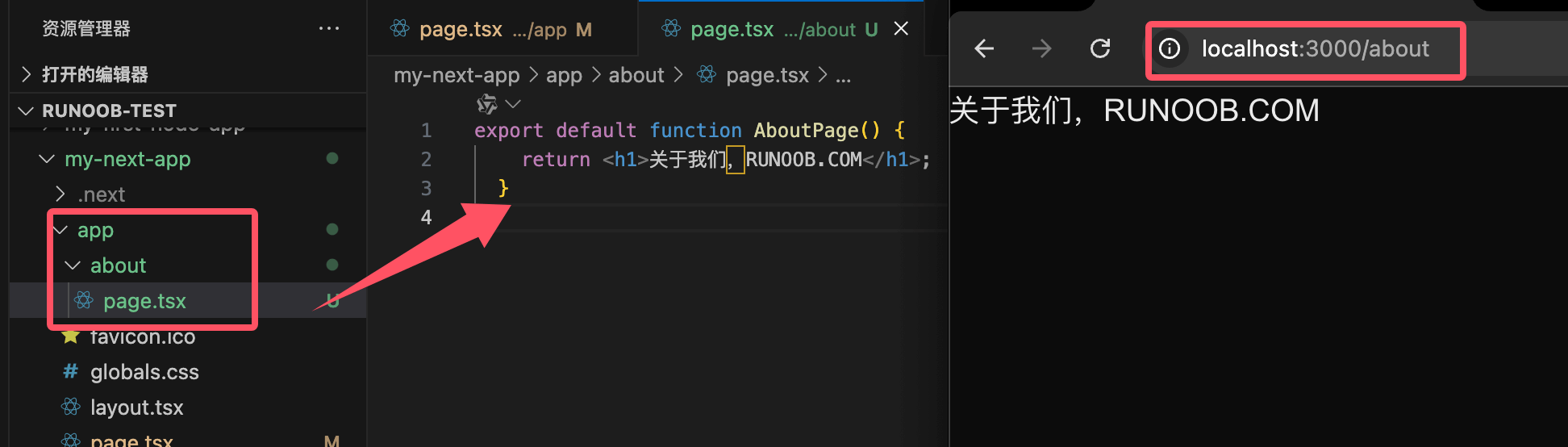
Let's take creating a simple static page as an example. Create an about/page.tsx file with the following content:
Example
return <h1>About Us</h1>;
}
When you visit the /about path, Next.js will automatically render that page.
Using Dynamic Routes
Suppose you want to render a page based on the article ID. Create an app/[id]/page.tsx file with the following content:
Example
export default function PostPage() {
const { id } = useParams();
return <h1>Post ID: {id}</h1>;
}
Visiting /123 will display Post ID: 123.
Route Navigation
Next.js uses the component provided by next/link for route navigation. You can add links in your pages to navigate to other pages.
Example
export default function HomePage() {
return (
<div>
<h1>Welcome to Next.js!</h1>
<Link href="/about">About Us</Link>
</div>
);
}
<Link />The component is used to navigate between pages while maintaining the single-page application (SPA) experience.