Next.js Directory Structure
In Next.js, the directory structure is organized based on a file-system routing mechanism, which means your file and folder structure directly determines the routing and page layout of your application.
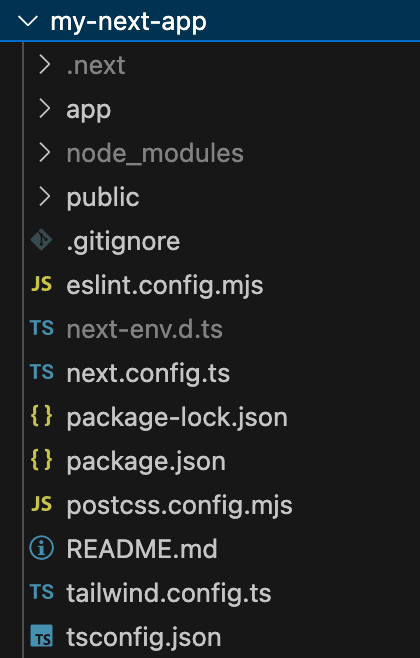
app/The directory is used to store page and layout files, and is the core directory in Next.js.public/It is used to store public static resource files.styles/It is used to store style files.node_modules/Stores all dependency packages of the project.package.jsonIt is the project configuration file, containing project dependencies and script commands.next.config.jsIt is used to customize Next.js configuration.
Root Directory
The root directory typically contains some basic configuration files and dependencies. Common files and folders are as follows:
my-next-app/
├── app/                 # 存放应用页面和布局文件
├── public/              # 存放静态资源文件(如图片、字体)
├── styles/              # 存放样式文件(CSS、Sass等)
├── node_modules/        # 存放项目依赖
├── package.json         # 项目配置文件
├── next.config.js       # Next.js 配置文件(可选)
└── .gitignore           # Git 忽略文件
app/: This directory is the new way in Next.js to organize page and layout files. All routing and pages are created based on this directory.public/: This directory stores public static files, such as images, fonts, favicon, etc. You can directly access these files via URL.styles/: Store your CSS, Sass, or other style files.
app/ Directory
The app/ directory is the core of Next.js, storing pages, layouts, and other related files.
The following is some common structure of the app/ directory:
app/
├── layout.tsx           # 根布局文件
├── page.tsx             # 根页面
└── [slug]/              # 动态路由目录
    ├── page.tsx         # 动态页面
└── layout.tsx # 特定页面的布局layout.tsx: In this file, the root layout or page layout is defined, usually used to set the global structure (such as<html>and<body>tag). All sub-pages will be nested within this layout.page.tsx: Each page component should have apage.tsxfile. This file represents the page content corresponding to that route. For example,app/page.tsxcorresponds to the root path (/) page.- Dynamic Routes: Next.js supports dynamic routes. The names of dynamic route directories are enclosed in square brackets, such as
[slug]. This means you can load different pages based on different parts of the URL. For example,[slug]/page.tsxwill be based onslugparameter to dynamically render the page.
public/ Directory
This directory is used to store static assets. It allows you to expose resources such as images, fonts, icons, etc., in the application, and they can be loaded by directly accessing the file path.
public/
├── images/              # 存放图片文件
├── fonts/               # 存放字体文件
└── favicon.ico          # 网站图标
- Files can be accessed through
/images/and other paths directly. For example,public/images/logo.pngcan be accessed viahttp://localhost:3000/images/logo.png.
styles/ Directory
In the styles/ directory, you can organize and manage your style files. Next.js supports CSS Modules, global styles, and other CSS solutions.
styles/
├── Home.module.css      # CSS 模块化样式
└── globals.css          # 全局样式
Home.module.css: This is a CSS Module file. By default, Next.js automatically uses CSS Modules for each component, ensuring the style scope is limited to that component.globals.css: Stores global styles, usually used to set global fonts, colors, etc.
node_modules/ Directory
This directory stores all dependency packages of the project. It is automatically generated by npm or yarn based on the dependency information in the package.json file, and does not require manual operation.
package.json File
package.json is the core configuration file of the project, recording the project's dependencies, scripts, and other metadata. You can define commands such as start, build, and develop here.
Example
"scripts": {
"dev": "next dev",
"build": "next build",
"start": "next start",
"lint": "next lint"
}
}
next.config.js File (Optional)
This is an optional configuration file used to configure the behavior of Next.js. For example, you can set static file optimization, routing rules, Webpack configuration, etc., in this file.
Example
reactStrictMode: true,
}
Project Structure Example
The following is a typical Next.js project structure example:
Example: Next.js Project Structure
├── app/
│ ├── layout.js //Root layout
│ ├── page.js //Home page
│ ├── about/
│ │ ├── layout.js // /Layout for about
│ │ └── page.js // /about page
│ ├── blog/
│ │ ├── layout.js // /Layout for blog
│ │ ├── page.js // /blog list page
│ │ └── [slug]/
│ │ └── page.js // /blog/:slug detail page
│ └── dashboard/
│ ├── layout.js // /Layout for dashboard
│ └── page.js // /dashboard page
├── public/
│ ├── logo.png //Static assets
│ └── favicon.ico //Website icon
├── node_modules/ //Project dependencies
├── package.json //Project configuration file
├── next.config.js //Next.js configuration file
└── .next/ //Build output directory
Comparison of app Directory and Traditional pages Directory
Next.js 13 introduced the new app directory. It coexists with the traditional pages directory and provides a more flexible way to organize routing and layouts.
| Feature | pagesDirectory | appDirectory |
|---|---|---|
| Route definition | File-system routing | Folder routing |
| Layout management | Manual implementation | Nested layouts |
| Data fetching | getStaticPropswait | Server Components + async/await |
| File naming | Free naming | Must be namedpage.js |
| Special files | _app.js, _document.jswait | layout.js, loading.jswait |
| Performance optimization | Manual optimization | Default optimization |
| Compatibility | Fully compatible | Beta stage, requires manual enabling |