HTML canvas bezierCurveTo()Method
 Canvas Object
Example
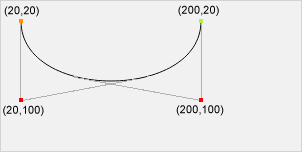
Draw a cubic Bézier curve:
JavaScript:
var ctx=c.getContext("2d");
ctx.beginPath();
ctx.moveTo(20,20);
ctx.bezierCurveTo(20,100,200,100,200,20);
ctx.stroke();
Try it Yourself »
Browser Support


Internet Explorer 9, Firefox, Opera, Chrome and Safari support the bezierCurveTo() method.
Note:Internet Explorer 8 and earlier versions do not support the <canvas> element.
Definition and Usage
The bezierCurveTo() method adds a point to the current path by using the specified control points that represent a cubic Bézier curve.
A cubic Bézier curve requires three points. The first two points are control points used in the cubic Bézier calculation, and the third point is the end point of the curve. The start point of the curve is the last point in the current path. If the path does not exist, then use thebeginPath()andmoveTo()method to define the start point.
Tip:Please see thequadraticCurveTo()method. It has one control point instead of two.
| JavaScript Syntax: | context.bezierCurveTo(cp1x,cp1y,cp2x,cp2y,x,y); |
|---|
Parameter Values
| Parameter | Description |
|---|---|
| cp1x | The x-coordinate of the first Bézier control point. |
| cp1y | The y-coordinate of the first Bézier control point. |
| cp2x | The x-coordinate of the second Bézier control point. |
| cp2y | The y-coordinate of the second Bézier control point. |
| x | The x-coordinate of the end point. |
| y | The y-coordinate of the end point. |
Other Extensions