HTML canvas arc()Method
 Canvas Object
Example
Create a circle:
JavaScript:
var c=document.getElementById("myCanvas");
var ctx=c.getContext("2d");
ctx.beginPath();
ctx.arc(100,75,50,0,2*Math.PI);
ctx.stroke();
Try it Yourself »
Browser Support


Internet Explorer 9, Firefox, Opera, Chrome, and Safari support the arc() method.
Note:Internet Explorer 8 and earlier versions do not support the <canvas> element.
Definition and Usage
The arc() method creates an arc/curve (used to create a circle or part of a circle).
Tip:To create a circle with arc(), set the start angle to 0 and the end angle to 2*Math.PI.
Tip:Use thestroke()orfill()method to draw the actual arc on the canvas.
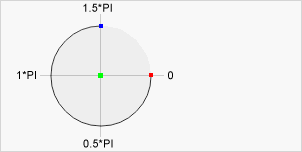
Center:
arc(100,75,50,0*Math.PI,1.5*Math.PI)Start angle:
arc(100,75,50,0,1.5*Math.PI)
End angle:
arc(100,75,50,0*Math.PI,1.5*Math.PI)
| JavaScript Syntax: | context.arc(x,y,r,sAngle,eAngle,counterclockwise); |
|---|
Parameter Values
| Parameter | Description |
|---|---|
| x | The x-coordinate of the center of the circle. |
| y | The y-coordinate of the center of the circle. |
| r | The radius of the circle. |
| sAngle | The starting angle, in radians (3 o'clock position of the arc's circle is 0 degrees). |
| eAngle | The ending angle, in radians. |
| counterclockwise | Optional. Specifies whether to draw counterclockwise or clockwise. False = clockwise, true = counterclockwise. |
Other Extensions