iOS Auto Layout
Einführung
Auto Layout wurde in iOS 6.0 eingeführt und unterstützt nur iOS 6.0 und höhere Versionen. Es hilft uns, Oberflächen für mehrere Geräte zu erstellen.
Beispielschritte
1. Erstellen Sie eine einfache View-basierte Anwendung
2. Ändern Sie den Inhalt der Datei ViewController.m wie unten gezeigt
#import "ViewController.h"
@interface ViewController ()
@property (nonatomic, strong) UIButton *leftButton;
@property (nonatomic, strong) UIButton *rightButton;
@property (nonatomic, strong) UITextField *textfield;

@end
@implementation ViewController

- (void)viewDidLoad{
    [super viewDidLoad];
    UIView *superview = self.view;
    /*1. Create leftButton and add to our view*/
    self.leftButton = [UIButton buttonWithType:UIButtonTypeRoundedRect];
    self.leftButton.translatesAutoresizingMaskIntoConstraints = NO;
    [self.leftButton setTitle:@"LeftButton" forState:UIControlStateNormal];
    [self.view addSubview:self.leftButton];
    /* 2. Constraint to position LeftButton's X*/
    NSLayoutConstraint *leftButtonXConstraint = [NSLayoutConstraint
    constraintWithItem:self.leftButton attribute:NSLayoutAttributeCenterX
    relatedBy:NSLayoutRelationGreaterThanOrEqual toItem:superview attribute:
    NSLayoutAttributeCenterX multiplier:1.0 constant:-60.0f];
    /* 3. Constraint to position LeftButton's Y*/
    NSLayoutConstraint *leftButtonYConstraint = [NSLayoutConstraint
    constraintWithItem:self.leftButton attribute:NSLayoutAttributeCenterY
    relatedBy:NSLayoutRelationEqual toItem:superview attribute:
    NSLayoutAttributeCenterY multiplier:1.0f constant:0.0f];
    /* 4. Add the constraints to button's superview*/
    [superview addConstraints:@[ leftButtonXConstraint,
    leftButtonYConstraint]];
    /*5. Create rightButton and add to our view*/
    self.rightButton = [UIButton buttonWithType:UIButtonTypeRoundedRect];
    self.rightButton.translatesAutoresizingMaskIntoConstraints = NO;
    [self.rightButton setTitle:@"RightButton" forState:UIControlStateNormal];
    [self.view addSubview:self.rightButton];
    /*6. Constraint to position RightButton's X*/
    NSLayoutConstraint *rightButtonXConstraint = [NSLayoutConstraint
    constraintWithItem:self.rightButton attribute:NSLayoutAttributeCenterX
    relatedBy:NSLayoutRelationGreaterThanOrEqual toItem:superview attribute:
    NSLayoutAttributeCenterX multiplier:1.0 constant:60.0f];
    /*7. Constraint to position RightButton's Y*/
    rightButtonXConstraint.priority = UILayoutPriorityDefaultHigh;
    NSLayoutConstraint *centerYMyConstraint = [NSLayoutConstraint
    constraintWithItem:self.rightButton attribute:NSLayoutAttributeCenterY
    relatedBy:NSLayoutRelationGreaterThanOrEqual toItem:superview attribute:
    NSLayoutAttributeCenterY multiplier:1.0f constant:0.0f];
    [superview addConstraints:@[centerYMyConstraint,
    rightButtonXConstraint]];
   //8. Add Text field
    self.textfield = [[UITextField alloc]initWithFrame:
    CGRectMake(0, 100, 100, 30)];
    self.textfield.borderStyle = UITextBorderStyleRoundedRect;
    self.textfield.translatesAutoresizingMaskIntoConstraints = NO;
    [self.view addSubview:self.textfield];
    //9. Text field Constraints
    NSLayoutConstraint *textFieldTopConstraint = [NSLayoutConstraint
    constraintWithItem:self.textfield attribute:NSLayoutAttributeTop
    relatedBy:NSLayoutRelationGreaterThanOrEqual toItem:superview
    attribute:NSLayoutAttributeTop multiplier:1.0 constant:60.0f];
    NSLayoutConstraint *textFieldBottomConstraint = [NSLayoutConstraint
    constraintWithItem:self.textfield attribute:NSLayoutAttributeTop
    relatedBy:NSLayoutRelationGreaterThanOrEqual toItem:self.rightButton
    attribute:NSLayoutAttributeTop multiplier:0.8 constant:-60.0f];
    NSLayoutConstraint *textFieldLeftConstraint = [NSLayoutConstraint
    constraintWithItem:self.textfield attribute:NSLayoutAttributeLeft
    relatedBy:NSLayoutRelationEqual toItem:superview attribute:
    NSLayoutAttributeLeft multiplier:1.0 constant:30.0f];
    NSLayoutConstraint *textFieldRightConstraint = [NSLayoutConstraint
    constraintWithItem:self.textfield attribute:NSLayoutAttributeRight
    relatedBy:NSLayoutRelationEqual toItem:superview attribute:
    NSLayoutAttributeRight multiplier:1.0 constant:-30.0f];
    [superview addConstraints:@[textFieldBottomConstraint ,
    textFieldLeftConstraint, textFieldRightConstraint,
    textFieldTopConstraint]];
}
- (void)didReceiveMemoryWarning
{
    [super didReceiveMemoryWarning];
    // Dispose of any resources that can be recreated.
}
@end
Ausgabe
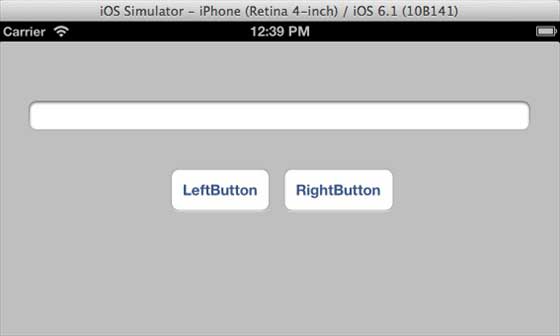
Führen Sie die Anwendung aus, und Sie sehen die folgende Ausgabe im iPhone-Simulator.
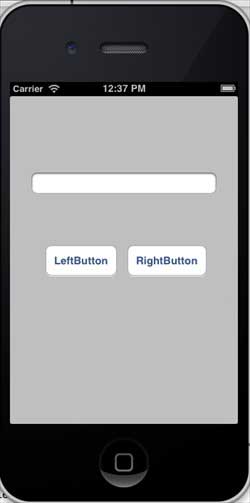
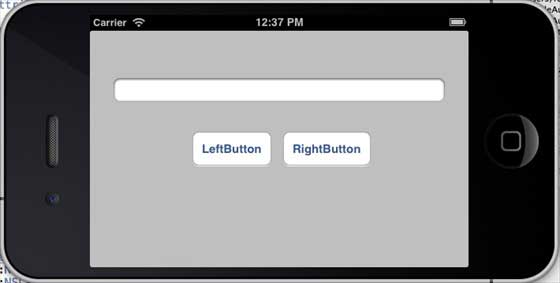
Wenn wir den Simulator auf Querformat umstellen, sieht die Ausgabe wie folgt aus:
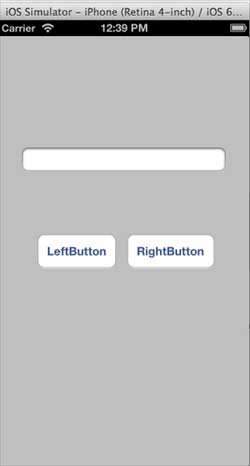
Wenn wir dieselbe Anwendung im iPhone-5-Simulator ausführen, sieht die Ausgabe wie folgt aus:
Wenn wir den Simulator auf Querformat umstellen, sieht die Ausgabe wie folgt aus: