XSL-FO Pages
XSL-FO uses page templates named "Page Masters" to define the layout of pages.
XSL-FO Page Templates
XSL-FO uses page templates named "Page Masters" to define the layout of pages. Each template must have a unique name:
<fo:region-body margin="5in" />
</fo:simple-page-master>
<fo:simple-page-master master-name="left">
<fo:region-body margin-left="2in" margin-right="3in" />
</fo:simple-page-master>
<fo:simple-page-master master-name="right">
<fo:region-body margin-left="3in" margin-right="2in" />
</fo:simple-page-master>
In the example above, three <fo:simple-page-master> elements define three different templates. Each template (page-master) has a different name.
The first template is named "intro". It can be used as a template for the introduction page.
The second and third templates are named "left" and "right". They can be used as page templates for even and odd page numbers.
XSL-FO Page Size
XSL-FO uses the following attributes to define the page size:
- page-width defines the width of the page
- page-height defines the height of the page
XSL-FO Page Margins
XSL-FO uses the following attributes to define the page margins:
- margin-top defines the top margin
- margin-bottom defines the bottom margin
- margin-left defines the left margin
- margin-right defines the right margin
- margin defines the margin on all sides
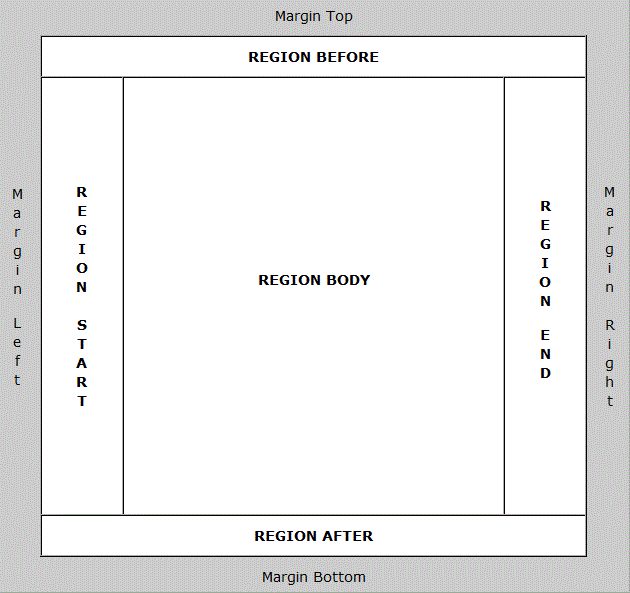
XSL-FO Page Regions
XSL-FO uses the following elements to define the regions of the page:
- region-body defines the body region
- region-before defines the top region (header)
- region-after defines the bottom region (footer)
- region-start defines the left region (left sidebar)
- region-end defines the right region (right sidebar)
Note that region-before, region-after, region-start, and region-end are part of the body region. To prevent the text in the body region from overlapping the text in these regions, the margins of the body region must be at least equal to the size of the other regions.
XSL-FO Examples
This is a fragment extracted from an XSL-FO document:
page-height="210mm" margin-top="1cm" margin-bottom="1cm"
margin-left="1cm" margin-right="1cm">
<fo:region-body margin="3cm"/>
<fo:region-before extent="2cm"/>
<fo:region-after extent="2cm"/>
<fo:region-start extent="2cm"/>
<fo:region-end extent="2cm"/>
</fo:simple-page-master>
The code above defines a "Simple Page Master Template" named "A4".
The page width is 297 millimeters and the height is 210 millimeters.
The four page margins (top, bottom, left, right) are all 1 centimeter.
The body margins are 3 centimeters (on all four sides).
The body's before, after, start, and end regions are all 2 centimeters.
The width of the body in the above example can be calculated by subtracting the left and right margins and the region-body margins from the page width:
297mm - (2 x 1cm) - (2 x 3cm) = 297mm - 20mm - 60mm = 217mm
Note that the regions (region-start and region-end) are not included in the calculation. As explained earlier, these regions are part of the body.
Other Extensions