XSL-FO block
XSL-FO output is located in block areas.
XSL-FO Pages, Flow, and Blocks
Content "blocks" flow into "pages" and then output to media.
XSL-FO output is usually nested within <fo:block> elements, <fo:block> is nested within <fo:flow> elements, and <fo:flow> is nested within <fo:page-sequence> elements:
<fo:flow flow-name="xsl-region-body">
<fo:block>
<!-- Output goes here -->
</fo:block>
</fo:flow>
</fo:page-sequence>
Block Area Properties
A block is an output sequence located in a rectangular box:
This block of output will have a one millimeter border around it.
</fo:block>
Since block areas are rectangular boxes, they can share many common area properties:
- space before and space after
- margin
- border
- padding
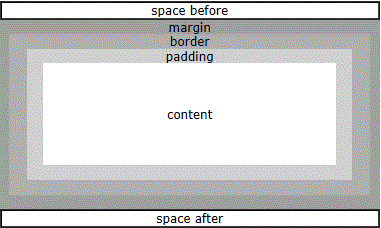
space beforeandspace afterIs the whitespace that separates blocks.
marginIs the blank area outside the block.
borderIs the rectangle at the outer edge of the area. Its four sides can each have different widths. It can also be filled with different colors and background images.
paddingIs the area located between the border and the content area.
contentThe area can contain actual content, such as text, images, graphics, etc.
Block Margin
- margin
- margin-top
- margin-bottom
- margin-left
- margin-right
Block Border
Border style properties:
- border-style
- border-before-style
- border-after-style
- border-start-style
- border-end-style
- border-top-style (equivalent to border-before)
- border-bottom-style (equivalent to border-after)
- border-left-style (equivalent to border-start)
- border-right-style (equivalent to border-end)
Border color properties:
- border-color
- border-before-color
- border-after-color
- border-start-color
- border-end-color
- border-top-color (equivalent to border-before)
- border-bottom-color (equivalent to border-after)
- border-left-color (equivalent to border-start)
- border-right-color (equivalent to border-end)
Border width properties:
- border-width
- border-before-width
- border-after-width
- border-start-width
- border-end-width
- border-top-width (equivalent to border-before)
- border-bottom-width (equivalent to border-after)
- border-left-width (equivalent to border-start)
- border-right-width (equivalent to border-end)
Block Padding
- padding
- padding-before
- padding-after
- padding-start
- padding-end
- padding-top (equivalent to padding-before)
- padding-bottom (equivalent to padding-after)
- padding-left (equivalent to padding-start)
- padding-right (equivalent to padding-end)
Block Background
- background-color
- background-image
- background-repeat
- background-attachment (scroll or fixed)
Block Styling Attributes
Blocks are output sequences that can be individually styled:
This block of output will be written in a 12pt sans-serif font.
</fo:block>
Font properties:
- font-family
- font-weight
- font-style
- font-size
- font-variant
Text properties:
- text-align
- text-align-last
- text-indent
- start-indent
- end-indent
- wrap-option (defines automatic line wrapping)
- break-before (defines page break)
- break-after (defines page break)
- reference-orientation (defines text rotation in 90" increments)
Example
space-before="5mm" space-after="5mm">
EXAMPLE
</fo:block>
<fo:block text-indent="5mm" font-family="verdana" font-size="12pt">
At EXAMPLE you will find all the Web-building tutorials you
need, from basic HTML and XHTML to advanced XML, XSL, Multimedia and WAP.
</fo:block>
Result:
|
EXAMPLE At EXAMPLE you will find all the Web-building tutorials you need, from basic HTML and XHTML to advanced XML, XSL, Multimedia and WAP. |
Look at the example above. If you want to generate a document with many headings and paragraphs, it will require a lot of code.
Usually, XSL-FO documents do not combine formatting information and content the way we just did.
With a little help from XSLT, we can put formatting information into templates and then write cleaner content.
You will learn how to use XSLT templates to combine XSL-FO in later chapters of this tutorial.
Other Extensions