Swing is a GUI toolkit designed for Java.
Swing is part of the Java Foundation Classes.
Swing includes graphical user interface (GUI) widgets such as: text boxes, buttons, split panes, and tables.
Swing provides many screen display elements that are better than AWT. They are written in pure Java, so like Java itself, they can run cross-platform, unlike AWT. They are part of JFC. They support replaceable look and feel and themes (the default themes specific to various operating systems), but they do not actually use the native widgets provided by the platform; instead, they merely imitate them on the surface. This means you can use any look and feel supported by Java on any platform. The disadvantage of lightweight components is slower execution speed, while the advantage is that they can exhibit uniform behavior on all platforms.
Hello World Program
The code for the HelloWorldSwing.java file is as follows:
import javax.swing.*;
public class HelloWorldSwing {
    /**{
     * 创建并显示GUI。出于线程安全的考虑,
     * 这个方法在事件调用线程中调用。
     */
    private static void createAndShowGUI() {
        // 确保一个漂亮的外观风格
        JFrame.setDefaultLookAndFeelDecorated(true);

        // 创建及设置窗口
        JFrame frame = new JFrame("HelloWorldSwing");
        frame.setDefaultCloseOperation(JFrame.EXIT_ON_CLOSE);

        // 添加 "Hello World" 标签
        JLabel label = new JLabel("Hello World");
        frame.getContentPane().add(label);

        // 显示窗口
        frame.pack();
        frame.setVisible(true);
    }

    public static void main(String[] args) {
        // 显示应用 GUI
        javax.swing.SwingUtilities.invokeLater(new Runnable() {
            public void run() {
                createAndShowGUI();
            }
        });
    }
}
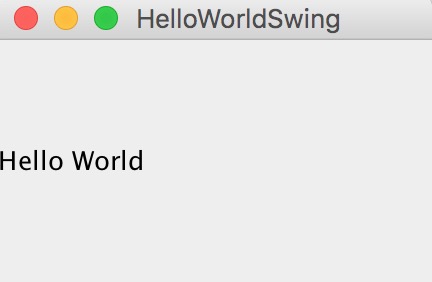
Execute the following command to output the result:
$ javac HelloWorldSwing.java
$ java HelloWorldSwing
A User Login Box Example
The code for the SwingLoginExample.java file is as follows:
import javax.swing.JButton;
import javax.swing.JFrame;
import javax.swing.JLabel;
import javax.swing.JPanel;
import javax.swing.JPasswordField;
import javax.swing.JTextField;
public class SwingLoginExample {

    public static void main(String[] args) {
        // 创建 JFrame 实例
        JFrame frame = new JFrame("Login Example");
        // Setting the width and height of frame
        frame.setSize(350, 200);
        frame.setDefaultCloseOperation(JFrame.EXIT_ON_CLOSE);

        /* 创建面板,这个类似于 HTML 的 div 标签
         * 我们可以创建多个面板并在 JFrame 中指定位置
         * 面板中我们可以添加文本字段,按钮及其他组件。
         */
        JPanel panel = new JPanel();
        // 添加面板
        frame.add(panel);
        /*
         * 调用用户定义的方法并添加组件到面板
         */
        placeComponents(panel);

        // 设置界面可见
        frame.setVisible(true);
    }

    private static void placeComponents(JPanel panel) {

        /* 布局部分我们这边不多做介绍
         * 这边设置布局为 null
         */
        panel.setLayout(null);

        // 创建 JLabel
        JLabel userLabel = new JLabel("User:");
        /* 这个方法定义了组件的位置。
         * setBounds(x, y, width, height)
         * x 和 y 指定左上角的新位置,由 width 和 height 指定新的大小。
         */
        userLabel.setBounds(10,20,80,25);
        panel.add(userLabel);

        /*
         * 创建文本域用于用户输入
         */
        JTextField userText = new JTextField(20);
        userText.setBounds(100,20,165,25);
        panel.add(userText);

        // 输入密码的文本域
        JLabel passwordLabel = new JLabel("Password:");
        passwordLabel.setBounds(10,50,80,25);
        panel.add(passwordLabel);

        /*
         *这个类似用于输入的文本域
         * 但是输入的信息会以点号代替,用于包含密码的安全性
         */
        JPasswordField passwordText = new JPasswordField(20);
        passwordText.setBounds(100,50,165,25);
        panel.add(passwordText);

        // 创建登录按钮
        JButton loginButton = new JButton("login");
        loginButton.setBounds(10, 80, 80, 25);
        panel.add(loginButton);
    }

}
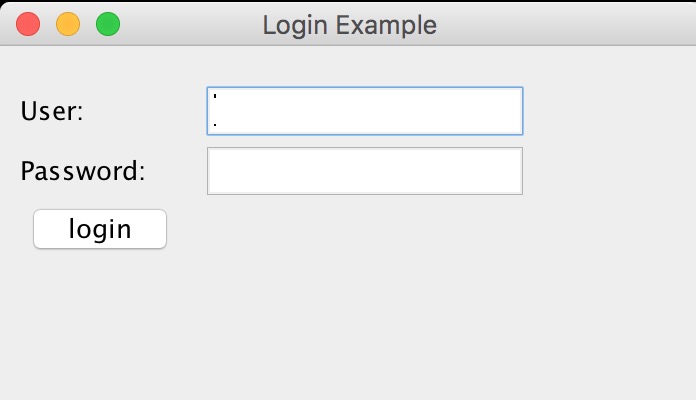
Execute the following command to output the result:
$ javac SwingLoginExample.java
$ java SwingLoginExample
Concept Analysis:
JFrame– The basic idea of a Java GUI program is based on JFrame. It is a window object on the screen that can be maximized, minimized, and closed.
JPanel– A panel container class in the Java Swing GUI toolkit, included in the javax.swing package. It can be nested, and its function is to combine components with the same logical function in a window. It is a lightweight container that can be added to a JFrame window.
JLabel– A JLabel object can display text, images, or both. You can specify where the label content is aligned in the label display area by setting the vertical and horizontal alignment. By default, a label is vertically centered in its display area. By default, a label that only displays text is aligned to the leading edge; a label that only displays an image is horizontally centered.
JTextField– A lightweight component that allows editing a single line of text.
JPasswordField– Allows us to input a line of text like an input box, but hides it with asterisks (*) or dots to create a password.
JButton– An instance of the JButton class. Used to create buttons like "Login" in the example.