Dash Tutorial

Dash is an open-source Python framework for rapidly building data-driven web applications.
The core advantage of Dash lies in its ease of use and flexibility, allowing developers without front-end experience to get started easily.
Dash allows users to create interactive data visualization applications with simple Python code, without needing to master complex front-end technologies (such as JavaScript, HTML, CSS).
Who should read this tutorial?
Dash is a powerful tool, suitable for developers who want to quickly build data-driven web applications.
Dash is especially suitable for data scientists, analysts, and engineers. With just a few lines of code, you can create a powerful web application to showcase data analysis results, machine learning model predictions, or other data-driven features.
Dash's core goal is to let users focus on data and logic, rather than front-end development.
With Dash, you can create a powerful web application in just a few lines of code to display data analysis results, machine learning model predictions, or other data-driven features.
Dash can transform complex data analysis and visualization tasks into interactive web applications, thereby more effectively presenting and sharing work results.
What you need to know before learning this tutorial
This tutorial is suitable for developers with a foundational knowledge of Python. If you are not familiar with Python, you can refer toPython 3.x Basic Tutorial。
A simple Dash program
The following is a basic Dash example:
Example
from dash import Dash, dcc, html, Input, Output
# Create a Dash application instance
app = Dash(__name__)
# Define the application layout
app.layout = html.Div([
# Create a text input box
dcc.Input(
id='input', # Input ID, used for callback function
value='initial value', # Default value of the input field
type='text' # Input type is text
),
# Create a Div for displaying output
html.Div(id='output')
])
# Define the callback function
@app.callback(
Output('output', 'children'), # Output to the children property of the Div with id 'output'
Input('input', 'value') # Input comes from the value property of the input field with id 'input'
)
def update_output_div(input_value):
# Return a formatted string displaying the user's input
return f'You entered: {input_value}'
# Run the app
if __name__ == '__main__':
app.run_server(debug=True) # Start the app, debug=True enables debug mode
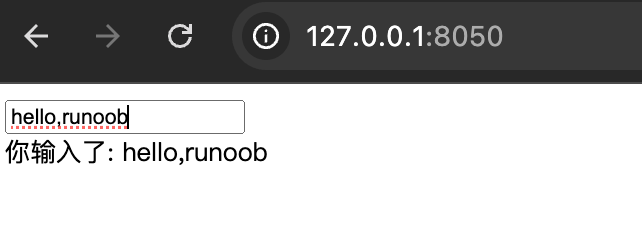
This simple application includes an input box and a display area. When the user enters content in the input box, the display area updates in real time to show what the user has entered.
Related Links
Official website:https://plotly.com/dash/
GitHub open-source repository:https://github.com/plotly/dash
Dash official documentation:https://dash.plotly.com/
other extensions