How Skills Work
You might wonder: the agent isn't human, so how does it know what a Skill can do and how to do it?
The answer is simple — by reading files.
Behind every Skill is a description file, usually calledSKILL.md, just like a manual.
How Skills Work
Skills use Progressive Disclosure, allowing the agent to load information at different levels of detail in different stages. This design lets the agent manage a large number of skills simultaneously without exhausting context space.
Three stages
The agent loads skills in the following three stages:
-
1. Discovery stage:When the conversation starts, the agent scans all available skill folders and only reads each skill's name and description. This is the lightest information, enough for the agent to judge whether a skill might be relevant to the current task.
-
2. Activation stage:
When the agent determines that a skill's description matches the user's request, it loads the full contents of the SKILL.md file into the context. At this point, the agent reads the complete instructions and descriptions. -
3. Execution stage:The agent executes the task according to the instructions in SKILL.md. During this process, the agent may call scripts bundled with the skill, read reference materials, or use other resources.
Advantages of progressive loading
| Stage | Content loaded | Typical size |
|---|---|---|
| Discovery stage | name + description | About 100 tokens |
| Activation stage | Full SKILL.md | Recommended not to exceed 5000 tokens |
| Execution stage | Scripts, reference materials, etc. | Loaded on demand |
Before executing a task, the agent reads this manual first to figure out three things:
- What can this Skill do? (Capability description)
- What do I need to provide to use it? (Input parameters)
- What are the rules for doing this? (Environmental constraints and precautions)
After reading it, the agent knows: oh, this Skill is suitable for solving the current problem, let me call it.
The diagram below illustrates this process:
Skill execution flow
Starting from the user instruction, Skill intent recognition is performed first to decide whether to enter the controlled execution path.
Once a Skill is matched, the system loads SKILL.md, establishes tool permissions and behavioral boundaries, and then reasons based on the context.
Only when truly necessary are permitted external tools called; otherwise, the logic is completed within the rules.
The final result is output after constraint integration, and the user's next input triggers a new complete round of the process.
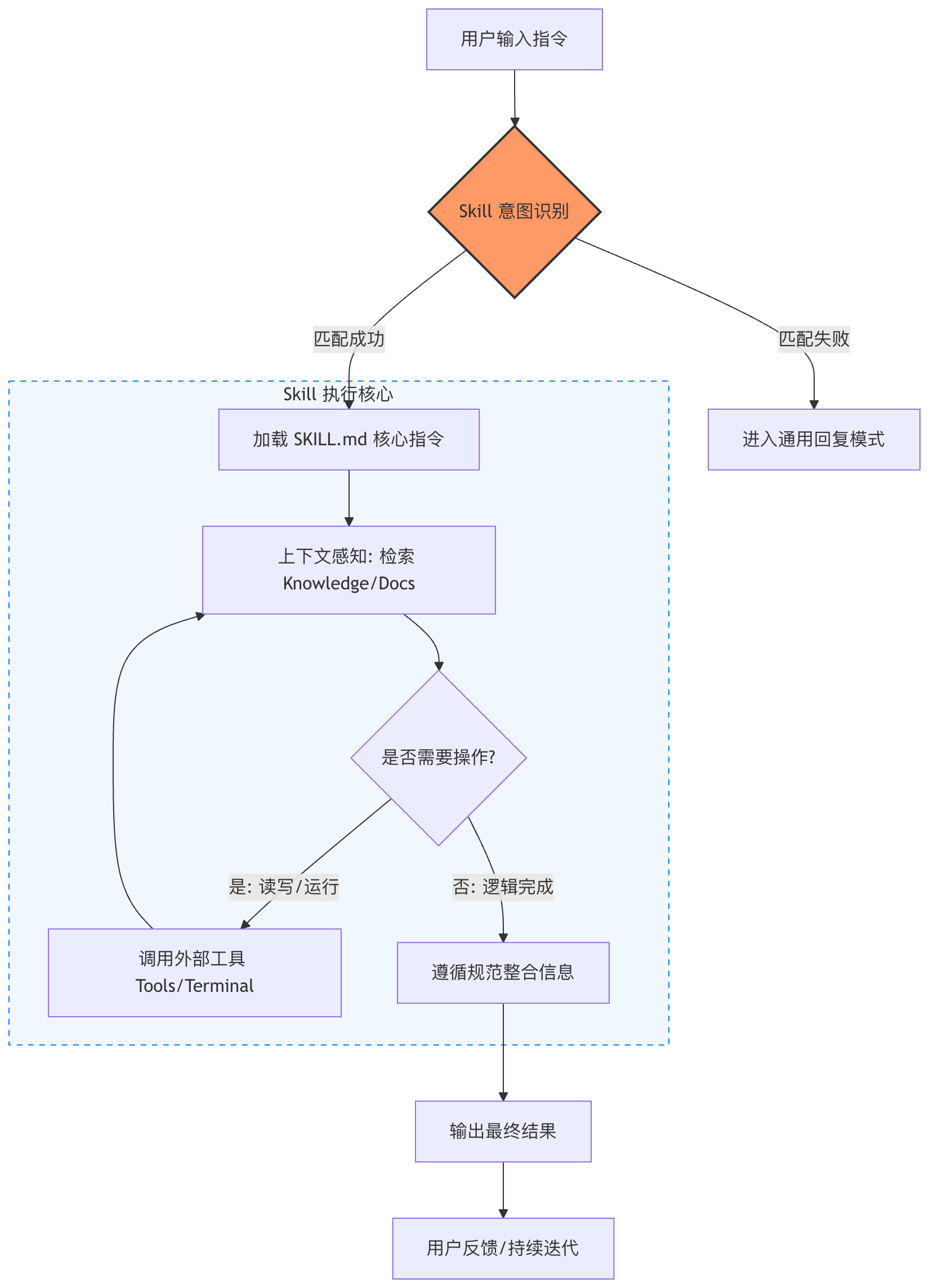
Skills working process
After the user makes a request, the Agent first understands the task content, then analyzes which capabilities (Skills) should be used to complete the work.
A Skill can be understood as an independent capability module or plugin, such as weather queries, search, file processing, database access, etc.
The Agent is responsible for thinking and decision-making, while the Skill is responsible for executing actions. After execution, the result is returned to the Agent, which organizes it into a result easy for the user to understand and outputs it.
The entire process forms a complete closed loop: understand → decide → execute → return result.

| Step | Stage | Agent internal actions | Example |
|---|---|---|---|
| ① | User initiates request | Receive natural language task | "Help me check today's weather in Beijing" |
| ② | Understand user intent | Analyze what the user really wants to do and extract parameters | Action: query; Type: weather; Location: Beijing |
| ③ | Formulate execution plan | Break down task steps | Find weather service → Get weather data → Organize results |
| ④ | Select Skill | Match the most suitable capability module | Select Weather Skill |
| ⑤ | Execute Skill | Call external tools or APIs | Request weather API |
| ⑥ | Get execution result | Receive data returned by the Skill | Temperature, humidity, air quality |
| ⑦ | Generate final reply | Organize and convert into natural language | "Beijing is sunny today, 18°C~30°C" |
| ⑧ | Return to user | Output final result | User sees the complete reply |
Skill types:
| Skill type | Function description | Common scenarios |
|---|---|---|
| Search Skill | Query external information | Search news, Q&A |
| Weather Skill | Get weather data | Weather query |
| File Skill | Read file content | PDF、Word、Excel |
| Data analysis Skill | Data calculation and statistics | Report analysis |
| Database Skill | Query database | MySQL、PostgreSQL |
| Browser Skill | Automate web pages | Auto login, crawl content |
| Code Skill | Execute code | Python、Node.js |
| Image Skill | Image processing capability | OCR, image generation |