Servlet Cookie Handling
Cookies are text files stored on the client computer and retain various tracking information. Java Servlet obviously supports HTTP Cookies.
Recognizing returning users involves three steps:
- The server script sends a set of Cookies to the browser. For example: name, age, or identification number, etc.
- The browser stores this information on the local computer for future use.
- When the browser next sends any request to the Web server, the browser sends this Cookie information to the server, and the server will use this information to identify the user.
This chapter will explain how to set or reset Cookies, how to access them, and how to delete them.
Servlet Cookie handling requires encoding and decoding Chinese characters. The methods are as follows:
String   str   =   java.net.URLEncoder.encode("中文","UTF-8");            //编码
String   str   =   java.net.URLDecoder.decode("编码后的字符串","UTF-8");   // 解码
Cookie Analysis
Cookies are usually set in the HTTP header (although JavaScript can also directly set a Cookie in the browser). A Servlet that sets Cookies will send header information as follows:
HTTP/1.1 200 OK
Date: Fri, 04 Feb 2000 21:03:38 GMT
Server: Apache/1.3.9 (UNIX) PHP/4.0b3
Set-Cookie: name=xyz; expires=Friday, 04-Feb-07 22:03:38 GMT;
                 path=/; domain=example.com
Connection: close
Content-Type: text/html
As you can see, the Set-Cookie header contains a name-value pair, a GMT date, a path, and a domain. The name and value are URL encoded. The expires field is an instruction that tells the browser to "forget" the Cookie after the given time and date.
If the browser is configured to store Cookies, it will retain this information until the expiration date. If the user's browser points to any page that matches the Cookie's path and domain, it will resend the Cookie to the server. The browser's header information may look like this:
GET / HTTP/1.0
Connection: Keep-Alive
User-Agent: Mozilla/4.6 (X11; I; Linux 2.2.6-15apmac ppc)
Host: zink.demon.co.uk:1126
Accept: image/gif, */*
Accept-Encoding: gzip
Accept-Language: en
Accept-Charset: iso-8859-1,*,utf-8
Cookie: name=xyz
The Servlet can then use the request methodrequest.getCookies()to access Cookies, which returns aCookiearray of objects.
Servlet Cookie Methods
The following is a list of useful methods available for manipulating Cookies in a Servlet.
| No. | Method & Description |
|---|---|
| 1 | public void setDomain(String pattern) This method sets the domain to which the cookie applies, e.g., example.com. |
| 2 | public String getDomain() This method gets the domain to which the cookie applies, e.g., example.com. |
| 3 | public void setMaxAge(int expiry) This method sets the cookie expiration time (in seconds). If not set this way, the cookie will only remain valid during the current session. |
| 4 | public int getMaxAge() This method returns the maximum lifetime of the cookie (in seconds). By default, -1 indicates the cookie will persist until the browser is closed. |
| 5 | public String getName() This method returns the name of the cookie. The name cannot be changed after creation. |
| 6 | public void setValue(String newValue) This method sets the value associated with the cookie. |
| 7 | public String getValue() This method gets the value associated with the cookie. |
| 8 | public void setPath(String uri) This method sets the path to which the cookie applies. If you do not specify a path, all URLs in the same directory as the current page (including subdirectories) will return the cookie. |
| 9 | public String getPath() This method gets the path to which the cookie applies. |
| 10 | public void setSecure(boolean flag) This method sets a boolean value indicating whether the cookie should only be sent over encrypted (i.e., SSL) connections. |
| 11 | public void setComment(String purpose) Sets the comment for the cookie. This comment is very useful when the browser presents the cookie to the user. |
| 12 | public String getComment() Gets the comment of the cookie, returns null if the cookie has no comment. |
Setting Cookies via Servlet
Setting Cookies via Servlet includes three steps:
(1) Create a Cookie object:You can call the Cookie constructor with the cookie name and cookie value, both of which are strings.
Cookie cookie = new Cookie("key","value");
Remember that neither the name nor the value should contain spaces or any of the following characters:
[ ] ( ) = , " / ? @ : ;
(2) Set the maximum lifetime:You can use the setMaxAge method to specify how long the cookie remains valid (in seconds). The following sets a cookie with a maximum validity of 24 hours.
cookie.setMaxAge(60*60*24);
(3) Send the Cookie to the HTTP response header:You can useresponse.addCookieto add the Cookie to the HTTP response header, as follows:
response.addCookie(cookie);
Example
Let's modify ourForm Data Exampleto set Cookies for first name and last name.
package com.example.test;

import java.io.IOException;
import java.io.PrintWriter;
import java.net.URLEncoder;

import javax.servlet.ServletException;
import javax.servlet.annotation.WebServlet;
import javax.servlet.http.Cookie;
import javax.servlet.http.HttpServlet;
import javax.servlet.http.HttpServletRequest;
import javax.servlet.http.HttpServletResponse;

/**
 * Servlet implementation class HelloServlet
 */
@WebServlet("/HelloForm")
public class HelloForm extends HttpServlet {
    private static final long serialVersionUID = 1L;

    /**
     * @see HttpServlet#HttpServlet()
     */
    public HelloForm() {
        super();
        // TODO Auto-generated constructor stub
    }

    /**
     * @see HttpServlet#doGet(HttpServletRequest request, HttpServletResponse response)
     */
    public void doGet(HttpServletRequest request, HttpServletResponse response) throws ServletException, IOException
    {
        // 为名字和姓氏创建 Cookie
        Cookie name = new Cookie("name",
                URLEncoder.encode(request.getParameter("name"), "UTF-8")); // 中文转码
        Cookie url = new Cookie("url",
                      request.getParameter("url"));

        // 为两个 Cookie 设置过期日期为 24 小时后
        name.setMaxAge(60*60*24);
        url.setMaxAge(60*60*24);

        // 在响应头中添加两个 Cookie
        response.addCookie( name );
        response.addCookie( url );

        // 设置响应内容类型
        response.setContentType("text/html;charset=UTF-8");

        PrintWriter out = response.getWriter();
        String title = "设置 Cookie 实例";
        String docType = "<!DOCTYPE html>\n";
        out.println(docType +
                "<html>\n" +
                "<head><title>" + title + "</title></head>\n" +
                "<body bgcolor=\"#F0F0F0\">\n" +
                "<h1 align=\"center\">" + title + "</h1>\n" +
                "<ul>\n" +
                "  <li><b>站点名:</b>:"
                + request.getParameter("name") + "\n</li>" +
                "  <li><b>站点 URL:</b>:"
                + request.getParameter("url") + "\n</li>" +
                "</ul>\n" +
                "</body></html>");
        }

    /**
     * @see HttpServlet#doPost(HttpServletRequest request, HttpServletResponse response)
     */
    protected void doPost(HttpServletRequest request, HttpServletResponse response) throws ServletException, IOException {
        // TODO Auto-generated method stub
        doGet(request, response);
    }

}
Compile the above ServletHelloForm, and create appropriate entries in the web.xml file:
<?xml version="1.0" encoding="UTF-8"?>
<web-app>
  <servlet>
    <!-- 类名 -->
    <servlet-name>HelloForm</servlet-name>
    <!-- 所在的包 -->
    <servlet-class>com.example.test.HelloForm</servlet-class>
  </servlet>
  <servlet-mapping>
    <servlet-name>HelloForm</servlet-name>
    <!-- 访问的网址 -->
    <url-pattern>/TomcatTest/HelloForm</url-pattern>
  </servlet-mapping>
</web-app>
Finally, try the following HTML page to call the Servlet.
<!DOCTYPE html>
<html>
<head>
<meta charset="utf-8">
<title>Example(example.com)</title>
</head>
<body>
<form action="../TomcatTest/HelloForm" method="GET">
站点名 :<input type="text" name="name">
<br />
站点 URL:<input type="text" name="url" /><br>
<input type="submit" value="提交" />
</form>
</body>
</html>
Save the above HTML content to the file /TomcatTest/test.html.
Next, we visit http://localhost:8080/TomcatTest/test.html. The Gif demo is as follows:
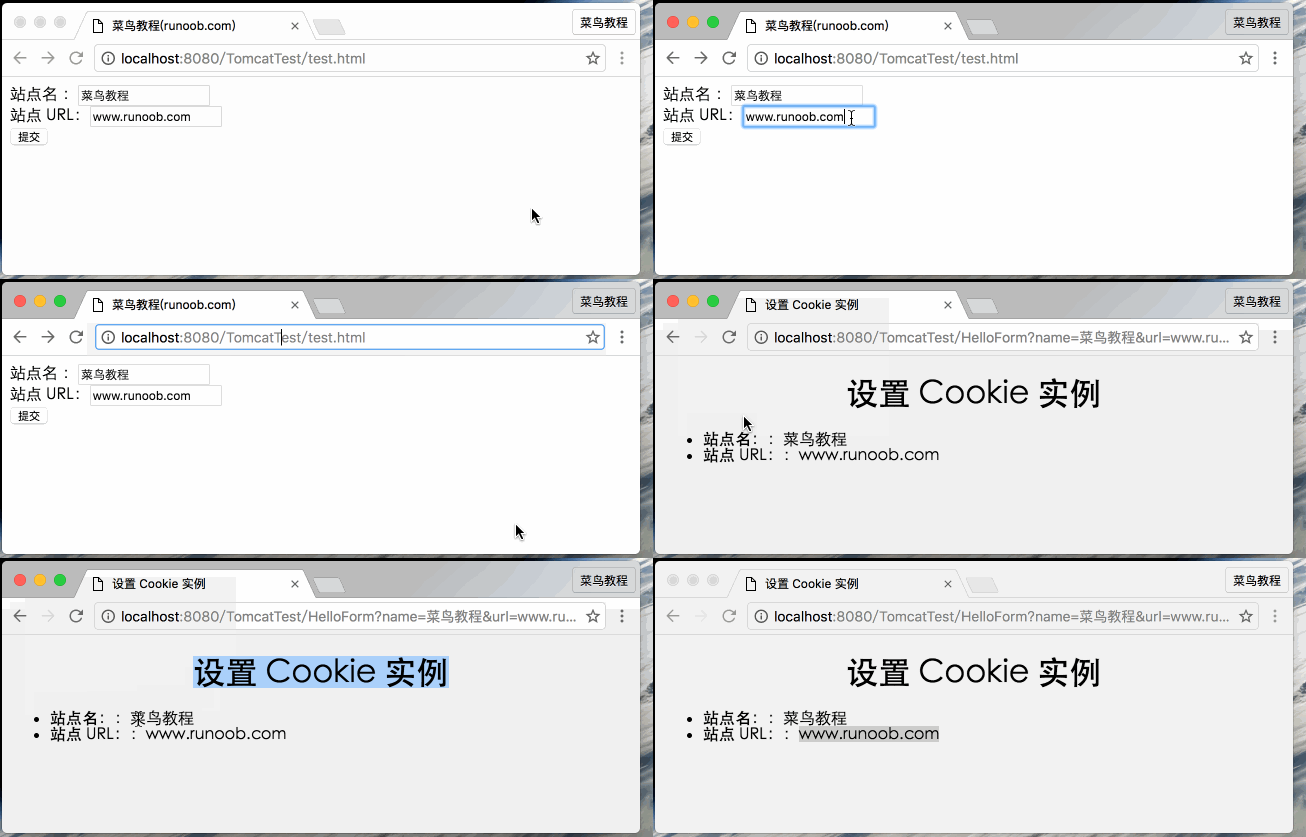
Note:Some of the paths above need to be modified according to your project's actual path.
Reading Cookies via Servlet
To read Cookies, you need to call theHttpServletRequestofgetCookies( )method to create ajavax.servlet.http.Cookiearray of objects. Then loop through the array and use the getName() and getValue() methods to access each cookie and its associated value.
Example
Let's read the Cookies set in the above example
package com.example.test;

import java.io.IOException;
import java.io.PrintWriter;
import java.net.URLDecoder;

import javax.servlet.ServletException;
import javax.servlet.annotation.WebServlet;
import javax.servlet.http.Cookie;
import javax.servlet.http.HttpServlet;
import javax.servlet.http.HttpServletRequest;
import javax.servlet.http.HttpServletResponse;

/**
 * Servlet implementation class ReadCookies
 */
@WebServlet("/ReadCookies")
public class ReadCookies extends HttpServlet {
    private static final long serialVersionUID = 1L;

    /**
     * @see HttpServlet#HttpServlet()
     */
    public ReadCookies() {
        super();
        // TODO Auto-generated constructor stub
    }

    /**
     * @see HttpServlet#doGet(HttpServletRequest request, HttpServletResponse response)
     */
    public void doGet(HttpServletRequest request, HttpServletResponse response) throws ServletException, IOException
    {
        Cookie cookie = null;
        Cookie[] cookies = null;
        // 获取与该域相关的 Cookie 的数组
        cookies = request.getCookies();

         // 设置响应内容类型
         response.setContentType("text/html;charset=UTF-8");

         PrintWriter out = response.getWriter();
         String title = "Delete Cookie Example";
         String docType = "<!DOCTYPE html>\n";
         out.println(docType +
                   "<html>\n" +
                   "<head><title>" + title + "</title></head>\n" +
                   "<body bgcolor=\"#F0F0F0\">\n" );
          if( cookies != null ){
            out.println("<h2>Cookie 名称和值</h2>");
            for (int i = 0; i < cookies.length; i++){
               cookie = cookies[i];
               if((cookie.getName( )).compareTo("name") == 0 ){
                    cookie.setMaxAge(0);
                    response.addCookie(cookie);
                    out.print("已删除的 cookie:" +
                                 cookie.getName( ) + "<br/>");
               }
               out.print("名称:" + cookie.getName( ) + ",");
               out.print("值:" +  URLDecoder.decode(cookie.getValue(), "utf-8") +" <br/>");
            }
         }else{
             out.println(
               "<h2 class=\"tutheader\">No Cookie founds</h2>");
         }
         out.println("</body>");
         out.println("</html>");
        }

    /**
     * @see HttpServlet#doPost(HttpServletRequest request, HttpServletResponse response)
     */
    protected void doPost(HttpServletRequest request, HttpServletResponse response) throws ServletException, IOException {
        // TODO Auto-generated method stub
        doGet(request, response);
    }

}
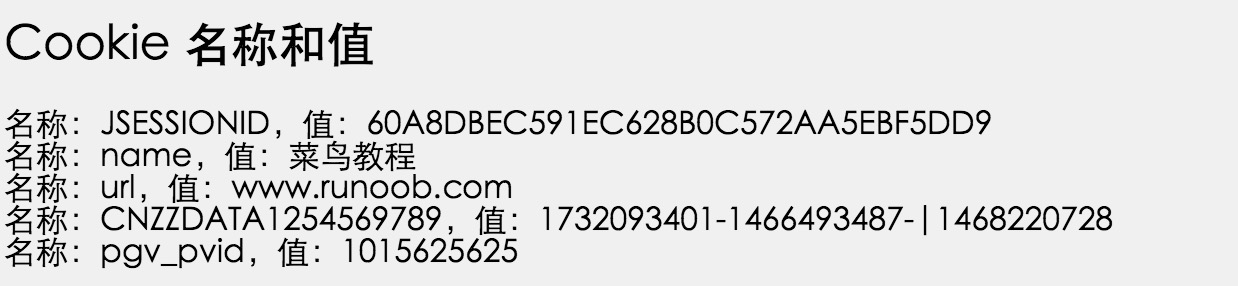
Compile the above ServletReadCookies, and create appropriate entries in the web.xml file. Try runninghttp://localhost:8080/TomcatTest/ReadCookies, and the following result will be displayed:
Deleting Cookies via Servlet
Deleting a Cookie is very simple. If you want to delete a cookie, you just need to follow these three steps:
- Read an existing cookie and store it in a Cookie object.
- UsesetMaxAge()method to set the cookie's age to zero to delete the existing cookie.
- Add this cookie to the response header.
Example
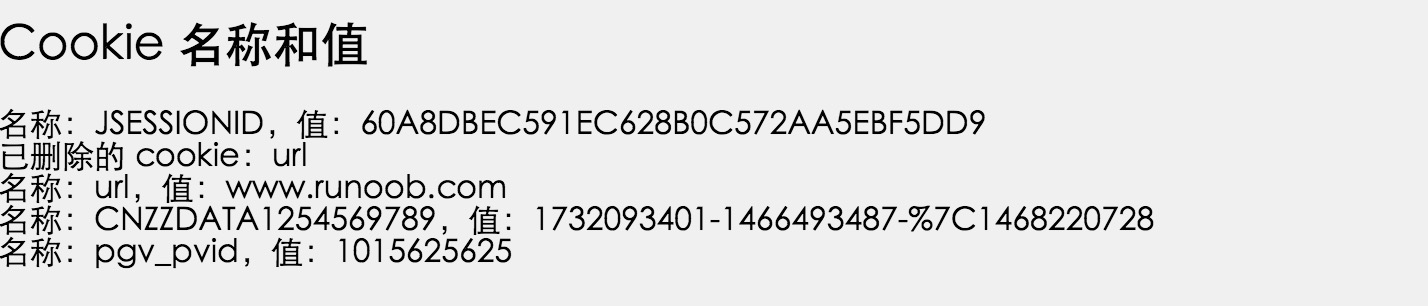
The following example will delete the existing cookie named "url". When you next run the ReadCookies Servlet, it will return url as null.
package com.example.test;

import java.io.IOException;
import java.io.PrintWriter;

import javax.servlet.ServletException;
import javax.servlet.annotation.WebServlet;
import javax.servlet.http.Cookie;
import javax.servlet.http.HttpServlet;
import javax.servlet.http.HttpServletRequest;
import javax.servlet.http.HttpServletResponse;

/**
 * Servlet implementation class DeleteCookies
 */
@WebServlet("/DeleteCookies")
public class DeleteCookies extends HttpServlet {
    private static final long serialVersionUID = 1L;

    /**
     * @see HttpServlet#HttpServlet()
     */
    public DeleteCookies() {
        super();
        // TODO Auto-generated constructor stub
    }

    /**
     * @see HttpServlet#doGet(HttpServletRequest request, HttpServletResponse response)
     */
    public void doGet(HttpServletRequest request, HttpServletResponse response) throws ServletException, IOException
    {
        Cookie cookie = null;
        Cookie[] cookies = null;
        // 获取与该域相关的 Cookie 的数组
        cookies = request.getCookies();

            // 设置响应内容类型
        response.setContentType("text/html;charset=UTF-8");

        PrintWriter out = response.getWriter();
        String title = "删除 Cookie 实例";
        String docType = "<!DOCTYPE html>\n";
        out.println(docType +
                  "<html>\n" +
                  "<head><title>" + title + "</title></head>\n" +
                  "<body bgcolor=\"#F0F0F0\">\n" );
         if( cookies != null ){
           out.println("<h2>Cookie 名称和值</h2>");
           for (int i = 0; i < cookies.length; i++){
              cookie = cookies[i];
              if((cookie.getName( )).compareTo("url") == 0 ){
                   cookie.setMaxAge(0);
                   response.addCookie(cookie);
                   out.print("已删除的 cookie:" +
                                cookie.getName( ) + "<br/>");
              }
              out.print("名称:" + cookie.getName( ) + ",");
              out.print("值:" + cookie.getValue( )+" <br/>");
           }
        }else{
            out.println(
              "<h2 class=\"tutheader\">No Cookie founds</h2>");
        }
        out.println("</body>");
        out.println("</html>");
        }

    /**
     * @see HttpServlet#doPost(HttpServletRequest request, HttpServletResponse response)
     */
    protected void doPost(HttpServletRequest request, HttpServletResponse response) throws ServletException, IOException {
        // TODO Auto-generated method stub
        doGet(request, response);
    }

}
Compile the above ServletDeleteCookies, and create appropriate entries in the web.xml file. Now runhttp://localhost:8080/TomcatTest/DeleteCookies, and the following result will be displayed: